

Write on PDF
Productivity
Open a PDF file and write on it.
- Rating
- 4.2
- 18.7K ratings
- Downloads
- 100M+
- on Google Play
- Price
- Free
- No in-app purchases
- Updated
- Dec 14
- 2018
Screenshots

About Write on PDF
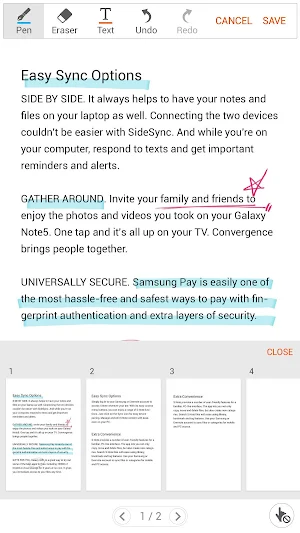
Write on PDF is a convenient PDF annotator for you.
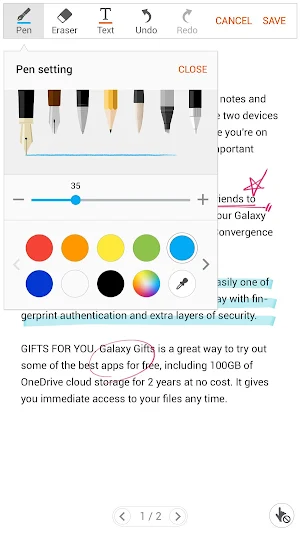
You can take notes by your own handwriting with a variety of Pen and tools.
• Features :
- List of all PDF files in your device
- Save a PDF file with your text and drawing content
- Share a PDF file
- PDF viewer
• The following permissions are required for the app service. For optional permissions, the default functionality of the service is turned on, but not allowed.
[Required permissions]
- Storage: To access the PDF files stored on your phone.
- Contacts: To access the PDF files stored on Google Drive.
(Contact permission is optional from Write on PDF v2.4.23.0 or higher.)
[Optional permissions]
- Location: To provide location information when accessing links in PDF files.
(Location permission is not required from Write on PDF v2.4.23.0 or higher.)
• Support for following devices :
[Phone]
Galaxy Note9, Galaxy Note8, Galaxy Note Fan Edition, Galaxy Note5, Galaxy Note4, Galaxy Note Edge, Galaxy Note3, Galaxy Note3 Neo,
Galaxy S8, Galaxy S8+, Galaxy S7, Galaxy S7 Edge, Galaxy S6, Galaxy S6 Edge, Galaxy S6 Edge+, Galaxy S5, Galaxy S5 Mini, Galaxy S4,
Galaxy A8, Galaxy A9 Pro, Galaxy-A9,
Galaxy A3, Galaxy A3(2016),Galaxy A5, Galaxy A5(2016), Galaxy A7, Galaxy A7(2016),
Galaxy J, Galaxy J2, Galaxy J3, Galaxy J3(2016), Galaxy J5, Galaxy J5(2016), Galaxy J7, Galaxy J7(2016),
Galaxy On5, Galaxy On7, Galaxy Mega2, Galaxy Alpha, Galaxy Grand Prime, Galaxy Grand Max,
Galaxy J5 Prime, Galaxy J7 Prime, Galaxy On7(2016), Galaxy A8(2016),
Grand Prime Plus, Galaxy A3(2017), Galaxy A5(2017), Galaxy A7 (2017),
Galaxy Elite, Galaxy Feel, Galaxy Xcover4,
Galaxy J3 Pop, Galaxy J7 Pop, Galaxy J3 Pro, Galaxy J7 Pro,
Galaxy J5(2017), Galaxy J7(2017), Galaxy J7 Max
[Tablet]
Galaxy Tab S 8.4 / 10.5, Galaxy Tab S2 8.0 / 9.7, Galaxy Tab S3, Galaxy Tab S4,
Galaxy Note Pro 12.2, Galaxy Note 10.1(2014E),
Galaxy Tab A 7.0/ 8.0 / 9.7/10.1
Galaxy Tab A Plus 8.0 / 9.7/10.1
Galaxy Tab4 7.0 / 8.0 / 10.1,
Galaxy Tab Active,
Galaxy Tab E 8.0 / 9.6,
Galaxy View
You can take notes by your own handwriting with a variety of Pen and tools.
• Features :
- List of all PDF files in your device
- Save a PDF file with your text and drawing content
- Share a PDF file
- PDF viewer
• The following permissions are required for the app service. For optional permissions, the default functionality of the service is turned on, but not allowed.
[Required permissions]
- Storage: To access the PDF files stored on your phone.
- Contacts: To access the PDF files stored on Google Drive.
(Contact permission is optional from Write on PDF v2.4.23.0 or higher.)
[Optional permissions]
- Location: To provide location information when accessing links in PDF files.
(Location permission is not required from Write on PDF v2.4.23.0 or higher.)
• Support for following devices :
[Phone]
Galaxy Note9, Galaxy Note8, Galaxy Note Fan Edition, Galaxy Note5, Galaxy Note4, Galaxy Note Edge, Galaxy Note3, Galaxy Note3 Neo,
Galaxy S8, Galaxy S8+, Galaxy S7, Galaxy S7 Edge, Galaxy S6, Galaxy S6 Edge, Galaxy S6 Edge+, Galaxy S5, Galaxy S5 Mini, Galaxy S4,
Galaxy A8, Galaxy A9 Pro, Galaxy-A9,
Galaxy A3, Galaxy A3(2016),Galaxy A5, Galaxy A5(2016), Galaxy A7, Galaxy A7(2016),
Galaxy J, Galaxy J2, Galaxy J3, Galaxy J3(2016), Galaxy J5, Galaxy J5(2016), Galaxy J7, Galaxy J7(2016),
Galaxy On5, Galaxy On7, Galaxy Mega2, Galaxy Alpha, Galaxy Grand Prime, Galaxy Grand Max,
Galaxy J5 Prime, Galaxy J7 Prime, Galaxy On7(2016), Galaxy A8(2016),
Grand Prime Plus, Galaxy A3(2017), Galaxy A5(2017), Galaxy A7 (2017),
Galaxy Elite, Galaxy Feel, Galaxy Xcover4,
Galaxy J3 Pop, Galaxy J7 Pop, Galaxy J3 Pro, Galaxy J7 Pro,
Galaxy J5(2017), Galaxy J7(2017), Galaxy J7 Max
[Tablet]
Galaxy Tab S 8.4 / 10.5, Galaxy Tab S2 8.0 / 9.7, Galaxy Tab S3, Galaxy Tab S4,
Galaxy Note Pro 12.2, Galaxy Note 10.1(2014E),
Galaxy Tab A 7.0/ 8.0 / 9.7/10.1
Galaxy Tab A Plus 8.0 / 9.7/10.1
Galaxy Tab4 7.0 / 8.0 / 10.1,
Galaxy Tab Active,
Galaxy Tab E 8.0 / 9.6,
Galaxy View
What’s new
Updated December 14, 2018
Supports Android P OS (Android 9.0)
User reviews

Love it. Always first choice.

NGO HUMANITARIAN IN HARMONY

Briliant app

Cool

Exceptional for writing on pdf.

Very good !
Alternatives to Write on PDF
Looking for apps like Write on PDF? Here are 6 similar Android apps on Google Play. The highest rated is SmartThings (4.2/5), and all 6 are free to download.
-
Samsung Smart Switch Mobile 4.1
-
Galaxy Wearable (Samsung Gear) 4.1
-
SmartThings 4.2
-
Samsung Pay (Watch Plug-in) 3.7
-
Samsung Voice Recorder 3.8
-
Samsung TV Plus-Live TV&Movies 4.1
| App | Rating | Price | Installs | Last updated | Compare |
|---|---|---|---|---|---|
| Write on PDF | 4.2 / 5 | Free | 100,000,000+ | Dec 14, 2018 | |
| Samsung Smart Switch Mobile | 4.1 / 5 | Free | 1,000,000,000+ | Sep 3, 2026 | Compare |
| Galaxy Wearable (Samsung Gear) | 4.1 / 5 | Free | 1,000,000,000+ | Oct 6, 2026 | Compare |
| SmartThings | 4.2 / 5 | Free | 1,000,000,000+ | Oct 12, 2026 | Compare |
| Samsung Pay (Watch Plug-in) | 3.7 / 5 | Free | 50,000,000+ | Jul 24, 2026 | Compare |
| Samsung Voice Recorder | 3.8 / 5 | Free | 1,000,000,000+ | Aug 27, 2025 | Compare |
| Samsung TV Plus-Live TV&Movies | 4.1 / 5 | Free | 100,000,000+ | Sep 9, 2026 | Compare |
Compare Write on PDF with the top alternatives: ratings, updates, ASO score and keyword gaps →
Similar apps on Google Play
- Samsung Smart Switch Mobile
- Galaxy Wearable (Samsung Gear)
- SmartThings
- Samsung Pay (Watch Plug-in)
- Samsung Voice Recorder
- Samsung TV Plus-Live TV&Movies
- Samsung Music
- Samsung Calculator
- Galaxy Watch4 Plugin
- Samsung Internet Browser
- Smart Tutor for SAMSUNG Mobile
- Samsung Health
- Samsung Accessory Service
- Galaxy Watch5 Plugin
- Samsung Notes
- Samsung Email
- Samsung Wallet (Samsung Pay)
- Galaxy Watch Plugin
- Samsung Flow
- Galaxy Buds Live Manager
- Samsung Members
- Galaxy Wearable
- Watch Active2 Plugin
- SAMSUNG Smart Washer/Dryer
- Galaxy Buds Manager
- Galaxy Buds Pro Manager
- Samsung Internet Browser Beta
- Galaxy Buds2 Manager
- PENUP - Share your drawings
- Galaxy Buds2 Pro Manager
- Gear S Plugin
- Galaxy Watch3 Plugin
- Galaxy Buds+ Manager
- Samsung Family Hub
- Watch Active Plugin
- Samsung Camera Manager App
- Samsung Global Goals
- Audio Remote
- WalkieTalkie
- SAMSUNG Display Solutions
- Samsung Portable SSD 1.0
- One Hand Operation +
- Samsung Level
- Health Platform
- Samsung Buds Controller
- Samsung Configurator
- Samsung Portable SSD
- Samsung Sound Tower (Giga Part
- Wireless Audio-Multiroom
- Samsung Link (Terminated)
- Power Sharing
- Samsung ANC Type-C
- Knox Deployment
- Samsung PPT Controller
- Samsung Gear 360 (New)
- Gear IconX Plugin
- GameDriver - Adreno (S20/N20)
- Music for Galaxy Watch
- Galaxy Fit2 Plugin
- Gear IconX (2018) Plugin
- Samsung Calculator
- Gear Fit2 Plugin
- Samsung Knox Capture
- Hand Wash
- Galaxy Fit Plugin
- Knox E-FOTA
- E-Smart Refrigerator
- Knox Service Plugin
- POWERbot-E
- Samsung Push Service
- Samsung Voice Recorder
- GameDriver - Mali (S20/N20)
- Secure Folder
- Samsung WE VoIP
- Knox Asset Intelligence
- Wireless Audio-Multiroom (Tab)
- Knox Settings VPN Plug-in
- Write on PDF
- Samsung Health
- Knox E-FOTA: Legacy OneUI Core
- Lux Manager
- SAMSUNG Air Solution
- Charm by Samsung
- Samsung Compass
- Quick Measure
- Samsung My Files
- Samsung Wireless Audio Dock
- Device Care
- 삼성전자 배당조회 Web Service
- Samsung Security Policy Update
- Wireless AudioDock
- Samsung Wireless Audio Dock
- Samsung Global Goals Digital
- Samsung Global Goals Spin
- Samsung Global Goals Countdown
- Samsung Global Goals Classic
- Smart Air Conditioner
- Samsung Cloud
- Daily Board
- Clock
- Samsung Security Policy Update