Privacy Display: Screen Guard
Privacy Display: Screen Guard — hide screen & filter light with Tilt Shield
About Privacy Display: Screen Guard
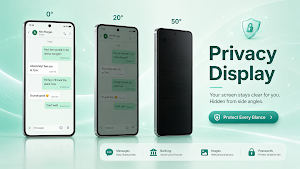
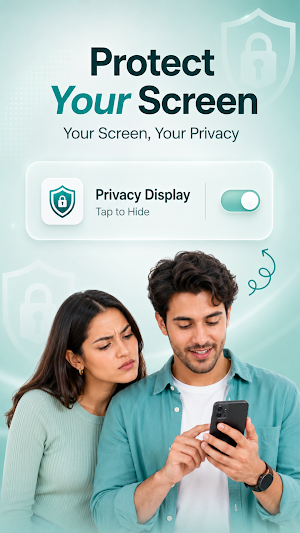
Privacy Display: Screen Guard is your all-in-one mobile privacy solution — designed to keep your screen safe from prying eyes, wherever you are. Whether you're commuting, working in a
🔒 Tilt Shield — Our Signature Feature
Just tilt your phone and a protective privacy overlay instantly appears — no manual toggling needed. It works as a smart screen hider, activating the moment your phone moves out of position, so your content stays hidden without lifting a finger.
Customize everything to match your habits:
• Dim Intensity — Set your own overlay darkness level
• App Selection — Choose exactly which apps the tilt shield applies to
• Trigger Direction — Configure your preferred tilt trigger direction (left, right, or down)
• Angle Sensitivity — Fine-tune tilt angle sensitivity to match your natural hand movement
• Overlay Style — Pick from multiple dark textures and overlay patterns
🛡 Screen Guard Layers
Add extra protection with customizable overlay layers — choose from double-layer, row, or circle patterns for stronger visual disruption against side viewers, on top of your everyday dim overlay.
📲 App Shield
Lock or protect sensitive apps individually — banking, messaging, and social apps stay hidden from anyone glancing at your screen.
🚨 Panic Protection & Emergency Alerts
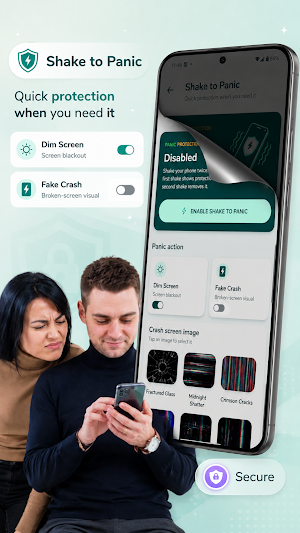
Shake your phone to instantly trigger panic mode and hide your screen in an emergency. Combine this with quick access to:
• Hide Contacts
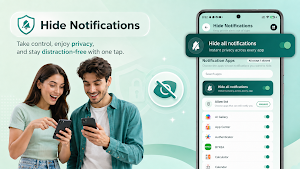
• Hide Notifications
• Emergency alert shortcuts
🔔 Notification Privacy
Block message previews and sensitive notification content from appearing on your lock screen or status bar, keeping your conversations confidential. Set a custom schedule to automatically block notifications during specific times of day — no need to manually turn it on and off every time.
🕒 Privacy Schedule
Automate your privacy — set specific times of day when tilt shield, app shield, or notification privacy should turn on automatically, without lifting a finger.
⚡ Home Screen Widgets
Access your most-used privacy tools directly from your home screen: privacy status, panic protection, app shield, privacy schedule, notification privacy, and eye comfort — all just one tap away.
😌 Everyday Privacy & Eye Comfort
Reduce eye strain and screen glare during long usage sessions, with adjustable brightness and comfort-friendly overlay tones — perfect for night-time reading or extended phone use.
Why Choose Privacy Display: Screen Guard?
• Fast, tilt-based automatic screen hiding
• Fully customizable dim levels, textures & patterns
• Panic mode for real emergencies
• Per-app protection with App Shield
• Notification & contact privacy controls
• Scheduled, hands-free privacy automation
• Lightweight and battery-friendly
• Simple, modern, easy-to-use interface
• Protect Screen in Public: Stop visual spying on buses, subways, cafes, and offices.
• Everyday Privacy Solution: Works as a screen hider, screen dimmer, and blue light filter all in one.
• Lightweight & Battery Saver: GPU-optimized performance ensures minimal battery consumption while running in the background.
• Secure & Private: We do not collect, read, or share any personal data or screen content.
🔒 PERMISSION & ACCESSIBILITY DISCLOSURE
Privacy Display: Screen Guard uses the Android AccessibilityService API solely to draw an adjustable privacy display filter over other apps. • This permission is required only to provide system-wide screen guard overlay functionality. • The app does not collect, store, or monitor any user data, messages, passwords, or personal content. • You can disable this service at any time from the app settings.
Download Privacy Display: Screen Guard today to automatically screen hider. when the phone is tilted, shield your data, and browse in public with total confidence!
Privacy Display: Screen Guard details
Privacy Display: Screen Guard is a free Personalization app for Android with 100+ installs on Google Play. It was released on August 28, 2026 and last updated on August 30, 2026. It's developed by SafeLayer Apps. It requires Android 8.0 or later. The app contains ads and offers in-app purchases.
- Category
- Personalization
- Installs
- 100+
- Price
- Free
- In-app purchases
- Yes
- Ads
- Contains ads
- Current version
- 12.0.1
- Requires Android
- 8.0
- Content rating
- PEGI 3
- Released
- August 28, 2026
- Last updated
- August 30, 2026
- Developer
- SafeLayer Apps
What’s new in Privacy Display: Screen Guard
🚀 Faster, more stable & battery-friendly performance 🚫 Smoother ad-free experience for Premium users 💎 Improved Premium & free trial experience 🛡️ Stronger privacy & screen protection 📱 Better Android compatibility ⚡ Faster Shake to Panic
Version 12.0.1 · Updated August 30, 2026
Alternatives to Privacy Display: Screen Guard
Looking for apps like Privacy Display: Screen Guard? Here are 6 similar Android apps on Google Play. The highest rated is Alpha Hybrid Launcher 4D theme (4.6/5), and 5 of the 6 are free to download.
Hi-tech Circuit Launcher
AppLock, HideApp, Keyboard, Wallpaper, Color themes, Weather, Widget & Folder
Alpha Hybrid Launcher 4D theme
Themes , Hide apps , Fingerprint App Locker , Wallpaper all in one Launcher

Photo Widget Pro
Your Home Screen, Your Memories Works on all Android devices
Spatial Touch™ - Air Gestures
Control your phone without touching the screen!
KiWi Vault: Hide Photos, Video
Protect your privacy. Hide photos & lock videos in a 100% offline secret vault.
Battery Transfer / Receiver
This is an app to transfer & receive battery from one single device or multiple
| App | Rating | Price | Installs |
|---|---|---|---|
| Privacy Display: Screen Guard | – | Free | 100+ |
| Hi-tech Circuit Launcher | 4.6 / 5 | Free | 100,000+ |
| Alpha Hybrid Launcher 4D theme | 4.6 / 5 | Free | 500,000+ |
| Photo Widget Pro | 3.9 / 5 | 0.39 USD | 500+ |
| Spatial Touch™ - Air Gestures | 3.9 / 5 | Free | 100,000+ |
| KiWi Vault: Hide Photos, Video | – | Free | – |
| Battery Transfer / Receiver | 3.7 / 5 | Free | 1,000+ |

