Poser: Pose Guide Camera
Match sample poses on camera with AR overlay, then capture or try AI Magic.
About Poser: Pose Guide Camera
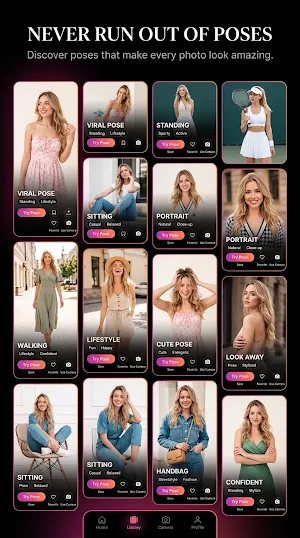
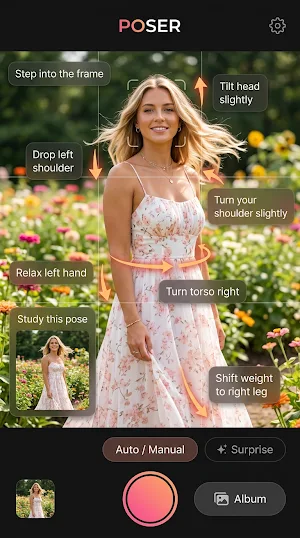
Poser is a live pose camera. You pick a reference pose, stand in front of the camera, and follow on-screen guidance until your body matches the sample photo.
How to use Poser
1. Choose a pose. Browse categories such as Selfie, Indoor, Outdoor, Street, Cafe, and Beach. The sample photo stays on screen as your reference.
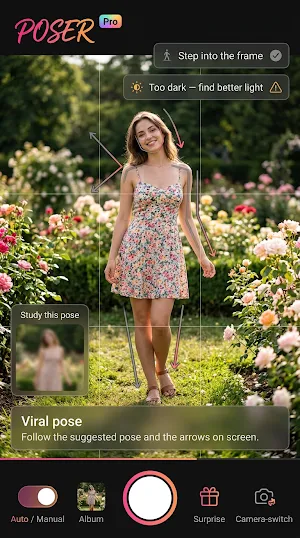
2. Copy the pose. Point the camera at yourself. Poser draws a body outline on the live preview and shows arrows for your head and hands.
3. Watch the match score. It updates as you move. Tap the shutter when you are ready, or turn on auto capture for a countdown when the pose locks.
4. Capture, save, and share. Shots save to your gallery. Share a photo, retake, or open your captured photos in the app.
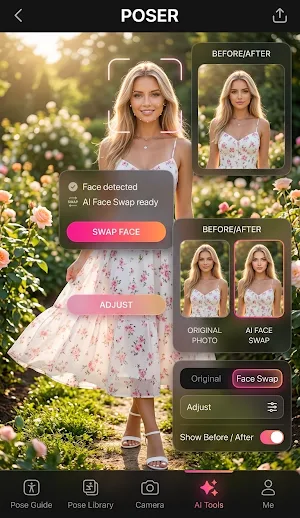
5. Try AI Magic (optional). After a shot, capture a clear face photo. Poser places your face onto the pose image and saves the result.
Also in the camera
• Lighting hints while you shoot
• Voice coach in your selected language
• Optional beauty sliders (smooth skin and blush)
• Language support: English, Vietnamese, Chinese, Spanish, Portuguese, French, Japanese, and Hindi
Poser needs camera access for the live preview and pose guidance. Photo access is used to save and browse photos you take in the app.
This app contains ads.
Similar Apps
Drawify - Photo to Sketch
Photo Drawing via Photo Sketch Maker - Pencil Sketch & Picture to Drawing
Handy Art Reference Tool
Artists wanting to use decent hand reference on the go, this app is for you!
Pose: AI Video Maker, AI Photo
AI Video Generator, viral ai fan videos of stadium cam & ai dance generator app!

GOGH: Animated Drawings
GOGH is a sketching app for making animated drawings with a single spark pencil.
PaperColor
Sketchbook imitating the brush, simple to painting

Dopple.AI
Engage with custom AI bots, explore, create yours and enjoy endless chats.
