System Info & Check
Explore Android hardware, system status, sensors, device tests, and reports
About System Info & Check
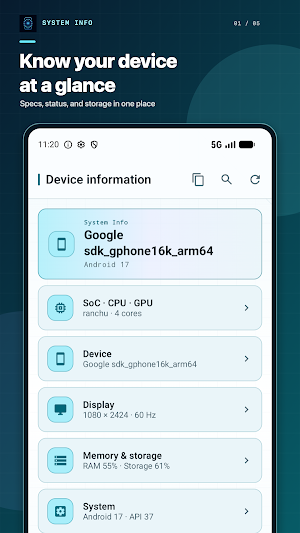
Understand your Android device at a glance with System Info.
View essential hardware and system details in one organized app. Check your processor, device, display, memory, storage, Android system, battery, temperature, sensors, network, and media capabilities without digging through multiple settings screens.
Key features
• Home dashboard for CPU usage when available, RAM, storage, battery, temperature, and network status
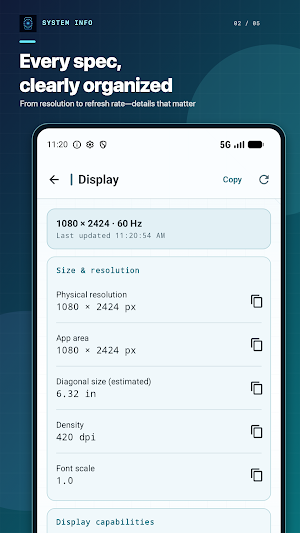
• Detailed SoC, CPU, GPU, device, display, memory, storage, system, battery, and thermal information
• Sensor list with specifications, live readings, recent-value graphs, and adjustable refresh speed
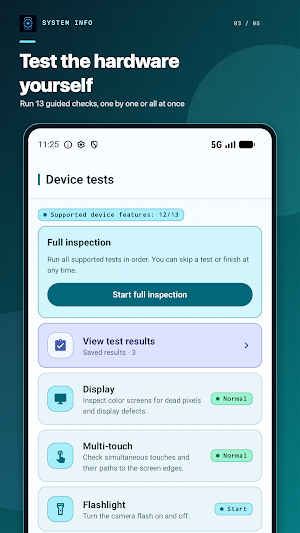
• Guided tests for the display, multi-touch, flashlight, camera, speaker, earpiece, proximity sensor, light sensor, accelerometer, vibration, Bluetooth, biometrics, and volume buttons
• Network details, DRM information, codec support, camera capabilities, and audio output information
• Search across device information and copy individual values or a complete summary
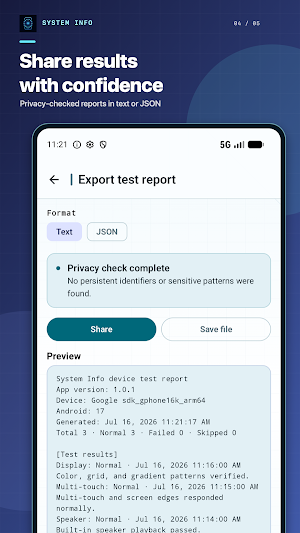
• Export text or JSON reports with a preview and sensitive-data checks before sharing
• Save local snapshots and compare changes in key device metrics
• Home screen widgets for battery, RAM, and storage
• Light and dark themes, temperature units, and refresh interval settings
Designed with privacy in mind
Basic device information works offline. System information and reports exclude phone numbers, IMEI, Android ID, advertising ID, and MAC addresses. Permissions are requested only when you choose a feature that needs them, such as viewing BSSID details or running a hardware test. Settings, snapshots, and test results are stored on your device. If ads are enabled, ad requests follow your consent and privacy choices.
Information availability varies by Android version and device manufacturer. When Android or the manufacturer blocks access to a value, System Info clearly marks it as unavailable or unsupported instead of estimating it.
Whether you are checking a new phone, troubleshooting a problem, or recording device specifications, System Info keeps the details and diagnostic tools you need in one place.
Similar Apps

Building Tools
Tools™ helps prevent costly mistakes and maximise efficiency

DevCheck Device & System Info
Testing, tools and complete information about your hardware and operating system

G-CPU:Monitor CPU, RAM, Widget
All information about CPU, RAM, Memory, Battery, Display, Network and Camera.

Castro Premium - system info
Learn the vast amount of system information about device and monitor it's state

TAP Kiln Control Mobile
Remote Kiln Control: edit schedules, modify settings, review logs, and more.

AppDash: App Manager & Backup
Advanced app manager with backups, insights, permissions and more
