Capti: Legendas para Vídeos
Professional subtitles for your videos, automatically generated.

About Capti: Legendas para Vídeos
Capti is a video subtitle editor. One thing, done very well.
You import a video, generate the subtitles, adjust the synchronization, choose a style, and export.
No filters. No camera. No social media. No complicated video editor.
PREVIEW FAITHFUL TO THE FINAL VIDEO
The subtitle you see in the preview is the same one that will be rendered in the final file.
Capti uses the same drawing system in the preview and export. Thus, size, position, typography, animations, and spacing remain consistent in the final video.
Change the style and see the result immediately.
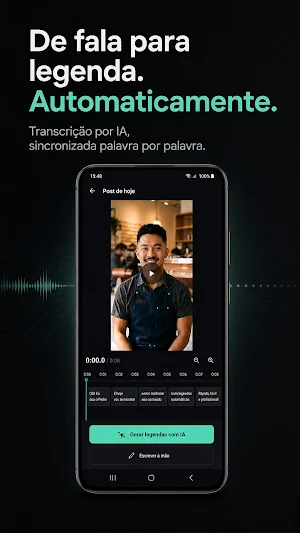
AUTOMATIC SUBTITLES WITH AI
Transform the speech in your video into automatically synchronized subtitles.
Word-by-word timing transcription
Brazilian Portuguese
Corrected punctuation
Word realignment
Precise speech synchronization
Early entry for easier reading
Capti doesn't treat transcription as just a sequence of sentences. The timing of each word is used to build truly synchronized subtitles.
PRIVACY FROM THE START
Video is never uploaded to the cloud.
Audio is extracted and compressed on the device itself. Only the audio necessary for automatic transcription is sent for processing and discarded after transcription.
If you are offline, you can still edit your projects normally. Only automatic transcription requires a connection.
No account. No cloud storage of your projects. No ads.
SUBTITLES MADE TO BE READ
Capti's Caption Engine was developed to produce natural and easy-to-follow subtitles.
Subtitle breaks consider punctuation, real speech pauses, rhythm, character-per-second limit, line balance, and sentence structure. Instead of simply cutting the text after a certain number of words, Capti looks for the best moment for each break.
30 CAPTION STYLES
Choose from 30 presets in 6 families:
Minimal
Creator
Social
Cinema
Bold
Accessibility
Customize any style with your own preferences for color, size, position, and alignment.
6 TYPOGRAPHIC FAMILIES
Inter
Montserrat
Nunito
Anton
Bebas Neue
Instrument Serif
HIGHLIGHTS AND ANIMATIONS
Highlight words as they are spoken using different effects:
Karaoke
Blocklight
Scale
Underline
Box per word
Add entrance animations such as fade, pop, bounce, scale, rise, and typewriter.
It's also possible to adjust outline, shadow, background, capitalization, line spacing, and spacing.
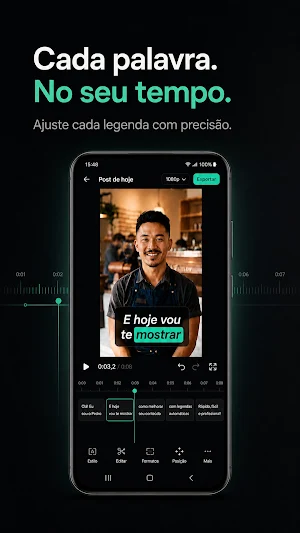
TIMELINE EDITOR
Have precise control over each subtitle.
Drag to move.
Adjust borders to change duration.
Split subtitles.
Merge subtitles.
Duplicate.
Insert new subtitles.
Delete subtitles.
Move all subtitles at once to correct synchronization delays.
Smart snapping helps align subtitles to neighboring subtitles, caps, and second marks.
You can also drag the subtitle directly onto the video to adjust its position.
FORMAT FOR EVERY CONTENT TYPE
Choose from formats for:
Social media
Balanced videos
Podcasts
Accessibility
EXPORT
Export your videos as MP4 with subtitles permanently applied to the image.
Hardware encoding on the device
3 quality options
Option to maintain original resolution
Multiple exports per project
Compare different styles of the same video
Save to gallery
Share directly
PROJECTS
Organize your work without complication.
Continue where you left off.
Search your projects.
Open recent projects.
Rename.
Duplicate.
Delete.
Duplication allows you to create a second version without losing the first.
WORKS OFFLINE
Projects, videos, and subtitles remain on your device.
Capti works without internet for editing, customization, and exporting. The only exception is automatic transcription, which requires a connection to process speech.
No account required.
No ads.
Similar Apps

KiWi Vault: Hide Photos, Video
Protect your privacy. Hide photos & lock videos in a 100% offline secret vault.

DayDew - Daily Journal, Diary
Daily journal and diary app for notes, memories, mood tracking, habits, and more

BeeDone - Gamified To-Do List
Turn tasks into quests! ADHD-friendly gamified productivity with AI coaches & XP

Color Notes, Notebook, Notepad
Quick Notes, Easy Notebook, Memos, Notepad, Sticky Note Widget, School Notes.

Nested Folder Notes - Folino
Unlimited Subfolders and Hierarchy

Enchlist: Shopping List
Barcode scan, voice input, photo scan, total price, expenses - grocery list
