Lavien Adaptive Shady You Icon
Triple monet color supported version of Lavien Adaptive For You Icon Pack
Free website generator for mobile apps; privacy policy, app-ads.txt support and more...
AppPage.net
About Lavien Adaptive Shady You Icon
Please read description carefully!
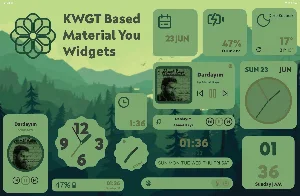
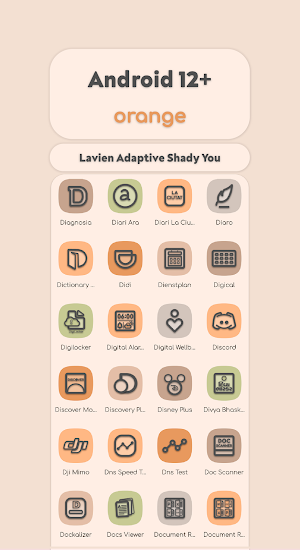
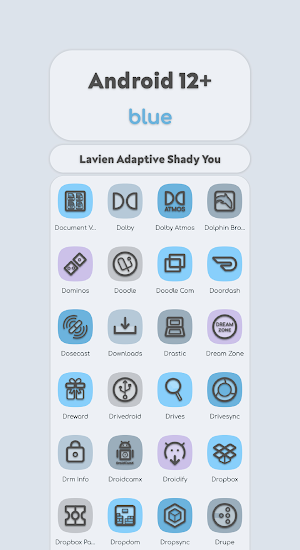
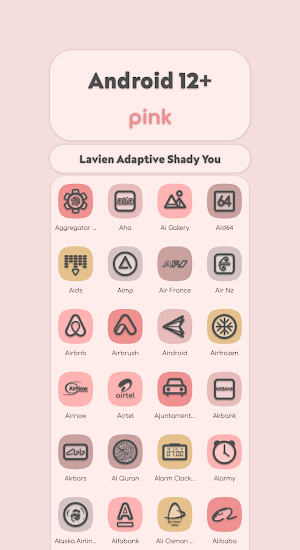
Lavien is elegant and modern icon pack. Icons color changes automatically by using wallpaper just like in android 12 like triple color palette. These adaptive icons were created in the style of Material You.
You must reapply icon pack after the change wallpaper!
Features:
- 2000+ Adaptive Icons
- Material You Support
- 81 Wallpapers
- 16 Widgets
- Lightweight size
- Dynamic Clock
- Dynamic Calendar
- High Resolution Icons (432x432)
- Regular Updates
Supported Launchers:
- Lawnchair Launcher v2
- Rootless Pixel Launcher
- Hyperion Launcher
- Lean Launcher
- Nova Launcher
- Shade Launcher
- Ruthless Launcher
- Flick Launcher
- Niagara Launcher
- Poseidon Launcher
- Smart Launcher
- Poco Launcher
How to Use:
Lawnchair Launcher v2: Go to Launcher’s Home Settings. Open “Theme”, Then Choose The Icon Pack. Change the Shape.Rootless Pixel Launcher: Go to Launcher’s Home Settings. Then Choose the Icon Pack. Change the Shape.
Hyperion Launcher: Go to Launcher’s Home Settings. Open “Iconography”, Then Choose Icon Pack. Change the shape.
Lean Launcher: Go to Launcher’s Home Settings. Then Choose the Icon Pack. Change the Shape.
Nova Launcher: Go to Launcher’s Settings. Open “Look & Feel”, Then open “Icon Style”, Choose Icon Pack. Change shape.
Shade Launcher: Go to Launcher’s Home Settings. And choose the icon pack and shape from under "Theme".
Ruthless Launcher: Go to Launcher's Home Settings. Open "Styles", Then choose icon pack and shape.
Flick Launcher: Go to Laucher's Settings. Open "Icons", Then choose icon pack and shape.
Niagara Launcher: Go to Lavien Adaptive Shady You Icon Pack app. Tap "Apply Lavien Adaptive Shady You", then choose icon shape from developer settings of phone or pixel themes app.
Poseidon Launcher: Go to launcher's settings. Open "Theme", Then choose icon pack and shape.
Smart Launcher: Go to launcher's settings. Open "Global appearance", after open "Icon appearance". Then choose icon pack and icon shape.
Poco Launcher: Go to Launcher’s Settings. Tap “More”, Then open “Icon Pack”, Choose Icon Pack. Change icon shape in developer settings of phone.
Frequently Asked Questions:
Why is my icons look broken?
Sometimes icon colors can be lagged due to API restrictions. In this case what you need to do after change wallpaper, restart launcher or reapply the icon pack.Why it says Device Unsupported?
Material You are introduced in Android 12 So, The Icon Pack only works on Android 12+ Devices.Why it is not working on my device?
It mainly works on AOSP Android 12 Based Firmware (Lineage OS, Resurrection Remix, AEX etc.). It’s not guaranteed that the icon pack will work on Devices with Custom Shell. It’s not the problem of Icon Pack, It’s the Problem of OEMSupport:
Mail:[email protected]Telegram:t.me/lavien_icons
Rate it with 5🌟 if Possible. Before giving a bad review please contact me.I will reply you as quickly as possible.
Rate it with 5🌟 if Possible. Before giving a bad review please contact me.I will reply you as quickly as possible.
Similar Apps
Lavien Lines Monet Icon Pack
Please read description carefully!Lavien is elegant and modern They have linear foreground...

Lavien Lines Neon
Please read description carefully!Lavien is elegant and modern icon pack. They have...

Lavien Adaptive Shady You Icon
Please read description carefully!Lavien is elegant and modern icon pack. Icons color...
Lavien Adaptive Shady Dark
Please read description carefully!Lavien is elegant and modern icon pack. They have...

Lavien Adaptive Shady Light
Please read description carefully!Lavien is elegant and modern icon pack. They have...

Lavien For You Outline Icons
Please read description carefully!Lavien is elegant and modern icon pack. They have...

Amazing 😍😍
The adaptive shady verient of the lavien icon looks so dope. The adaptive color with the shady accent looks so impressive. The outlook creates an aesthetic vibe overall. A must try icon pack to try out.
Amazing colours changing icon pack 😍

Terrific design & style, great color, outstanding coverage, walls, fantastic support, another must-have to any collection, highly recommend!
