Free website generator for mobile apps; privacy policy, app-ads.txt support and more...
AppPage.net
About Lavien Adaptive Black&White
Please read description carefully!
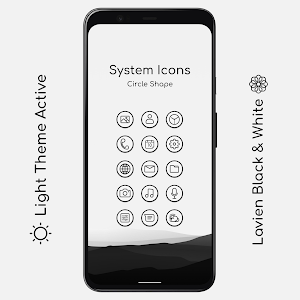
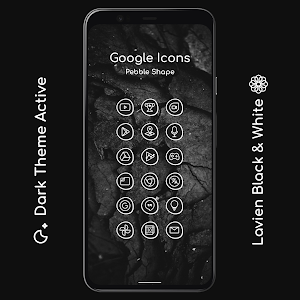
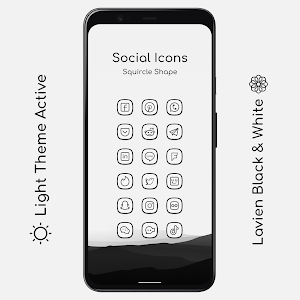
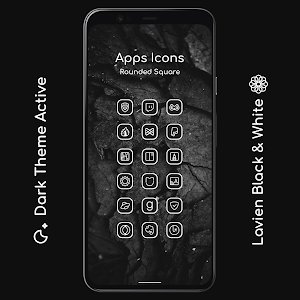
Lavien is elegant and modern icon pack. They have linear foreground and solid color background. The icons change their color to black and white according to the phone's day/night theme. These adaptive icons have outline borders compatible with adaptive shapes.You must reapply icons after change theme device to Dark/Light.
Features:
- 1000+ Adaptive Icons
- Adaptive icon frame
- Day/night theme support
- Lightweight size
- 13 widgets
- 36 Wallpapers
- Dynamic Calendar
- High Resolution Icons (432x432)
- Regular Updates
Supported Launchers:
- Lawnchair Launcher v2
- Rootless Pixel Launcher
- Hyperion Launcher
- Lean Launcher
- Nova Launcher
- Shade Launcher
- Ruthless Launcher
- Flick Launcher
- Niagara Launcher
- Poseidon Launcher
- Smart Launcher
- Poco Launcher
How to Use:
Lawnchair Launcher v2: Go to Launcher’s Home Settings. Open “Theme”, Then Choose The Icon Pack. Change the Shape.Rootless Pixel Launcher: Go to Launcher’s Home Settings. Then Choose the Icon Pack. Change the Shape.
Hyperion Launcher: Go to Launcher’s Home Settings. Open “Iconography”, Then Choose Icon Pack. Change the shape.
Lean Launcher: Go to Launcher’s Home Settings. Then Choose the Icon Pack. Change the Shape.
Nova Launcher: Go to Launcher’s Settings. Open “Look & Feel”, Then open “Icon Style”, Choose Icon Pack. Change shape.
Shade Launcher: Go to Launcher’s Home Settings. And choose the icon pack and shape from under "Theme".
Ruthless Launcher: Go to Launcher's Home Settings. Open "Styles", Then choose icon pack and shape.
Flick Launcher: Go to Laucher's Settings. Open "Icons", Then choose icon pack and shape.
Niagara Launcher: Go to Lavien Adaptive Black&White Icon Pack app. Tap "Apply Lavien Adaptive Black&White Icon Pack", then choose icon shape from developer settings or pixel themes app.
Poseidon Launcher: Go to launcher's settings. Open "Theme", Then choose icon pack and shape.
Smart Launcher: Go to launcher's settings. Open "Global appearance", after open "Icon appearance". Then choose icon pack and icon shape.
Poco Launcher: Go to Launcher’s Settings. Tap “More”, Then open “Icon Pack”, Choose Icon Pack. Change icon shape in developer settings or pixel themes app.
Frequently Asked Questions:
Why is my icons look broken?
The icon pack doesn't use the standard adaptive icon api so some launchers may have broken icon frames. In this case, choose the icon shape from the system (like style and wallpapers or customization settings), not from your launcher. Why it is not working on my device?
It mainly works on AOSP Android 8.0+ Based Firmware (Lineage OS, Resurrection Remix, AEX etc.). It’s not guaranteed that the icon pack will work on Devices with Custom Shell. It’s not the problem of Icon Pack, It’s the Problem of OEMHow do I get more Icon Shapes?
Ask your launcher developer to add more shape, I can't do anything about it.Support:
Mail:[email protected]Telegram:t.me/lavien_icons
Rate it with 5🌟 if Possible. Before giving a bad review please contact me.I will reply you as quickly as possible.
Similar Apps
Lavien Adaptive Shady Dark
Please read description carefully!Lavien is elegant and modern icon pack. They have...

Lavien Adaptive Shady Light
Please read description carefully!Lavien is elegant and modern icon pack. They have...

Lavien For You Outline
Please read description carefully!Lavien is elegant and modern icon pack. They have...

Lavien Adaptive For You
Please read description carefully!Lavien is elegant and modern icon pack. Icons color...
Lavien Adaptive Black&White
Please read description carefully!Lavien is elegant and modern icon pack. They have...
Lavien Adaptive Accent
Please read description carefully!Lavien is elegant and modern icon pack. They have...

Wow I love it

Just crisp and clear. Impressive work. More updates will bring it to Top Charts on Play Store.

Awesome pack

Such a good icon pack

Good

Thanks for Promocode
