ReCap: Reaction Recorder
Record genuine selfie reactions over other apps — privately and your way.
About ReCap: Reaction Recorder
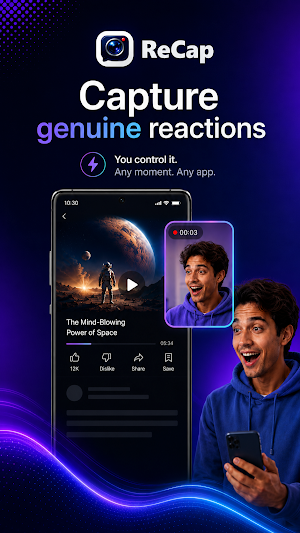
Capture the reaction before the moment is gone.
ReCap helps you record genuine selfie reaction videos while you are using other Android apps. Open ReCap, tap Arm ReCap, keep the floating trigger ready, then tap when something makes you laugh, surprises you or deserves a real response.
HOW RECAP WORKS
1. Set up the essentials
Allow camera, microphone and display-over-other-apps permissions so ReCap can record your reaction and show the floating trigger.
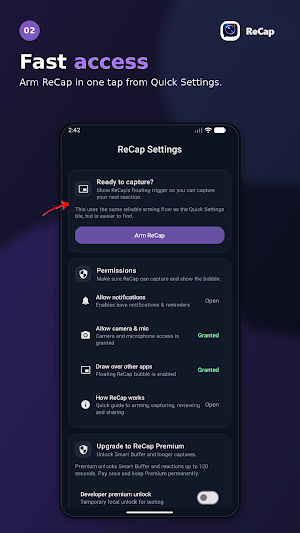
2. Arm ReCap from the app
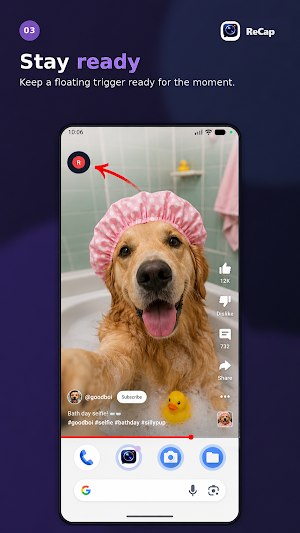
Tap Arm ReCap when you want ReCap to be ready. The floating trigger appears while you use other apps.
3. Capture the moment
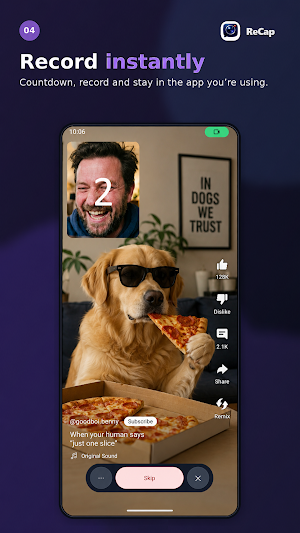
Open the message, post, video or app you want to react to. When the moment happens, tap the floating ReCap trigger.
4. Review, trim and share
Check your reaction, trim the clip, add a caption if you want, then share it using Android’s share options.
For faster access later, you can also add the ReCap Quick Settings tile.
CAPTURE YOUR WAY
Choose the experience that feels right for you:
• Live Preview — see your camera framing while recording.
• Compact REC — record without keeping your face visible on screen.
• Adjustable countdown — keep the delay, shorten it or turn it off.
• Floating trigger controls — drag the bubble, snap it to an edge or tuck it partly off-screen.
• Collapsible toolbar — keep recording controls available without taking over your screen.
QUICK AND USER-CONTROLLED
ReCap does not record automatically. You decide when to arm it and when recording begins by tapping the visible floating trigger.
Choose your front or rear camera, set your preferred capture length and stop early whenever you have the reaction you want. ReCap can also disarm automatically after a successful save.
REVIEW BEFORE YOU SHARE
After recording, you can:
• Play your reaction back.
• Trim the beginning or end.
• Add a caption for extra context.
• Share through compatible Android apps.
• Keep or delete the saved video.
Choose whether ReCap opens the review screen immediately after saving or leaves a tap-to-review notification instead.
RECAP PREMIUM
ReCap Premium unlocks Smart Buffer and longer captures.
Smart Buffer helps you capture surprise moments by keeping a short temporary buffer while ReCap is armed, so you can save more of the reaction even if you tap slightly late.
PRIVATE BY DESIGN
• ReCap does not read your messages.
• ReCap does not monitor incoming notifications.
• Camera and microphone recording starts only when you initiate it.
• Captures are stored locally in Movies/ReCap on your device.
• Nothing is shared unless you choose to share it.
KEY FEATURES
• Selfie reaction recording while using other apps
• Arm ReCap button inside the app
• Optional Quick Settings tile for faster access
• Live Preview and Compact REC modes
• Smart Buffer with ReCap Premium
• Adjustable countdown and capture duration
• Draggable, edge-snapping floating trigger
• Optional partly hidden edge position
• Auto-collapsing recording controls
• Optional auto-disarm after saving
• Front or rear camera selection
• Review, trim, caption, share and delete
• Local video storage
• Optional save notification
• Haptic feedback controls
ReCap is designed to be fast, lightweight and non-intrusive — ready when you need it and out of the way when you do not.
Similar Apps

Paul Music TV
Paul Music Radio and TV, music, information and quality content.

ЕГСВ
Video surveillance, analysis, monitoring and data storage platform

Any Video Player
Play your favorite videos easily with Any Video Player!
UMViewer
Remote Viewer for NVR

Ultimate Video Player HD
Play your videos smoothly in HD quality!

Mizupu
Stream media player. Play your own content with playlist support and EPG guide.
