About Halo Safety
Halo sends an alert to the people who can actually reach you in minutes: your family, your neighbours, a mutual aid circle. It is not a connection to emergency services. If life is in danger, call the emergency number first.
NO SIGN-UP
No account, no phone number, no email. You type the name and the address yourself — anything your own people will recognise. Nothing is verified, because those details are not for us: they are for whoever comes to help.
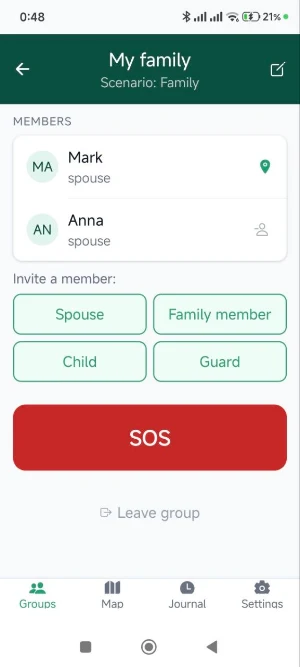
FOUR WAYS TO CALL FOR HELP
— A spoken phrase you choose yourself, recognised offline on the phone
— Impact detection — for a crash, a fall, being hit as a pedestrian
— Five presses of the volume key. Wake the screen with the power button first; the phone can stay in your pocket
— An SOS button
Three of the four work without touching the screen.
HOW HALO USES ACCESSIBILITY SERVICES
The volume-key trigger needs Android's AccessibilityService: while another app is on screen, the system does not pass hardware key presses to Halo, so there is no other way to notice them. That is the only thing the service does here. It does not read screen content, and it collects and transmits nothing. Turning it on is optional — the app works without it, and the other three triggers do not need it at all.
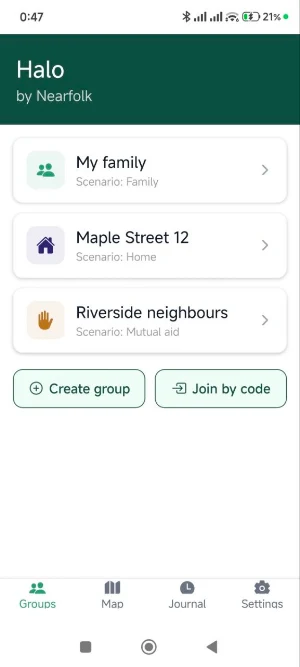
THREE CIRCLES
Family — the people closest to you. Automatic triggers always go here.
Home — the neighbours in your building. An alert belongs to an address rather than a person: a neighbour needs to know which door to knock on.
Mutual aid — whoever happens to be nearby.
An alert only reaches the circle it was triggered in.
WHEN AN ALERT ARRIVES
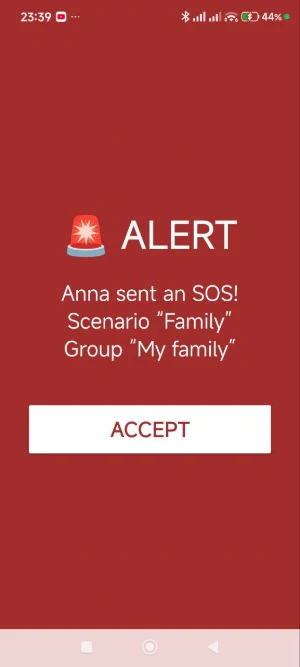
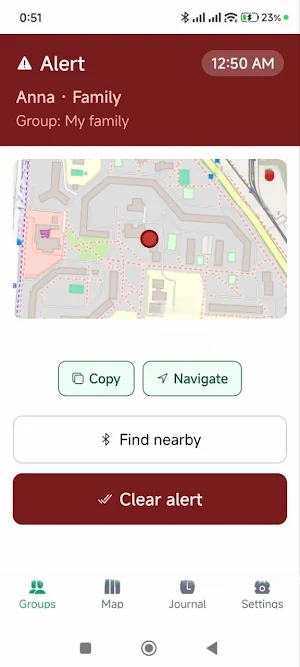
A full-screen alert with sound appears over the lock screen. Whoever responds sees your location on a map and can open it in a navigation app. When coordinates are not enough — a stairwell, an underground car park, a forest — a Bluetooth search covers the last few metres. It works without internet.
PRIVACY
There is no continuous tracking: location is shared only during an alert and when a child's location is requested. Maps come from OpenStreetMap, with no third-party trackers. Statistics are anonymous. There will never be ads.
HONEST ABOUT THE LIMITS
Halo does not call the police or an ambulance. Impact detection cannot tell a real crash from a hard knock with complete certainty — that is why there is a fifteen-second cancel window. The volume keys need the screen woken first. The Bluetooth search shows warmer or colder, not a point.
SUBSCRIPTION
Sending alerts costs $1 a month or $10 a year, with the first 14 days free. Receiving alerts is always free: you can help others without a subscription. A child's phone does not need one.
Similar Apps

Drive Backup
Back up selected Android folders to your own Google Drive.

120 FPS Turbo GFX Booster
Boost FPS up to 120 for smoother, faster mobile gaming.
NetLock: App Internet Blocker
Block Wi-Fi or mobile data for selected apps with an easy no-root firewall.

PlayMax TV
A media playback release

DAVx⁵ Select
Sync Contacts, Calendars and Tasks with selected servers

Spider-Man Game Minecraft Mod
Add superhero-inspired abilities, gear, and adventures to Minecraft PE.
