
Goal Tracker: Track Progress
Productivity In-app purchases Contains ads
Do you want to reach your goals? Then Goal Tracker is the app for you!
- Downloads
- 2.5K+
- on Google Play
- Price
- Free
- In-app purchases
- Updated
- Sep 1
- 2026 · v9.9.9
Screenshots


About Goal Tracker: Track Progress
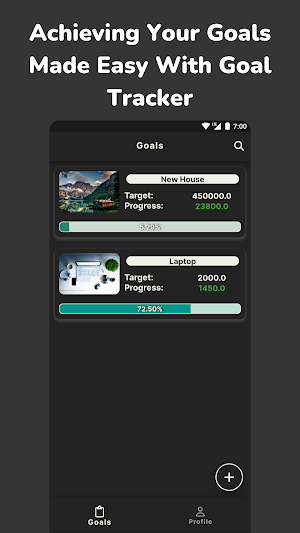
The Goal Tracker app is a simple and user-friendly tool that helps you set and track your goals in a clear and organized way. It allows you to create a list of your goals, set deadlines, and track your progress over time.
With the app, you can easily view your goals and see how far you have come towards achieving them. You can also set reminders to keep yourself on track and motivated to achieve your goals.
In addition to tracking your progress, the Goal Tracker app also offers a range of features to help you stay organized and motivated. These include the ability to set daily, weekly, or monthly goals, as well as the option to set multiple reminders for each goal.
🎯Why Set Goals?
📍Setting goals gives you a sense of purpose and direction, helping you stay motivated and focused on what you want to achieve.
📍When you set and achieve a goal, it can boost your confidence and self-esteem, as you have accomplished something you set out to do.
📍Goals can help you measure your progress and success, and allow you to make adjustments to your plans as needed.
📍Setting goals can also help you prioritize your time and resources, ensuring that you are working towards things that are most important to you.
📍Achieving goals can give you a sense of accomplishment and satisfaction, helping you feel more fulfilled and successful in your personal and professional life.
🎯Benefits of using the Goal Tracker:
📍You can track your progress and make updates to your goals as needed, helping you stay on track and motivated.
📍The app offers reminders to help you stay on top of your goals, as well as graph view options to visualize your progress.
📍You can customize the appearance of the app with different themes, making it personal and enjoyable to use.
📍The app also allows you to export your goals as PDF or Excel files, making it easy to share your progress with others or keep a record for yourself.
📍The Goal Tracker app allows you to track your progress, so you can see how far you've come and stay motivated to keep going.
🎯Using Goal Tracker:
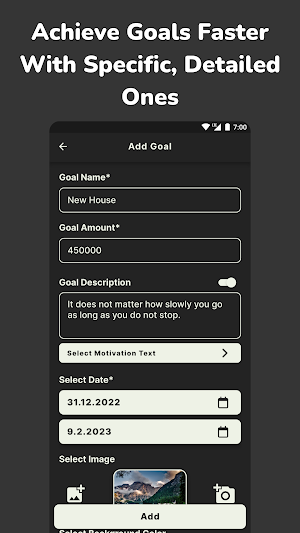
📍Set a goal name and amount: When you create a new goal in the app, you can give it a name and set a target amount that you want to save or spend towards that goal.
📍Set a completion date: You can also set a target date for when you want to achieve your goal. This can help you stay on track and ensure that you are making progress towards your goal in a timely manner.
📍Add an image: You can add an image to your goal to help make it more visually appealing and engaging. This can be a photo of the item you are saving for or an image that represents your goal in some way.
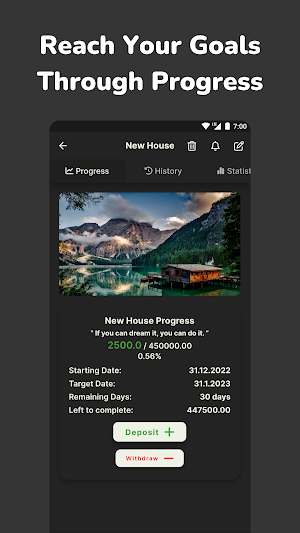
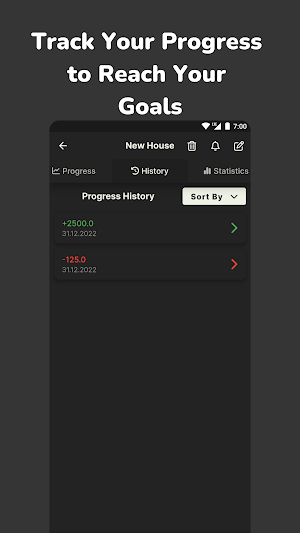
📍Edit and add progress: You can easily edit and update your goals as you make progress towards them. You can also add progress to your goals by entering the amount of money you have saved or spent towards that goal.
📍Remove progress: If you need to make adjustments to your progress, you can easily remove progress from your goals. This can be useful if you need to make changes to your budget or if you encounter unexpected expenses.
📍View graphs: The app includes helpful graphs that allow you to see your progress over time. You can view your progress in a line graph or a bar graph, depending on your preference.
📍Reminders: You can set reminders to help you stay on track with your goals. These reminders can be set to appear at a specific time or frequency, such as daily or weekly.
📍Export goals as PDF or Excel files: If you want to share your goals with others or keep a record for yourself, you can easily export your goals as a PDF or Excel file. This can be useful if you want to review your progress or share your goals with a friend or family member.
Overall, the Goal Tracker app is a valuable tool for anyone looking to set and track their goals in a convenient and organized manner. Thank you for using the Goal Tracker app. If you happen to see any errors or issues, please feel free to contact us at [email protected].
With the app, you can easily view your goals and see how far you have come towards achieving them. You can also set reminders to keep yourself on track and motivated to achieve your goals.
In addition to tracking your progress, the Goal Tracker app also offers a range of features to help you stay organized and motivated. These include the ability to set daily, weekly, or monthly goals, as well as the option to set multiple reminders for each goal.
🎯Why Set Goals?
📍Setting goals gives you a sense of purpose and direction, helping you stay motivated and focused on what you want to achieve.
📍When you set and achieve a goal, it can boost your confidence and self-esteem, as you have accomplished something you set out to do.
📍Goals can help you measure your progress and success, and allow you to make adjustments to your plans as needed.
📍Setting goals can also help you prioritize your time and resources, ensuring that you are working towards things that are most important to you.
📍Achieving goals can give you a sense of accomplishment and satisfaction, helping you feel more fulfilled and successful in your personal and professional life.
🎯Benefits of using the Goal Tracker:
📍You can track your progress and make updates to your goals as needed, helping you stay on track and motivated.
📍The app offers reminders to help you stay on top of your goals, as well as graph view options to visualize your progress.
📍You can customize the appearance of the app with different themes, making it personal and enjoyable to use.
📍The app also allows you to export your goals as PDF or Excel files, making it easy to share your progress with others or keep a record for yourself.
📍The Goal Tracker app allows you to track your progress, so you can see how far you've come and stay motivated to keep going.
🎯Using Goal Tracker:
📍Set a goal name and amount: When you create a new goal in the app, you can give it a name and set a target amount that you want to save or spend towards that goal.
📍Set a completion date: You can also set a target date for when you want to achieve your goal. This can help you stay on track and ensure that you are making progress towards your goal in a timely manner.
📍Add an image: You can add an image to your goal to help make it more visually appealing and engaging. This can be a photo of the item you are saving for or an image that represents your goal in some way.
📍Edit and add progress: You can easily edit and update your goals as you make progress towards them. You can also add progress to your goals by entering the amount of money you have saved or spent towards that goal.
📍Remove progress: If you need to make adjustments to your progress, you can easily remove progress from your goals. This can be useful if you need to make changes to your budget or if you encounter unexpected expenses.
📍View graphs: The app includes helpful graphs that allow you to see your progress over time. You can view your progress in a line graph or a bar graph, depending on your preference.
📍Reminders: You can set reminders to help you stay on track with your goals. These reminders can be set to appear at a specific time or frequency, such as daily or weekly.
📍Export goals as PDF or Excel files: If you want to share your goals with others or keep a record for yourself, you can easily export your goals as a PDF or Excel file. This can be useful if you want to review your progress or share your goals with a friend or family member.
Overall, the Goal Tracker app is a valuable tool for anyone looking to set and track their goals in a convenient and organized manner. Thank you for using the Goal Tracker app. If you happen to see any errors or issues, please feel free to contact us at [email protected].
What’s new
Version 9.9.9 · Updated September 1, 2026
Performance optimizations and package version updates.
User reviews

Good job

Good Goal tracker 👍
Alternatives to Goal Tracker: Track Progress
Looking for apps like Goal Tracker: Track Progress? Here are 6 similar Android apps on Google Play. The highest rated is Goal Tracker Workout Calendar (4.7/5), and all 6 are free to download.
-
Reach it: Goals, Habit Tracker 4.0
-
Timelog - Goal & Time Tracker 4.7
-
Goal Setting Tracker Planner 4.2
-
Goal Tracker Workout Calendar 4.7
-
iHour - Habit & Skill Tracker 4.3
-
everyday Habit Tracker 4.6
| App | Rating | Price | Installs | Last updated | Compare |
|---|---|---|---|---|---|
| Goal Tracker: Track Progress | – | Free | 1,000+ | Sep 1, 2026 | |
| Reach it: Goals, Habit Tracker | 4.0 / 5 | Free | 100,000+ | Sep 16, 2026 | Compare |
| Timelog - Goal & Time Tracker | 4.7 / 5 | Free | 100,000+ | Sep 15, 2026 | Compare |
| Goal Setting Tracker Planner | 4.2 / 5 | Free | 100,000+ | Oct 23, 2025 | Compare |
| Goal Tracker Workout Calendar | 4.7 / 5 | Free | 5,000,000+ | – | Compare |
| iHour - Habit & Skill Tracker | 4.3 / 5 | Free | 100,000+ | May 16, 2025 | Compare |
| everyday Habit Tracker | 4.6 / 5 | Free | 100,000+ | Jun 21, 2026 | Compare |
Similar apps on Google Play
- Reach it: Goals, Habit Tracker
- Timelog - Goal & Time Tracker
- Goal Setting Tracker Planner
- Goal Tracker Workout Calendar
- iHour - Habit & Skill Tracker
- everyday Habit Tracker
- Habit Tracker Planner - Habito
- SnapHabit - Accountability and
- Weekly Checklist - Habit Check
- Habit - habit tracker and goal
- EZ Habit: simple habit tracker
- Debt Payoff Manager & Tracker
- Health Coach Habinator
- Higher Goals: Inspiring Habits
- Timecap: Habit tracker & To-do
- Dollarbird Pro
- Freedcamp
- Habit Tracker Gamification
- Decarbon: Carbon Accounting