About KronoPrompt
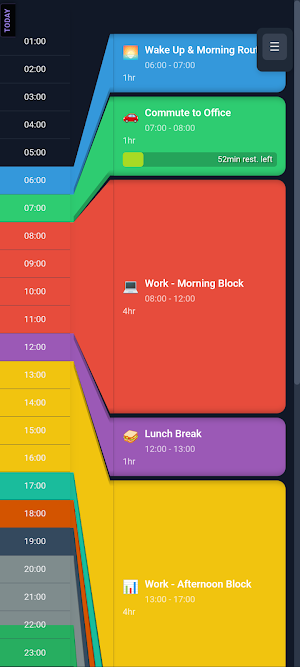
KronoPrompt is an AI‑powered daily schedule planner that transforms your ideas into organized, visual timelines you can follow minute by minute — complete with live progress bars for each activity. When life changes unexpectedly, quickly adjust your schedule with AI or resize tasks manually using intuitive drag handles.
🤖 AI SCHEDULE GENERATION
Describe your day in natural language — “meetings at 9 and 2, gym at noon, study in the evening” — and KronoPrompt instantly builds a clean, color‑coded timeline. Modify, replace, or add tasks with follow‑up prompts or edit directly in the app.
📅 VISUAL TIMELINE
See your entire day at a glance on an intuitive, draggable timeline. Resize tasks by dragging their handles.
✏️ FULL EDIT MODE
Change task names, times, durations, or colors. Add new tasks manually. Delete what you don’t need. Extend tasks instantly. Your schedule, your rules.
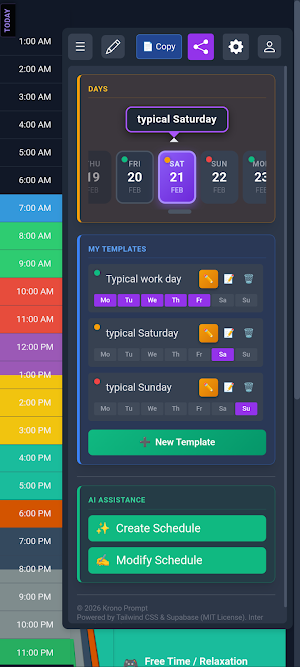
📋 TEMPLATES
Save your favorite schedules as reusable templates. Load a “Workday,” “Weekend,” or any custom template and personalize it in seconds.
🔗 SHARE & COLLABORATE
Generate a shareable link and send your schedule to your family, friends, or anyone who needs to stay in sync.
📱 WORKS EVERYWHERE
Use KronoPrompt on your phone, tablet, or desktop browser. Your schedules sync across all devices when you’re signed in.
Any dream you want to achieve becomes possible only when it’s part of your daily schedule — and KronoPrompt helps you make that happen.
KronoPrompt details
KronoPrompt is a free Productivity app for Android with 10+ installs on Google Play. It was released on April 12, 2026 and last updated on April 12, 2026. It's developed by Krono Studios. It requires Android 7.0 or later. The app offers in-app purchases.
- Category
- Productivity
- Installs
- 10+
- Price
- Free
- In-app purchases
- Yes
- Ads
- No ads
- Current version
- 1.5.6
- Requires Android
- 7.0
- Content rating
- Everyone
- Released
- April 12, 2026
- Last updated
- April 12, 2026
- Developer
- Krono Studios
What’s new in KronoPrompt
Setup wizard creates your first schedule templates based on your lifestyle. Date navigator: scroll the past 7 days and next 15. Tap any day to view or edit. Future planning: pre-plan upcoming days with a template, saved automatically. Copy schedule: duplicate to another date or save as a new template. Edit mode: add, delete and resize tasks with drag handles. AI assistant: describe your day to create or modify your schedule (3 free/month). Bug fixes and performance improvements.
Version 1.5.6 · Updated April 12, 2026
Alternatives to KronoPrompt
Looking for apps like KronoPrompt? Here are 6 similar Android apps on Google Play. All of them are free to download.

Showroom9 v2 (Admin)
Facility Management System
LogDroid: Logcat Debug Viewer
Android Logcat viewer with crash detection, filters and log export.

Appcognito: Site & App Blocker
Block apps & websites privately. Reduce screen time and reclaim your focus.

Kudos: Social To-Do List
Accountability with friends. Plan your day, then do it in the open.

Pringle Pristine
Pringle Pristine task management application

Morris Agent Team
The resource for home buying and homeownership in New Jersey!
| App | Rating | Price | Installs | Last updated |
|---|---|---|---|---|
| KronoPrompt | – | Free | 10+ | Apr 12, 2026 |
| Showroom9 v2 (Admin) | – | Free | 5+ | Jul 16, 2026 |
| LogDroid: Logcat Debug Viewer | – | Free | 500+ | Jul 28, 2026 |
| Appcognito: Site & App Blocker | – | Free | 1,000+ | Sep 22, 2026 |
| Kudos: Social To-Do List | – | Free | 10+ | Sep 9, 2026 |
| Pringle Pristine | – | Free | 50+ | Aug 27, 2026 |
| Morris Agent Team | – | Free | 0+ | Sep 8, 2026 |