About Grain - Pro Film Camera
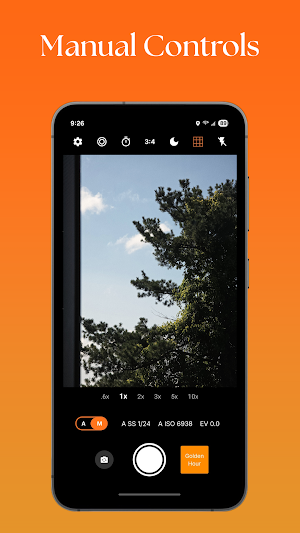
Grain Camera is a pro CameraX app with a real-time OpenGL ES 2.0 pipeline that lets you preview and capture film-like photos. Build your own “films,” fine-tune look settings, and shoot with confidence.
Why photographers like it
Real-time film looks: Live OpenGL preview that matches the captured result.
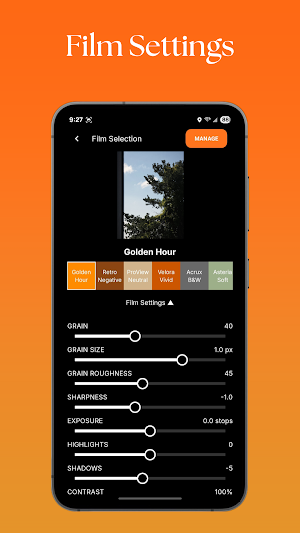
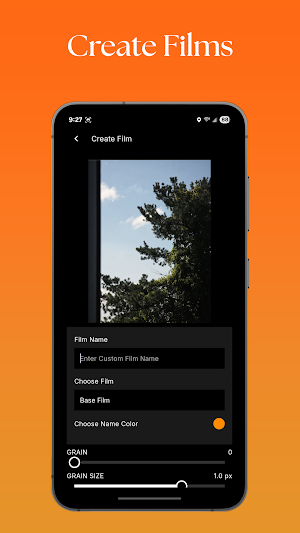
Create & edit films: Make your own presets by adjusting look settings.
Fast, reliable CameraX core: Modern Android camera stack with smooth preview and responsive capture.
On-device processing: Image rendering happens on your phone.
Clean workflow: Shoot, review, and share from your gallery—no extra steps.
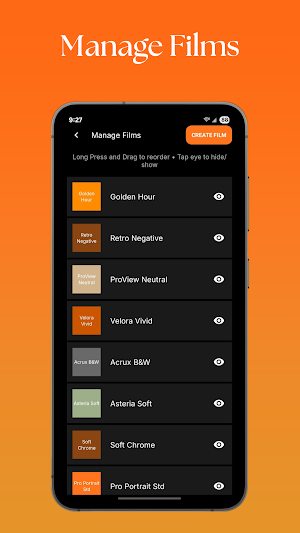
Included film presets (growing library)
ProView Neutral — balanced base for everyday shootin
Velora Vivid — punchy colors and contrast
Asteria Soft — gentle tones with natural skin
Soft Chrome — muted contrast, cool-leaning palette
Pro Portrait Std/Hi — flattering skin-tone emphasis (two strengths)
Eternis Cine — cinematic curves for moody frames
Retro Negative — warm, nostalgic tonality
Memoir Negative — soft shadows with pastel highlights
Acrux B&W — classic monochrome with film-like grain
Key features
Live preview OpenGL ES 2.0 rendering
Editable look parameters (per-film controls so you can tune your style)
Film grain option for authentic texture
One-tap switching between films while framing
Designed for consistency across preview and capture
Privacy
Processing is performed on the device.
No account is required.
Permissions
Camera: to capture photos
Photos/Media/Files: to save images you take
Notes & compatibility
Built with Android CameraX and OpenGL ES 2.0.
Performance and available controls may vary by device.
For best results, keep your device firmware up to date.
Grain - Pro Film Camera details
Grain - Pro Film Camera is a free Photography app for Android with 5,000+ installs on Google Play and a 4.7/5 average rating from 38 ratings. It was released on September 16, 2025 and last updated on October 31, 2025. It's developed by Grain Camera. It requires Android 8.0 or later.
- Category
- Photography
- Rating
- 4.7 / 5 (38 ratings)
- Installs
- 5,000+
- Price
- Free
- In-app purchases
- No
- Ads
- No ads
- Current version
- 3.8
- Requires Android
- 8.0
- Content rating
- PEGI 3
- Released
- September 16, 2025
- Last updated
- October 31, 2025
- Developer
- Grain Camera
What’s new in Grain - Pro Film Camera
Added Photo Processing Settings to have more control on photos **Analog Mode** Capture 36 Photos and develop them when roll is over Films Reals Ace and Teal & Orange Fade Slider for Old Film look Share Film button to save Film Settings Change default save location Bug fixes
Version 3.8 · Updated October 31, 2025
Similar Apps

PULSEpx - Photography
Want to level up your photography and earn real prizes? Download PULSEpx...
Magic Polish Lab: Photo Editor
Create stunning photo grids, collages, and edits in seconds!PhotoGrid Maker is your...

Video Downloader Manager VidWe
Video Downloader Manager VidWe lets you watch and save videos and reels...
eZy Watermark Photos Pro
Protect visuals with Custom Watermarks, Digital Signatures, Timestamps, Logo, Stickers & QR...

Camera FV-5 Lite
Camera FV-5 is a professional camera application for mobile devices, that puts...

Photo Effects - LD
LD gives you the most beautiful photo effects and presets to layer...