About Mango Ui for Klwp
A Refreshing look for your Home Screen
This preset is unlocked for customization and Export.
Optimized for 18:9 and above ratio screen
This is not a stand-alone app
You will need the Kustom Live Wallpaper & Kustom Live Wallpaper Pro key to use these Presets.(Paid version of KLWP) OR Kustom Widgets & Kustom Widgets Pro key to use these Widgets.(Paid version of KWGT)
To apply the theme open the app then go to widget section and select the theme you wish to apply
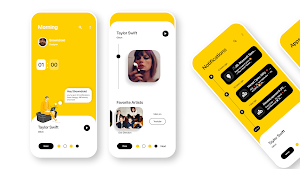
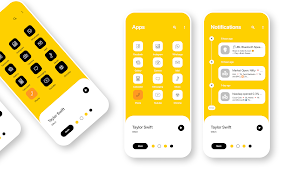
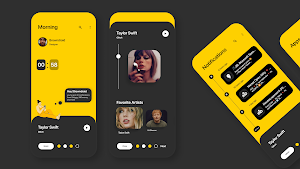
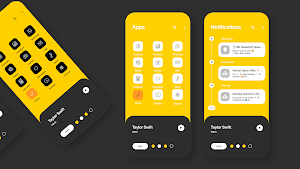
This theme offers 1 preset that comes with 4 interchangeable color contrasts.
➤ Gives your phone a refreshing look with a touch of Yellow and White/Black contrast colors (Colors are customizable).
➤ Page 1: Home Page: Boy or Girl Avatar Your Profile, Time, Calander and quick glance at your notifications with a bubble.
➤ Page 2: Apps page: quick acces to all your favorite apps
➤ Page 3: Notification Page: Never miss a Notification with notification right at your homescreen
➤ Music Player: Music controls for your music player, customizable Favorite Artists cards based on Youtube Music
➤ Customize and Export your work with this unlocked preset.
After applying the theme open klwp and make sure to select the apps from your phone by tapping on each app icons and tapping on edit.
Requirements:
✔ Kustom (KLWP)PRO https://play.google.com/store/apps/details?id=org.kustom.wallpaper.pro
✔ Compatible launcher supported by KLWP (Nova launcher is recommended)
✔ Kustom (KLWP)PRO https://play.google.com/store/apps/details?id=org.kustom.widgets.pro
How to install the theme:
✔ Download and Install Mango Ui for Klwp
✔ Open the app go to the Widget section and tap on the theme or open your KLWP app, choose menu icon on top left, then load preset
✔ Hit "SAVE" button on the top right
✔ Set as a Homescreen Wallpaper
Instructions for Wallpaper setup:
Nova launcher settings
✔ select 3 blank screen
✔ set wallpaper scrolling
✔ hide status bar and dock
✔ Set Page indicator and search bar to none
If you have any questions suggestions or feedback, feel free to reach me at the following channels:
➧ Instagram: https://www.instagram.com/browndroid_/
➧ Reddit: https://www.reddit.com/u/browndroid_
➧ YouTube: https://youtube.com/@Browndroid
➧ Email: [email protected]
Credits for Kuper: https://github.com/jahirfiquitiva
Similar Apps

Android 13 KLWP (Redesigned)
This is not a stand-alone appYou will need the Kustom Live Wallpaper...
Candy Ui
Bring your Home screen to life with Candy Ui, a vibrant KLWP...

Jarvis for Klwp
The Jarvis theme is a sleek and sophisticated design that draws inspiration...
iOS 17 Widgets for KWGT
Experience the sleek and modern aesthetics of iOS 17 right on your...
Spades for KLWP
This is not a stand-alone appYou will need the Kustom Live Wallpaper...
Mango Ui for Klwp
A Refreshing look for your Home ScreenThis preset is unlocked for customization...


