Android 13 Klwp Theme
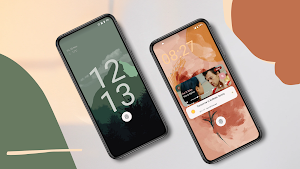
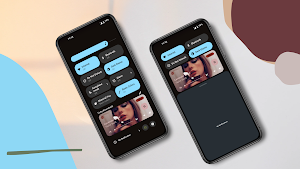
Android 13 Klwp Theme gives the experience of stock Android 13 on your phone.
About Android 13 Klwp Theme
This is not a stand-alone app
You will need the Kustom Live Wallpaper & Kustom Live Wallpaper Pro key to use these Presets.(Paid version of KLWP)
To apply the theme open the app then go to widget section and select the theme
This theme offers two presets
*Theme 1 comes with the time showing on the left corner
*Theme 2 comes with the time slightly in the middle left for side punch hole camera phones
Apply the theme as per your need
Android 13 klwp theme gives you the experience of stock Android 13 on any phone, this preset comes with a Homescreen and a Lockscreen
Features:
. Locksreen that activates when you unlock your device (may not work sometimes if device is unlocked frequently).
. Homesceen with 1 page that comes with 3 Widgets (4 styles of Clocks, Music & Weather).
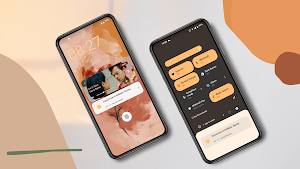
. Notification bar with 6 notifications and Quick settings with music notification.
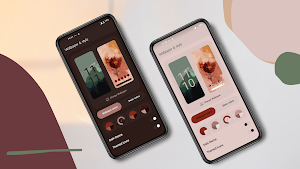
. 4 Wallpaper based colors and 4 basic colors that you can change as per your wish
. Status bar with time on the corner left for Theme 1 for for phones with notch or middle front camera and time on the middle left for phones with side camera.
This setup is designed in a way that it can be used with both fullscreen and navigation, you can get out of the Wallpaper settings page by tapping at the bottom of the page however if you are using a navigation bar and are unable to tap on the bottom of the page to go to the Homescreen
The clock widgets that comes with the setup can be customized, you can select any widget out of the 4 widgets you can also resize them in the widgets page and you can also move them anywhere on the screen by tapping on corresponding corner of the widget, the same goes for the other widget as well.
Requirements:
✔ Kustom (KLWP)PRO https://play.google.com/store/apps/details?id=org.kustom.wallpaper.pro
✔ Compatible launcher that supported by KLWP (Nova launcher is recommended)
How to install:
✔ Download Android 13 KLWP Theme
✔ Open the app go to the Widget section and tap on the them you wish to apply or Open your KLWP app, choose menu icon on top left, then load preset
✔ Find and tap on the Android 13 for KLWP Theme
✔ Hit "SAVE" button on the top right
✔ Set as a Homescreen Wallpaper
Instructions:
Nova launcher settings
✔ select 1 screen
✔ set wallpaper scrolling
✔ hide status bar and dock
✔ Set Page indicator and search bar to none
This is my first Preset
Please contact me @ [email protected] with any questions/issues before leaving a negative rating.
Similar Apps

Android 13 Klwp Theme
This is not a stand-alone appYou will need the Kustom Live Wallpaper...

Kards for Klwp & Kwgt
Black cards theme for a dark minimal lookThis is not a stand-alone...

Win 11 for KLWP
Win 11 for your Android get the look of Win 11 PC...
IOS 16 Lockscreen KLCK
Please Read before use.This preset will give your Lock Screen the exact...

Graphication UI for Klwp
Moving Animated Pictures to give your phone a Unique and Attractive look,...
Minimal Ui for Klwp
Minimal Ui for klwp theme gives the Minimalism your phone wants, this...