IOS 16 Lockscreen KLCK
IOS 16 Lock Screen with Depth Wallpapers, Control Center & Dynamic Island
About IOS 16 Lockscreen KLCK
Please Read before use.
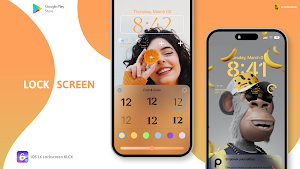
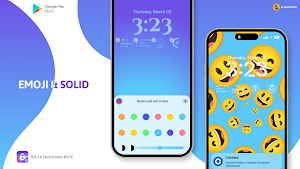
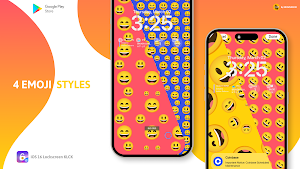
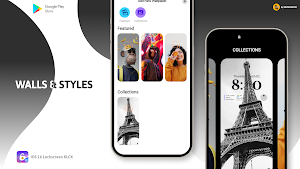
This preset will give your Lock Screen the exact look of IOS 16, with Depth wallpapers, Control Center, different Lock Screen and Clock styles with widgets and fully functional iPhone 14 Dynamic Island
This is not a stand-alone app
You will need the Kustom Lock Screen Maker & Kustom Lock Pro key to use these Presets.(Paid version of KLCK)
To apply the theme open the app then go to widget section and select the theme
This theme offers
➲ 3 Lock screen Styles with Depth Wallpapers
➲ Control Center
➲ Clock with 6 Fonts & Colors
➲ Widgets
Requirements:
✔ Kustom (KLCK) https://play.google.com/store/apps/details?id=org.kustom.lockscreen
✔ Kustom (KLCK)PRO https://play.google.com/store/apps/details?id=org.kustom.lockscreen.pro
How to install:
✔ Download and Install Klck and Klck pro and allow all the permissions and turn on Lockscreen
✔ Download iOS 16 Lockscreen KLCK
✔ Open the app go to the Widget section and tap on the theme or Open your KLCK app, tap on menu icon on top left, then load preset
✔ Find and tap on the iOS 16 KLCK Theme
✔ Hit "SAVE" button on the top right
If you need unlocked preset
Please contact me @ [email protected] with any questions/issues before leaving a negative rating.
Similar Apps

Android 13 Klwp Theme
This is not a stand-alone appYou will need the Kustom Live Wallpaper...

Kards for Klwp & Kwgt
Black cards theme for a dark minimal lookThis is not a stand-alone...
Win 11 for KLWP
Win 11 for your Android get the look of Win 11 PC...
IOS 16 Lockscreen KLCK
Please Read before use.This preset will give your Lock Screen the exact...

Graphication UI for Klwp
Moving Animated Pictures to give your phone a Unique and Attractive look,...
Minimal Ui for Klwp
Minimal Ui for klwp theme gives the Minimalism your phone wants, this...
Frequently Asked Questions (FAQ)
