Smart Companion
Notification Forwarder - Control your smart glasses, TV right from your phone.
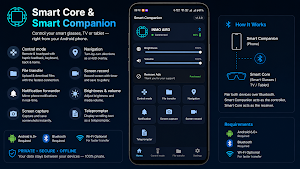
About Smart Companion
✨ Features
🔔 Notification Forwarder
Your phone's notifications appear instantly as cards on your smart glasses or TV screen.
Dismissible cards — swipe away or tap to view full history.
Adapts to both portrait and landscape orientations.
Only meaningful notifications are shown — silent or empty ones are filtered out automatically.
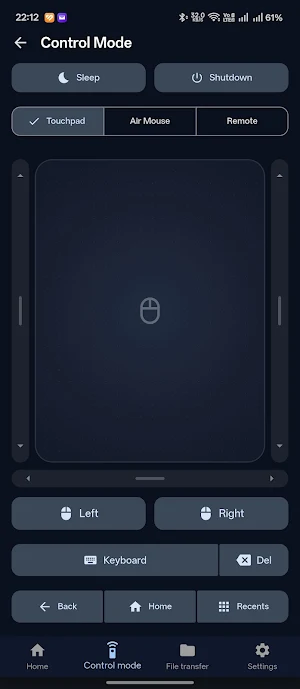
🕹️ Control Mode (Remote & Touchpad)
Touchpad tab — Use your phone screen as a large touchpad for cursor/pointer control with haptic feedback.
Left/right scroll bars for vertical scrolling.
Horizontal scroll bar for horizontal scrolling.
Physical left/right click buttons.
Remote tab — D-Pad (Up/Down/Left/Right) + OK button, just like a TV remote.
Back and Home hardware buttons available at all times.
Keyboard button — Opens your phone keyboard and sends keystrokes directly to the target device.
Works wirelessly over Bluetooth — no cables or extra hardware required.
🗺️ Navigation HUD
Get real-time turn-by-turn directions displayed as a heads-up overlay on your smart glasses or TV.
Navigation takes priority — displayed prominently above all other content.
Works seamlessly with Google Maps on your phone.
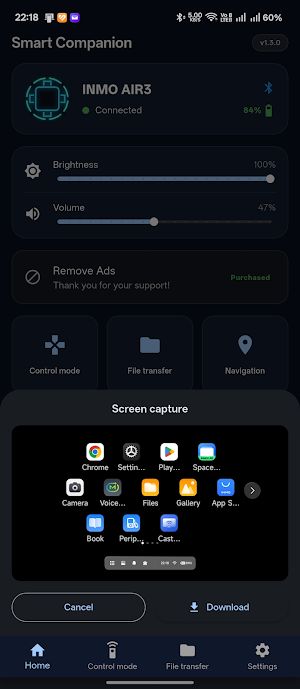
📸 Screen Capture
Capture a screenshot of your smart glasses or TV directly from your phone.
The image is instantly shown on your phone with a Download option.
Save it straight to your phone's gallery.
🎬 Screen Record
Record what's happening on your smart glasses or TV screen — straight from your phone.
A live timer shows while recording is in progress.
Tap once to start, tap again to stop. The video is saved to the device's gallery.
Use File Transfer to copy the video to your phone.
📁 File Transfer
Browse the target device's folders directly from your phone.
Upload files from your phone to the target device.
Download files from the target device to your phone's Downloads folder.
Automatically uses the fastest available wireless connection.
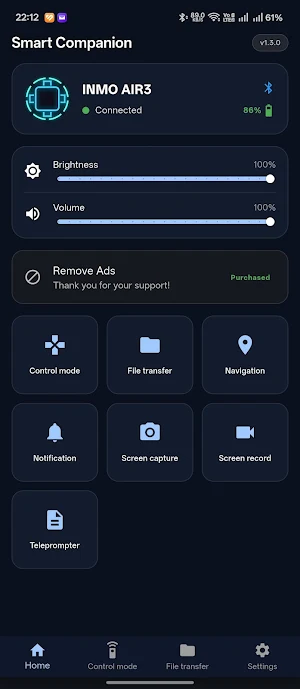
☀️ Brightness & Volume Control
Adjust the target device's screen brightness and media volume directly from the Smart Companion home screen using sliders.
🔋 Battery Monitor
See the target device's battery level and charging status in the Smart Companion connection card.
Smart Companion details
Smart Companion is a free Productivity app for Android with 100+ installs on Google Play and a 5.0/5 average rating from 1 rating. It was released on June 22, 2026 and last updated on September 12, 2026. It's developed by Bob Gaming. It requires Android 7.0 or later. The app contains ads and offers in-app purchases.
- Category
- Productivity
- Rating
- 5.0 / 5 (1 rating)
- Installs
- 100+
- Price
- Free
- In-app purchases
- Yes
- Ads
- Contains ads
- Current version
- 2.3.3
- Requires Android
- 7.0
- Content rating
- Everyone
- Released
- June 22, 2026
- Last updated
- September 12, 2026
- Developer
- Bob Gaming
Similar Apps
LightLens
Professional street light survey and asset management platform.
Daily Notes & Objetivos
A simple, customizable, and efficient notes app to boost your productivity.

Oasis Space
Your AI-powered digital memory assistant. Capture, search, and recall anything

Pray5 – Daily Salah Tracker
Track Salah, log prayers, count Dhikr & find mosques. Build daily Muslim habits!
LinkdBot
Freelance job finder
MENDOU — Friction App Blocker
One annoying task before you open. Stops mindless launches. One-time, no ads.
