Enchant — Projection Art
Turn the art on your wall into living, AI-animated projections. No pro gear.
About Enchant — Projection Art
Enchant your art.
Enchant turns the paintings, posters and framed art already on your wall into
living, animated visuals — projected back onto each piece with pixel-precise
alignment. No projection-mapping expertise, no professional installer, no
dedicated hardware. Just your projector, your phone, and your wall.
This is the Android TV app that runs on your projector. Install it, pair it
with the Enchant companion app on your phone, and let it do the hard part:
projecting the calibration patterns, learning the exact shape and position of
each artwork, and then playing back animations that sit perfectly inside the
frame.
HOW IT WORKS
1. Install Enchant on your Android TV projector.
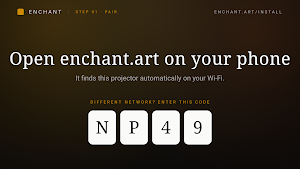
2. Pair your phone using the on-screen 4-character code (companion app needed).
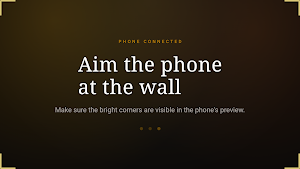
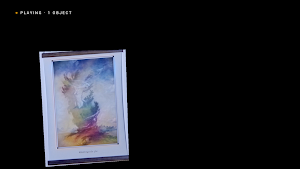
3. The projector runs a short guided wall scan — it briefly projects a sequence
of light patterns so the system can map your wall and find each artwork.
4. Choose which pieces to animate and pick a vibe.
5. The animation is generated in the cloud and played back, warped exactly onto
each artwork.
WHAT THE PROJECTOR APP DOES
• Projects the structured-light calibration patterns during the wall scan.
• Plays back the finished animations, warped precisely onto each detected
artwork — even tilted or off-square frames.
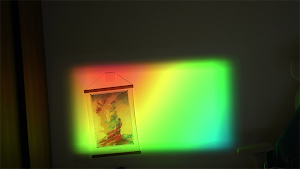
• Runs built-in GPU visual effects (plasma, flow, geometric and material looks)
that can map onto a single object or the whole wall.
• Optional audio-reactive effects driven by the projector's own audio output.
• An on-screen remote menu: play your library, autostart on power-up, adjust an
object's corners, scheduled playback, and check for updates.
• Autostart: a set-up projector can count down and bring the wall alive on its
own when it's switched on — any button cancels.
NO SPECIAL HARDWARE
Enchant is software-only. It works with the consumer Android TV projector you
already own and the camera in your phone — no ToF sensor, no custom box. (A USB
webcam plugged into the projector is an optional, experimental capture path.)
DESIGNED FOR THE REMOTE
The whole projector experience is built for Android TV and your remote — a
D-pad-friendly menu, large focusable controls, and a library you can browse and
play from the couch.
GREAT FOR
• Living rooms and bedrooms that want their art to move
• Galleries, restaurants, bars and shops wanting ambient, ever-changing walls
• Anyone who's ever wished a painting could breathe
A companion app for Android phones drives the wall scan and per-object settings.
Subscriptions (more objects, more animations, extra styles) are managed at
enchant.art. A free tier lets you try it on one piece of art.
Questions or feedback: [email protected]
Learn more: https://enchant.art
Similar Apps
Manual Camera DSLR (Lite)
Take your mobile photography to the next level!
HappyLighting
HappyLighting is a Bluetooth lamp control software.
AGC ToolKit - Watermark LUT
AGC ToolKit.

EdrawMax: AI Flowchart Diagram
Drawing graphic design app easily view, create, edit Visio, diagram, org charts

Polycam: 3D Scanner & Editor
Scan and Create Stunning 3D Models with Ease. Edit and Share with Polycam.
Litchi for DJI Drones
Unlock the full potential of your DJI drone with Litchi
