

All Mail: Email & Mailbox
Eretmochelys Imbricata Communication
Easy email app to manage mail, and all email accounts
- Downloads
- 10+
- on Google Play
- Price
- Free
- No in-app purchases
- Updated
- Sep 4
- 2026
Screenshots


About All Mail: Email & Mailbox
Manage Your Email with Ease
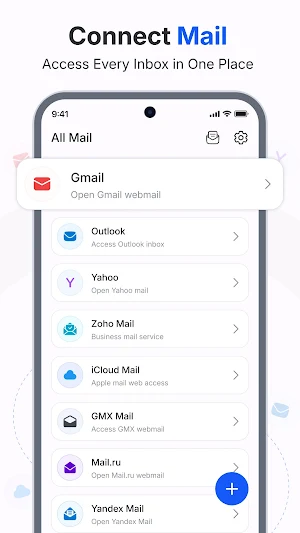
All Mail: Email App & Mailbox is a simple and reliable email app designed to help you manage all your mail in one place. Whether you use gmail, yahoo mail, or another email account, this email application keeps your emails organized and easy to access. Stay connected, read emails, and send new mail anytime with a smooth experience built for everyday use.
Key Features
* Sent Mail: View all sent mail and track your email activity anytime
* Drafts: Save unfinished emails and continue writing later with ease
* Trash: Manage deleted emails and keep your mailbox clean
* Templates: Use ready templates like newsletter, discount promotion, feedback review, shipping update, order confirmation, and password reset
* Custom Email: Personalize your email content for better communication
* New Mail Alerts: Stay updated with every new mail in your inbox
* Multiple Language Support: Use the email app in your preferred language
* Theme Mode: Switch between themes for a comfortable viewing experience
* Webmail Manager: Access and manage multiple email accounts from one place
Why Use This Email App
* Manage gmail, yahoo mail, and other email accounts in one email app
* Keep your emails organized with simple mail categories
* Save time using templates for common email messages
* Enjoy a clean interface for reading and sending emails
* Access your email account anytime with a smooth experience
How It Works
1. Open the email app and connect your email account
2. Check your inbox to read new mail and emails
3. Compose and send email using custom email or templates
4. Manage sent mail, drafts, and trash easily
5. Switch between accounts using the webmail manager
Stay connected with your email, manage your mail efficiently, and handle everyday communication with ease. This email application is designed for users who want a simple and effective way to handle emails across multiple accounts.
Try All Mail: Email App & Mailbox and enjoy a better way to manage your email and mail every day.
Disclaimer & Privacy
This email app provides email management features only. It is not affiliated with or endorsed by any third-party email service providers such as gmail or yahoo mail. Users can review privacy-related details in the app’s privacy policy available on Google Play.
All Mail: Email App & Mailbox is a simple and reliable email app designed to help you manage all your mail in one place. Whether you use gmail, yahoo mail, or another email account, this email application keeps your emails organized and easy to access. Stay connected, read emails, and send new mail anytime with a smooth experience built for everyday use.
Key Features
* Sent Mail: View all sent mail and track your email activity anytime
* Drafts: Save unfinished emails and continue writing later with ease
* Trash: Manage deleted emails and keep your mailbox clean
* Templates: Use ready templates like newsletter, discount promotion, feedback review, shipping update, order confirmation, and password reset
* Custom Email: Personalize your email content for better communication
* New Mail Alerts: Stay updated with every new mail in your inbox
* Multiple Language Support: Use the email app in your preferred language
* Theme Mode: Switch between themes for a comfortable viewing experience
* Webmail Manager: Access and manage multiple email accounts from one place
Why Use This Email App
* Manage gmail, yahoo mail, and other email accounts in one email app
* Keep your emails organized with simple mail categories
* Save time using templates for common email messages
* Enjoy a clean interface for reading and sending emails
* Access your email account anytime with a smooth experience
How It Works
1. Open the email app and connect your email account
2. Check your inbox to read new mail and emails
3. Compose and send email using custom email or templates
4. Manage sent mail, drafts, and trash easily
5. Switch between accounts using the webmail manager
Stay connected with your email, manage your mail efficiently, and handle everyday communication with ease. This email application is designed for users who want a simple and effective way to handle emails across multiple accounts.
Try All Mail: Email App & Mailbox and enjoy a better way to manage your email and mail every day.
Disclaimer & Privacy
This email app provides email management features only. It is not affiliated with or endorsed by any third-party email service providers such as gmail or yahoo mail. Users can review privacy-related details in the app’s privacy policy available on Google Play.
What’s new
Updated September 4, 2026
📧 Sent Mail, Drafts & Trash management 📝 Ready-made & custom email templates 🔔 New mail alerts with webmail management 🌍 Multi-language support with theme modes.