Poker Hand History Keyboard | Win at Poker
Hand History Keyboard for Live Poker Players to Study Poker and Win at Poker!

About Poker Hand History Keyboard | Win at Poker
♠️ The Original Poker Keyboard for Android! ⌨️
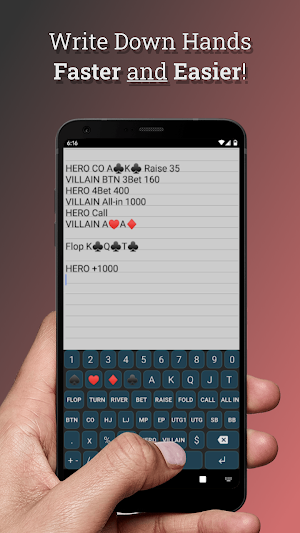
This poker keyboard is designed for live poker players to record hands at the table to study poker, and win at poker! A useful tool for No Limit Texas Holdem hand analysis. Write down your live hand history for later review.
Developed and tested by professional poker players in Las Vegas.
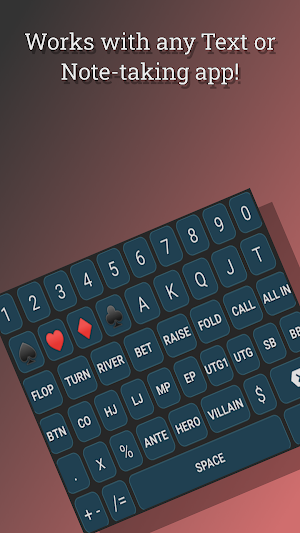
New: Poker Emojis Added! ♠️ ♥️ ♣️ ♦️
Simple to use poker keyboard will improve your hand recording skills and keep them consistent so you can study poker hand combinations and no limit poker situations when you are away from the poker table!
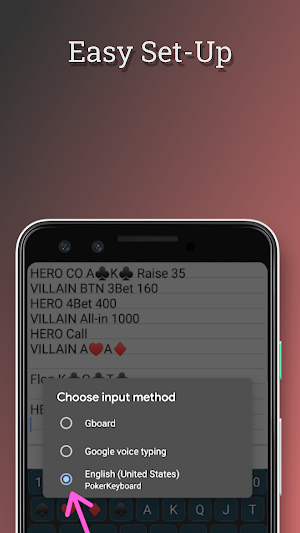
** Please Be Aware this is a Keyboard, not an app. You must activate in settings after downloading! (directions below) **
Live Poker Players do not have the option to use poker hand tracking software like HUD (Heads Up Display) or Poker Tracker to record hands at the poker table. This app can help you write down hands for game theory study later, off the table using GTO solvers and Poker Stove.
Use it for:
📲 Texting hand histories to your poker study group
✍️ Keeping detailed notes on poker villains
📈 Hand analysis game theory for poker coaching
💰 Studying helps you win at poker!
Perfect for texas holdem tournaments or live poker cash games!
If you play texas holdem poker for money, you need this poker keyboard for Android. One of the best poker study tools for mobile!
👉How to set up Poker Hand History Keyboard :
1. Download and install
2. Go to Settings on your device ⚙️
3. Navigate to System --> Language and input --> Keyboards (or search 'keyboard' in Settings search bar)
4. Activate Poker Keyboard by clicking the toggle switch
5. Open the app you wish to record the hand in (text message, What's App, etc.)
6. Click on the little keyboard icon (bottom right), OR hold space bar
7. Toggle default keyboard to Poker Keyboard (English US)
☝️ ☝️ ☝️ See Screenshots for help, or contact support at [email protected]
Plugging leaks is essential to improving your poker game !!
Now you can jot down crazy poker hands for later review with any note app, or even just send yourself an email with the hand history in the message. This poker keyboard will help you note the stacks, hands , positions and all relevant information from your poker hands throughout the session.
Landing Page: https://whalestacks.github.io/poker-hand-history-keyboard/
Privacy Policy: https://whalestacks.github.io/poker-hand-history-keyboard/privacy
Similar Apps

MTT Basics | Poker Strategy
Heads up poker hand quiz and Nash equilibrium shove/ fold ranges. You...
Poker Hand History Keyboard
This poker keyboard is designed for live poker players to record hands...

Poker Fold Equity Calculator
Plug in a few numbers to determine fold equity without writing out...

Quick Pot Odds
A useful tool to calculate your pot odds in Texas Hold'em- Simple-...