Clipo - Clipboard & Keyboard
Clipboard history with a smart keyboard — private, local, no cloud or ads.
About Clipo - Clipboard & Keyboard
Clipo — Clipboard Manager & Keyboard
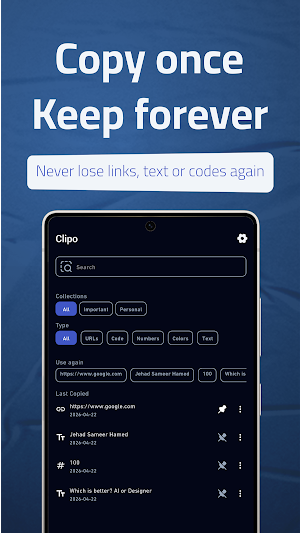
Clipo captures what you copy — while you type — using its built-in keyboard. No background hacks, no accessibility workarounds.
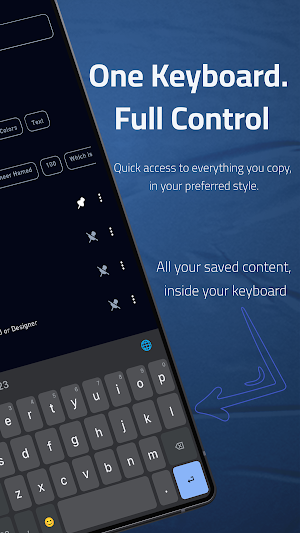
👉 Important: Clipo works best when you enable and use the Clipo Keyboard as your input method. Copied text saves automatically while the keyboard is active.
🚀 Clipo Keyboard
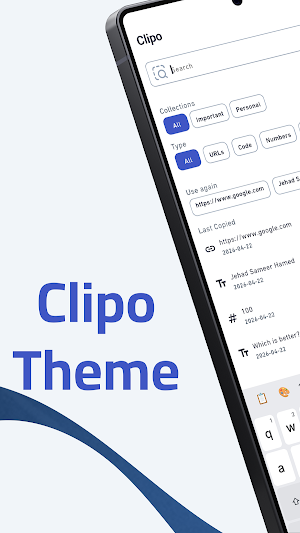
• Gboard-style design with light, dark, and system themes
• Smart word suggestions and autocorrect with a local learned dictionary
• Multiple keyboard languages — add and reorder in Settings
• Long-press keys for accented characters and number shortcuts
• On-device emoji keyboard with categories, search, skin tones, and recents (Google Emoji2 data — runs locally, no network)
• Swipe the spacebar to move the cursor
• Smart layout adapts for email and URL fields
• Key preview popups and haptic feedback
• Optional number row toggle
• Quick access to clipboard history from the keyboard toolbar
📋 Clipboard Manager
• Automatic clipboard capture while the Clipo keyboard is active — fast and reliable on Android 10+
• Searchable clipboard history with highlighted matches
• Pin important clips to keep them at the top
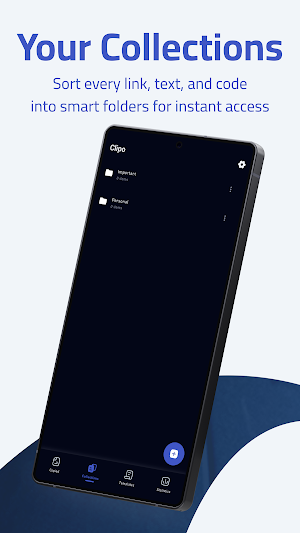
• Organize clips into collections with drag & drop
• Create templates for reusable snippets with placeholders
• Detects links, emails, phone numbers, and other content types
• Edit clips and apply text transforms; view copy statistics
• Export or import backups as JSON, TXT, or CSV
• Save text to Clipo from other apps via Android Share
• Home screen widgets (2×2 and 4×2) for quick access to recent clips
• Smart deduplication; password and secure fields are not captured in secure fields
⭐ Clipo Pro
Clipo is free to use with clear limits. Clipo Pro is an optional subscription for more capacity and power-user tools.
Free plan:
• Up to 20 clips, 3 templates, and 3 collections
• Search, pins, keyboard, app lock, export, basic transforms (UPPER, lower, Title)
• No ads, no time limit, no account required
Clipo Pro unlocks:
• Unlimited clips, templates, and collections
• Flexible history limits (100, 200, 500, 1000, or unlimited)
• Advanced transforms: Trim, remove line breaks, URL encode/decode, Base64 encode/decode
• Upgrade anytime from Settings
• Monthly, yearly, and lifetime plans (price shown before you subscribe)
• 7-day free trial on the yearly plan
• Restore purchases with the same Google account
• Manage or cancel in Google Play → Payments & subscriptions
Payment is charged to your Google Play account. Subscriptions renew automatically unless cancelled before renewal.
🔒 Security & Privacy
• Lock the app with PIN or biometrics (fingerprint / face unlock where supported)
• Optional auto-lock after 1, 5, 15, or 30 minutes
• Clipboard history, templates, and keyboard data stay on device
• No Clipo account, cloud sync, or sign-in required
• No analytics, no ads, no tracking
• Your clipboard content is not sent off-device by Clipo
• Subscription status verified through Google Play and RevenueCat (purchase data only)
⚙️ How It Works
Enable Clipo Keyboard in device settings and select it as your input method. Copy as you normally would — Clipo captures changes automatically while the keyboard is active. Open the Clipo app to search, pin, and organize history. New copies are also saved while the app is in the foreground. Tap the clipboard icon on the keyboard toolbar to paste saved clips.
🔑 Permissions
Input Method permission is required for the keyboard and clipboard capture while active. Biometrics are optional for app lock. Google Play Billing is used for Clipo Pro.
📜 Legal
Privacy Policy: https://mumensh.github.io/clipo-privecy-policy/
Terms of Use: https://mumensh.github.io/clipo-privecy-policy/terms.html
📩 Support
• Questions, billing help, or privacy requests: [email protected]
• Clearing app data or uninstalling deletes local history — export a backup first
• Cancelling Clipo Pro does not delete local clips
Similar Apps

The Engineering app
Engineering app for building material reports, timesheets, tasks.

NogalesOnline
Connect with your city and participate in improving your community.

AOBRA
Find professionals, retailers, and service providers for your construction project.

PSX Office-PDF Scanner,Convert
PDF converter, scanner and PDF reader all-in-one office tool

Emory
Save memories in seconds. Private. Offline.
台語AI語音翻譯 台語STS 台語即時語音轉譯 語言革命
Speak Mandarin, listen to Taiwanese, and chat with your family about everyday life. Supports two-way voice translation, candidate sentence confirmation, voice playback, and saved audio history.

