角川 合本俳句歳時記 第五版
A revised new edition of the popular Kadokawa Saijiki. The long-awaited combined edition!
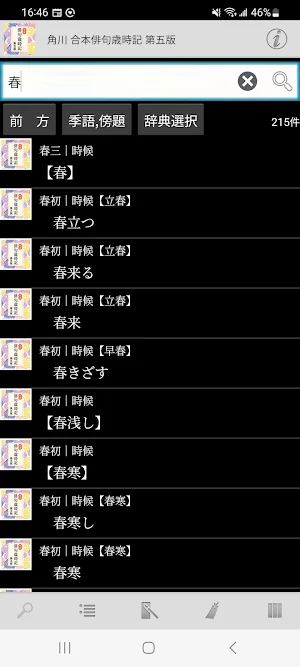
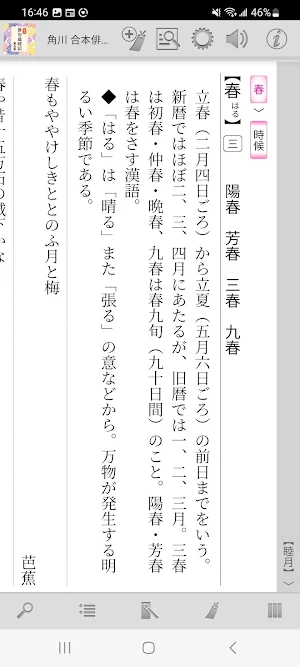
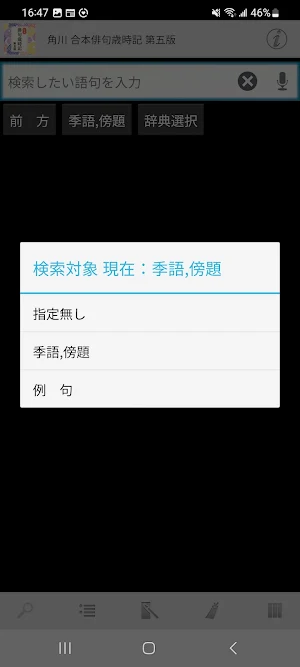
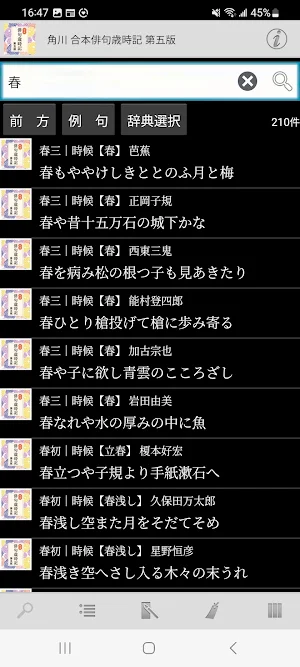
About 角川 合本俳句歳時記 第五版
◆Release commemorative sale is underway! ◆
To commemorate the release of "Kadokawa Gobon Haiku Saijiki 5th Edition",
For a limited time from May 1, 2025 to July 31, 2025,
We are currently holding a sale commemorating the release at a special price of 2,200 yen (tax included), which is more than 20% off the regular price of 2,900 yen (tax included).
This is only available for a limited time, so don't miss out on this opportunity!
■ Dictionary content information ■
The Kadokawa Saijiki contains everything from traditional seasonal words dating back to waka poetry to newer seasonal words in recent years, and is well-regarded for its accurate explanations and excellent famous phrases. The new explanation, which adds important points about haiku that even advanced users can easily make mistakes, is very popular. A must-have combination edition for everyone from beginners to veterans!
The electronic version also includes the following appendices.
・Haiku expressions you want to deepen
・Haiku expressions you want to deepen (Body version)
・Haiku expressions that you want to deepen further
・ Subtitles of seasonal words you would like to use
・Haiku particles that you would like to try
・Can you read?
Spring season word
Summer season word
Autumn season word
Winter season word
New Year season words
■ Power up the features of dictionary content with app functions! ■
- Taking advantage of the fact that it is an app version, it fully supports link jump functions to related items.
- Equipped with a function to search by "seasonal words, subtitles" and "example phrases".
- As a haiku function, you can create a haiku and save it as an image. You can also set your own photo or illustration data as the background when writing haiku.
■ Complete search function! ■
・Automatic search every time you enter a keyword. Instantly update search results with "Incremental Search".
- Search keyword input is of course also supported by voice input.
- Match conditions for search keywords can be specified in detail, such as "starting match" and "suffix matching". Instantly re-search even when conditions change.
・You can use "Full text search" to search the text of all items in almost all dictionaries.
・It is possible to search within the text of the dictionary entry you are currently reading.
- Automatically records the history of entered keywords and displayed items. Re-entering and re-displaying is easy.
■ Since it is an app, you can share operations with other apps! ■
・Supports basic Android operation "Share"! It is possible to have the dictionary browser search for text selected in another app.
- You can freely specify the dictionary you want to search using "Shared" from among the dictionary apps you already have.
・Contrary to "Share", you can search the web using the text of the dictionary entry. Of course, you can also search in dictionary apps.
■ Customize the text to make it easier to read! ■
- Font size can be set in detail for text in dictionary entries.
- Equipped with a dark theme type display mode (black background + white text) that is less tiring on the eyes.
-Of course, you can also change the item size using touch operations.
■ Register important information as a bookmark! ■
-You can register bookmarks to dictionary items at any time.
- Bookmarks can be divided into 10 color patterns and memo text can be set.
- The bookmark list screen is equipped with a filter function that displays only bookmarks of a specific color.
- The display order on the bookmark list screen can be sorted by registration date, item order, etc.
■ Strong cooperation between dictionary series! ■
- You can freely group dictionary series and search them all at once.
・In the group dictionary search result list, you can jump to the beginning of each member's dictionary.
・Duplicate is also OK! One dictionary can be registered as a member of various groups at the same time.
・Of course, the bookmarks of the group dictionary can be displayed all at once.
-You can immediately search in another dictionary using the text of the displayed dictionary item.
■ Equipped with convenient additional/expanded functions! ■
・You can have the text of dictionary entries read out loud with a synthesized voice.
■ No need to connect to the internet after preparations are complete! ■
- All data required by the dictionary is saved within the app.
・After installation and preparation for use, it can be used completely offline.
■ Notes ■
- To use this app, you will need the companion app ``LogoVista Electronic Dictionary Viewing Browser Ver.2 for Android''.
Please install "LogoVista electronic dictionary viewing browser Ver.2 for Android" from Google Play. .
・To use the text reading function using synthesized voice, you need to install the separate free "Google Text-to-Speech" app.
-If you have any questions about our products, please contact us at the address below.
[email protected]
■ About saving data to external storage (external SD card) ■
・You can save some of the dictionary app data to external storage (external SD card).
*There are precautions such as conditions for use. For more information, please check Q8 from our Q&A page below.
https://www.logovista.co.jp/LVERP/information/support/user_qa/android/top.html#Q8
■ Operating environment ■
・Android OS 7.0 to 14.0
*The operating environment is the latest version released. If you are using an earlier version, the terms may be different.
■ About Chromebook compatible models
To use the LogoVista electronic dictionary series for Android app on your Chromebook, you need a Chromebook that supports Google Play (Android app).
■ Operation not guaranteed ■
・Android OS 1.0 ~ 6.0.1
・Android device equipped with a non-ARM CPU
・“Go Edition” version of each Android OS
■Developer/Distributor ■
Logovista Co., Ltd. https://www.logovista.co.jp/
■ Content publisher ■
KADOKAWA Co., Ltd.
Similar Apps

小学館 韓日・日韓辞典
<小学館 韓日・日韓辞典とは>収録項目11万、用例6万5千、学習・ビジネスに必要にして十分な語彙・用例を収録し、新語・新語義を多数追加した「小学館 韓日辞典」と、日本で編集した初めての学習日韓辞典で、収録項目4万2千、文用例を中心とした用例6万5千を収録し、基本表現からさらに一歩進んだ応用表現まで学べる「小学館 日韓辞典」をまとめた製品です。■ 辞典コンテンツのご案内 ■・小学館 韓日辞典 好評を博した『朝鮮語辞典』の改訂新版です。最新の正書法に基づき内容を25年ぶりに一新しました。おもな特長は以下のとおりです。1.収録項目11万、用例6万5千:学習・ビジネスに必要にして十分な語彙・用例を収録しました。2.新語・新語義を多数追加:政治・経済・文化・ITなどの分野を中心に新語・新語義を積極的に採用しました。3.豊富な擬音語・擬態語:特に新聞などのマスメディアに頻出する擬音語・擬態語には的確な訳語を与えました。4.発音記号とカタカナ発音の付与:変化形を除くすべての見出し語に発音記号を付け、さらに最重要語1650語にはカタカナ発音も付けました。5.一目で分かる用言の活用変化:用言にはすべて活用番号を付け、巻末の「用言活用表」を参照することにより用言の活用がすべて分かるようにしました。6.朝鮮民主主義人民共和国や中国の朝鮮族の間で用いられる語彙も収録しています。7.充実した付録:日韓小辞典・助数詞一覧・漢字音訓索引・基礎漢字など付録も充実しています。以上のように、韓国語学習に必要な情報がぎっしり詰まった充実の内容となっています。・小学館 日韓辞典日本で編集した、初めての学習日韓辞典。収録項目4万2千。用例は、文用例を中心に6万5千収録。基本表現から、さらに一歩進んだ応用表現まで学べる、韓国語の初級学習者にぴったりの日韓辞典。おもな重要語には、覚えておきたい「基本表現」、文法的な解説が詳しい「語法」、訳語の使い分けがわかる「使い分け」、リアルな「会話」などを掲載し、韓国語で作文・会話をするときに役立つようにした。また、おもな名詞には韓国語の「数え方」も示した。その他、随所に参考記事や非文情報、発音注意、補足記事など、学習に役立つ情報が満載。※「韓日辞典」の以下の付録は収録しておりません。・ハングル早見表・親族呼称・日本語索引・助詞〈応用編〉・助数詞一覧・漢字音訓索引・基礎漢字・主な姓とその読み方一覧・人名によく用いられる難読漢字とその読み方一覧・朝鮮半島全図"■ アプリの機能で、辞典コンテンツの特長をパワーアップ! ■・約6000の発音音声が付いています。(小学館 韓日辞典)・辞典項目内の用例等を検索する機能を搭載しています。・関連項目へのリンク機能を搭載しています。<辞典アプリシリーズの特長>■ 充実の検索機能!...

デイリーコンサイス韓日・日韓辞典
<デイリーコンサイス韓日・日韓辞典とは>韓日8万項目(うち見出し4万8千、用例・成句3万1千、類語や対語など3千)、日韓5万項目(うち見出し3万、用例2万)、新語・専門語を含めて総項目数13万の韓国語辞典です。助詞・助数詞一覧、動詞・形容詞活用表、日常会話など付録も充実した内容となっています。■ 辞典コンテンツのご案内 ■・新語・専門語を含めて総項目数13万。・韓日は8万項目(うち見出し4万8千、成句・用例3万1千、類語や対語など3千)、日韓は5万項目(うち見出し3万、用例2万)。・助詞・助数詞一覧、動詞・形容詞活用表、日常会話など付録も充実。■ アプリの機能で、辞典コンテンツの特長をパワーアップ! ■・辞典項目内の用例等を検索する機能を搭載しています。・関連項目へのリンク機能を搭載しています。<辞典アプリシリーズの特長>■ 充実の検索機能! ■・キーワードを入力するごとに自動検索。「インクリメンタルサーチ」で検索結果を即更新します。・検索キーワードの入力は、もちろん音声入力にも対応。・検索キーワードの一致条件は、「前方一致」「後方一致」など、細かく指定可能です。条件変更の時も瞬時に再検索します。・ほぼ全ての辞典で、全項目のテキストを検索する「全文検索」を利用できます。・今読んでいる辞典項目の中身を検索する「本文内検索」が可能です。・入力したキーワード、表示した項目の履歴を自動で記録。再入力、再表示はカンタンです。■ アプリだから可能な、別アプリとの共有操作! ■・Androidの基本操作「共有」に対応!別のアプリで選択したテキストを、辞典ブラウザに検索させることが可能です。・「共有」で検索する辞典は、入手済みの辞典アプリから自由に指定できます。・「共有」とは逆に、辞典項目のテキストを使用して、ウェブ検索が可能です。もちろん、辞典アプリの検索もできます。■ テキストを読みやすくカスタマイズ! ■・辞典項目のテキストは、文字サイズを細かく設定可能です。・目が疲れにくい、ダークテーマタイプの表示(黒色背景+白色文字)モードも搭載。・もちろん、タッチ操作での項目サイズ変更も可能です。■ 大事な情報は、しおり登録!...

日本語表現辞典セット
<日本語表現辞典セット>■ 辞典コンテンツのご案内 ■・語彙や知識を増やし言葉の表現を豊かに!一般の国語辞典ではなかなか引くことができないコロケーション(語と語の慣用的な結びつき)に着眼した 画期的な日本語辞典『研究社 日本語コロケーション辞典』、日常の〈話し言葉〉や〈慣用句〉を理解して使いこなすための辞典『研究社 日本語口語表現辞典 第2版』、意味の類似に従って言葉を分類した最強の「言葉探し」辞典『日本語シソーラス 類語検索辞典 第2版』を収録しています。語彙や知識を増やし言葉の表現を豊かにする辞典をセットにした製品です。<辞典アプリシリーズの特長>■ 充実の検索機能! ■・コロケーション辞典の特別な検索方法「逆引き検索」を搭載しています。関連する語句を含むすべてを検索しますので、記憶があいまいな語句や類似した語句を探すことに役立ちます。・キーワードを入力するごとに自動検索。「インクリメンタルサーチ」で検索結果を即更新します。・検索キーワードの入力は、もちろん音声入力にも対応。・検索キーワードの一致条件は、「前方一致「後方一致」など、細かく指定可能です。条件変更の時も瞬時に再検索します。・ほぼ全ての辞典で、全項目のテキストを検索する「全文検索」を利用できます。・今読んでいる辞典項目の中身を検索する「本文内検索」が可能です。・入力したキーワード、表示した項目の履歴を自動で記録。再入力、再表示はカンタンです。■ アプリだから可能な、別アプリとの共有操作!...

小学館 プログレッシブ英和(第5版)・和英(第4版)中辞典
<小学館 プログレッシブ英和(第5版)・和英(第4版)中辞典とは>■ 辞典コンテンツのご案内 ■『小学館 プログレッシブ英和(第5版)・和英(第4版)中辞典』は、ビジネス実務や最新メディアを読み解くのに役立つ、ビジネスパーソンのための英語ツールとして生まれ変わった「プログレッシブ英和中辞典(第5版)」と、新時代の要請に応え、語彙・用例のどちらも全面的に見直すとともに、時事語・専門語を中心とした新語を追加した「小学館プログレッシブ和英中辞典(第4版)」を収録した製品です。■ アプリの機能で、辞典コンテンツの特長をパワーアップ! ■・用例、派生語、複合語、慣用句など、見出し語以外の検索結果だけを表示できる絞り込み検索も搭載。 辞典の特長である、ビジネスなどにそのまま使える用例を素早く見つけ出せます。・英和辞典の主要な見出し語を対象に、8万以上の音声データを収録。・アプリ版であることを活かした、関連項目へのリンクジャンプ機能などにしっかり対応。<辞典アプリシリーズの特長>■ 充実の検索機能! ■・キーワードを入力するごとに自動検索。「インクリメンタルサーチ」で検索結果を即更新します。・検索キーワードの入力は、もちろん音声入力にも対応。・検索キーワードの一致条件は、「前方一致」「後方一致」など、細かく指定可能です。条件変更の時も瞬時に再検索します。・ほぼ全ての辞典で、全項目のテキストを検索する「全文検索」を利用できます。・今読んでいる辞典項目の中身を検索する「本文内検索」が可能です。・入力したキーワード、表示した項目の履歴を自動で記録。再入力、再表示はカンタンです。■ アプリだから可能な、別アプリとの共有操作! ■・Androidの基本操作「共有」に対応!別のアプリで選択したテキストを、辞典ブラウザに検索させることが可能です。・「共有」で検索する辞典は、入手済みの辞典アプリから自由に指定できます。・「共有」とは逆に、辞典項目のテキストを使用して、ウェブ検索が可能です。もちろん、辞典アプリの検索もできます。■ テキストを読みやすくカスタマイズ!...

研究社 日本語口語表現辞典 第2版
■ 辞典コンテンツのご案内 ■ 日常の〈話し言葉〉や〈慣用句〉を理解して使いこなすための辞典。『研究社 日本語口語表現辞典 第2版』は、一般の国語辞典では使い方や例文が不足しているために、中上級の日本語学習者が不便を感じたり、日本語教師が指導するのに苦労している「話し言葉」や「慣用表現」に焦点を当てた日本語辞典です。くだけた表現や流行語・若者言葉だけでなく、古くさい表現や慣用句・決まり文句、専門用語や方言でも、日常の「話し言葉」として頻繁に使われている日本語は積極的に取り上げ、実社会や新聞・雑誌等で使われている「ビジネス日本語」の微妙なニュアンスも詳しく解説しています。■ アプリの機能で、辞典コンテンツの特長をパワーアップ! ■・アプリ版であることを活かした、関連項目へのリンクジャンプ機能などにしっかり対応。・関連した項目を探し出す、関連語検索機能を搭載しています。<辞典アプリシリーズの特長>■ 充実の検索機能! ■・キーワードを入力するごとに自動検索。「インクリメンタルサーチ」で検索結果を即更新します。・検索キーワードの入力は、もちろん音声入力にも対応。・検索キーワードの一致条件は、「前方一致」「後方一致」など、細かく指定可能です。条件変更の時も瞬時に再検索します。・ほぼ全ての辞典で、全項目のテキストを検索する「全文検索」を利用できます。・今読んでいる辞典項目の中身を検索する「本文内検索」が可能です。・入力したキーワード、表示した項目の履歴を自動で記録。再入力、再表示はカンタンです。■ アプリだから可能な、別アプリとの共有操作! ■・Androidの基本操作「共有」に対応!別のアプリで選択したテキストを、辞典ブラウザに検索させることが可能です。・「共有」で検索する辞典は、入手済みの辞典アプリから自由に指定できます。・「共有」とは逆に、辞典項目のテキストを使用して、ウェブ検索が可能です。もちろん、辞典アプリの検索もできます。■ テキストを読みやすくカスタマイズ!...
![最新日米口語辞典[決定版]](https://apppage.net/img/7uTJ4Li0HzgaVrR7U19kNfUIOv_3aTQQiuiIDWC_8jqDcJHfjsVkRCetb6Gpnzh4DMg=w200-rw)
最新日米口語辞典[決定版]
<最新日米口語辞典[決定版]とは>■ 辞典コンテンツのご案内 ■多くの英語学習者のバイブルとなった『日米口語辞典』(朝日出版社刊)の改訂新版です。「二刀流」「上から目線」など時代を反映した語を多数増補し、日本語約6,700語、英語約1万表現を収録。日本語独特の口語表現を単に英語に対応させるだけでなく、ニュアンスや使う状況、日米の考え方の違いまで深く説明しており、実際に使いたくなるような例文も豊富に掲載しています。■ アプリの機能で、辞典コンテンツの特長をパワーアップ! ■・アプリ版であることを活かした、関連項目へのリンクジャンプ機能などにしっかり対応。・発音や例文に音声を追加。<辞典アプリシリーズの特長>■ 充実の検索機能! ■・キーワードを入力するごとに自動検索。「インクリメンタルサーチ」で検索結果を即更新します。・検索キーワードの入力は、もちろん音声入力にも対応。・検索キーワードの一致条件は、「前方一致」「後方一致」など、細かく指定可能です。条件変更の時も瞬時に再検索します。・ほぼ全ての辞典で、全項目のテキストを検索する「全文検索」を利用できます。・今読んでいる辞典項目の中身を検索する「本文内検索」が可能です。・入力したキーワード、表示した項目の履歴を自動で記録。再入力、再表示はカンタンです。■ アプリだから可能な、別アプリとの共有操作! ■・Androidの基本操作「共有」に対応!別のアプリで選択したテキストを、辞典ブラウザに検索させることが可能です。・「共有」で検索する辞典は、入手済みの辞典アプリから自由に指定できます。・「共有」とは逆に、辞典項目のテキストを使用して、ウェブ検索が可能です。もちろん、辞典アプリの検索もできます。■ テキストを読みやすくカスタマイズ! ■・辞典項目のテキストは、文字サイズを細かく設定可能です。・目が疲れにくい、ダークテーマタイプの表示(黒色背景+白色文字)モードも搭載。・もちろん、タッチ操作での項目サイズ変更も可能です。■ 大事な情報は、しおり登録!...
