
Back to Top
Whale Photo Screenshot 0
Whale Photo Screenshot 1
Whale Photo Screenshot 2
Whale Photo Screenshot 3
Free website generator for mobile apps; privacy policy, app-ads.txt support and more... AppPage.net

About Whale Photo

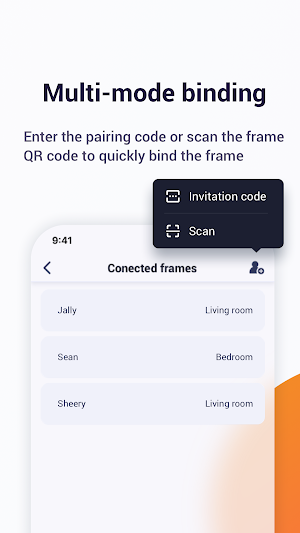
The Whale Photo APP is an application that syncs your album to an electronic digital Photo frame from your phone.After binding the photo frame with the invitation code or QR code, photos and videos can be sent to the frame through the APP.After sending successfully, you can manage the photos in the frame.
Function:
-Multi-device connection
One account can be bound to multiple photo frames, and one photo frame can be bound to multiple accounts.

-Device share
You can invite your family or friends to share their photos on your frame.

-Supports video/picture playback
Supports multiple video and photo types, and you can send photos and videos from anywhere to your photo frame.

-Photo sharing
You can send photos directly from the frame, or you can take new photos with your camera.You can customize the title for your favorite photo or video during the sharing process.

-Video Clips
Support 30 seconds video and share it when you finish editing.

-History
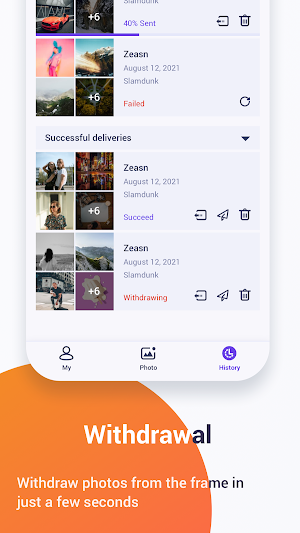
Photo sending status, clear at a glance.You can resend ,withdraw or delete the photo record.

-Target important areas
Adjust your photos to lock in the perspective you love.

Similar Apps

AI Inspire - Dream Art Maker

AI Inspire - Dream Art Maker

0.0

Create spectacular artwork from words using the latest AI technology. Just enter...

ARGear

ARGear

0.0

This app shows ARGear’s AR features and content to software developers, so...

Academy Museum

Academy Museum

4.0

Download the Academy Museum of Motion Pictures’ official app, a digital continuation...

Frequently Asked Questions (FAQ)

What is the Whale Photo APP?
The Whale Photo APP is an application that syncs your album to an electronic digital Photo frame from your phone. It allows you to send photos and videos to the frame and manage them.
Can I connect multiple devices to the Whale Photo APP?
Yes, you can connect multiple devices to the Whale Photo APP. One account can be bound to multiple photo frames, and one photo frame can be bound to multiple accounts.
Can I share my photo frame with family and friends?
Yes, you can invite your family or friends to share their photos on your frame using the Whale Photo APP.
What types of media does the Whale Photo APP support?
The Whale Photo APP supports multiple video and photo types. You can send photos and videos from anywhere to your photo frame.
Can I send photos directly from the photo frame?
Yes, you can send photos directly from the frame using the Whale Photo APP. You can also take new photos with your camera and send them to the frame.
Can I customize the title for my favorite photo or video during the sharing process?
Yes, you can customize the title for your favorite photo or video during the sharing process in the Whale Photo APP.
Does the Whale Photo APP support video clips?
Yes, the Whale Photo APP supports 30 seconds video clips. You can edit the video and share it using the app.
Can I view the sending status of my photos in the Whale Photo APP?
Yes, the Whale Photo APP provides a history feature where you can view the sending status of your photos. You can also resend, withdraw, or delete the photo records.
Can I adjust the perspective of my photos in the Whale Photo APP?
Yes, you can adjust your photos to lock in the perspective you love using the Whale Photo APP.