Aloft Drone Weather
Drone weather scores, wind forecasts, flight logs and airframe references.

About Aloft Drone Weather
Aloft Drone Weather is a practical weather and flight-planning companion designed for drone pilots who want to review conditions, choose suitable flying periods, record completed sessions, and keep important aircraft information organized in one place. The app combines weather indicators, hourly forecasts, flight records, statistics, and drone specifications within a structured mobile interface.
The main dashboard provides a quick overview of current conditions. A central weather score summarizes the available environmental indicators and helps you review the situation without opening multiple screens. Supporting cards display individual values so you can examine the information behind the overall score.
Aloft Drone Weather organizes weather data into separate indicators. Review wind conditions, gusts, precipitation, temperature, visibility, and other available parameters relevant to outdoor drone activity. Each value is presented clearly, making it easy to compare current conditions and understand how individual factors contribute to the overall assessment.
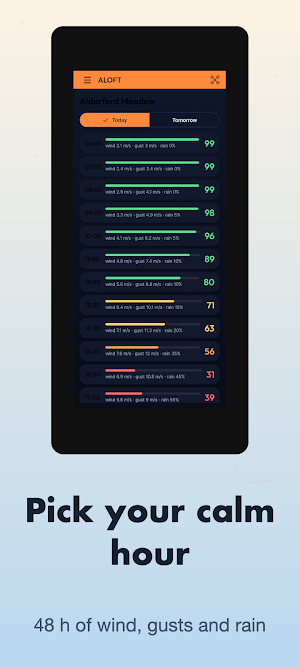
The hourly forecast provides a more detailed view of upcoming conditions. Browse up to 48 hours of available weather information and compare changes in wind, gusts, rain, and other parameters. Hour-by-hour data helps you identify periods with more suitable conditions based on your own preferences and aircraft requirements.
Forecast information is presented through compact rows, numerical values, and visual indicators. Instead of relying on a single measurement, you can review several weather factors together and decide which time period best matches your planned activity.
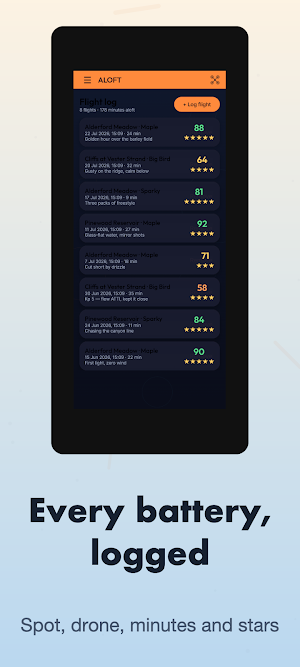
A dedicated flight log allows you to record completed drone sessions. Add information about the flying location, aircraft used, flight duration, and other available details. Previous entries remain organized in a chronological list, creating a convenient record of your activity over time.
Aloft Drone Weather also provides ratings and indicators for recorded sessions. Flight entries can be reviewed individually, making it easy to return to previous locations, compare sessions, and check how your activity develops throughout the season.
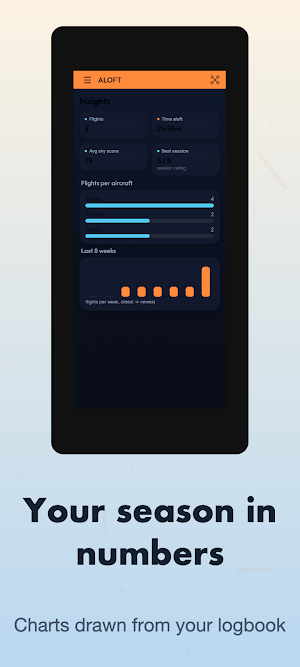
The Insights section converts information from your logbook into simple statistics and charts. Review accumulated flight activity, compare available indicators, and see how your recorded sessions are distributed over time. Visual bars and charts provide a compact summary without requiring manual calculations.
Season statistics bring together information from multiple recorded flights. This section helps you review activity patterns and maintain an organized overview of your logbook while keeping individual flight records available for more detailed reference.
The app also includes an airframe reference section with information for multiple drone models. Browse available aircraft, review their specifications, and check relevant operating limits. The structured list makes it convenient to switch between different models and consult their characteristics before planning a flight.
Aircraft information can include specifications and wind-related limits where available. This provides an additional reference when comparing forecast conditions with the characteristics of a selected drone.
Aloft Drone Weather keeps weather planning, flight history, statistics, and aircraft information separated into clear sections. Navigation is designed for quick access, while cards, charts, scores, and numerical indicators make important information easy to review on a mobile screen.
Aloft Drone Weather combines weather scores, 48-hour forecasts, wind and precipitation information, flight logging, seasonal statistics, charts, and an airframe reference library in one organized experience. Review conditions, compare upcoming hours, record your flights, explore your activity history, and keep useful drone information accessible whenever you plan your next session.
Similar Apps
Summit Optimize
Optimize games, monitor performance, and use advanced tools.

Join N' Share
Quick file link generation and sharing

Artega
Intranet and employee portal

StarMag: Magnitude Calculator
Compare star magnitudes, brightness ratios, and distance on one screen.
INVLocal: For GivEnergy Kit
Local monitoring and control for GivEnergy inverters and EV chargers

LGP Åkeri Connect
Intranet and employee portal
