SIG-FI Compass: Signal Finder
Try free for 7 days. Real-time signal & direction finder. dBm, ms, Mbps.
About SIG-FI Compass: Signal Finder
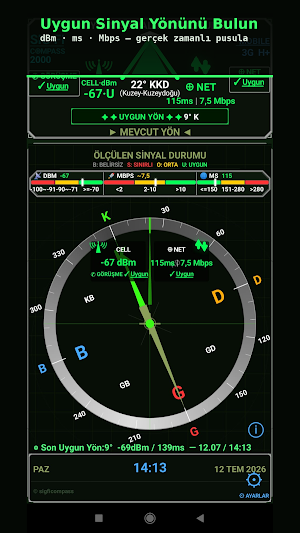
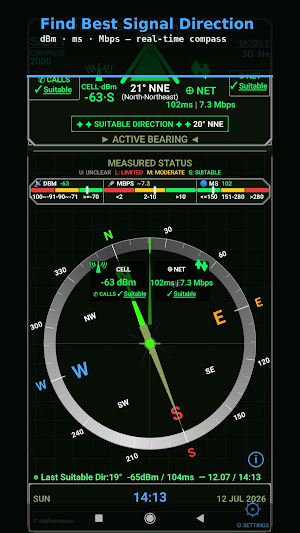
SIG-FI Compass is a motion-aware signal direction app. Rotate left-right, tilt up-down or change your position — whether stationary or in motion, mobile signal strength (dBm), latency (ms) and data speed (Mbps) update instantly and guide you to the most suitable signal direction.
Camping, caravanning, on a boat, or on a long road trip? Rotate your device in different directions to find where your signal is strongest.
WHAT IT DOES
▸ Measures real-time antenna signal strength (dBm)
▸ Measures internet connection latency (ms / Ping)
▸ Measures real-time data speed (Mbps)
▸ Shows strongest signal direction using a 360° compass
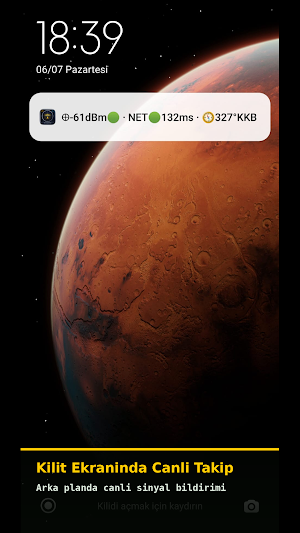
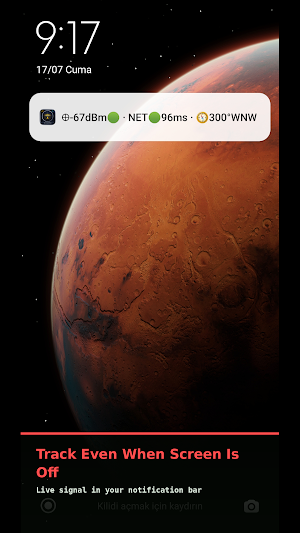
▸ Displays live signal information and current bearing in the notification bar when the screen is off
▸ Saves your last best signal direction
▸ Audio and vibration alerts for Best Direction
WHO IS IT FOR?
▸ Campers and outdoor enthusiasts
▸ RV, campervan and motorhome users
▸ Long-haul truck and lorry drivers
▸ Fishermen and boat owners
▸ Hikers and climbers
▸ Off-grid residents and remote area users
▸ Search and rescue (SAR) and emergency response teams
▸ Workers in low-signal areas
HOW TO USE
▸ Rotate your device left-right: dBm, ms and Mbps values update live.
▸ Tilt up-down: Find the best angle.
▸ Move physically: Even a few steps can make a difference.
▸ Combine all three: Direction + angle + measurement point = Strongest measured signal point.
SIGNAL STATUS COLOURS
🟢 SUITABLE · 🟡 MODERATE · 🔴 LIMITED · ⚪ UNCLEAR
CELL / dBm — Signal strength:
🟢 Suitable: -70 dBm and above | 🟡 Moderate: -71 to -90 dBm | 🔴 Limited: below -91 dBm
NET / ms — Latency:
🟢 Suitable: 0–150 ms | 🟡 Moderate: 151–280 ms | 🔴 Limited: 281 ms and above
NET / Mbps — Data speed:
🟢 Suitable: 10 Mbps and above | 🟡 Moderate: 2–10 Mbps | 🔴 Limited: below 2 Mbps
When dBm is at a suitable level and NET quality is sufficient, the triangle turns green and a "SUITABLE DIRECTION" banner appears.
PRICING
Free for the first 7 days — no card required. Continue afterwards with a 3-month or 12-month subscription.
IMPORTANT NOTE
SIG-FI Compass uses device sensors and network data to provide real-time measurements. Results may differ from carrier apps, status bar signal indicators or system network displays. This is due to differences in measurement methods and update intervals. Results may vary depending on network conditions, environmental factors and device state.
SIG-FI Compass is not affiliated with any mobile carrier and does not represent carrier performance. Results are indicative and may vary depending on network conditions.
PRIVACY
▸ No personal data is collected, stored, or transmitted.
▸ All measurements are processed locally on your device.
▸ Your GPS location is never used or stored.
▸ No advertisements.
▸ Subscription payments are processed through Google Play Billing; we never see or store your payment information.
Privacy Policy: https://sigficompass.github.io/sigfi-compass-legal/privacy_policy.html
TECHNICAL DETAILS
▸ Minimum Android: 5.0
▸ Supports 2G, 3G, H+, 4G LTE, 5G NR and WiFi connection types
▸ NET quality: NET connection quality combines latency (ms) and data speed (Mbps) to represent real-world network performance.
▸ Signal measurement works on devices without compass sensor; direction tracking requires compass
▸ No advertisements
FROM THE DEVELOPER
SIG-FI Compass was born from the real needs of users who struggle with internet in rural and remote areas. Every feature was designed with the user's real-world needs in mind. In V1, simplicity and speed are our priority. We will keep improving together with your feedback.
© 2026 SIG-FI. All rights reserved.
Similar Apps

Next Spaceflight
Rocket launch schedule for SpaceX, NASA, ULA, Starship, ISRO, Roscosmos & more

F-Secure Mobile Security
Antivirus, Virus Cleaner & Malware Scan | Mobile Security & Hacker Protection

INKBIRD
Smart Home, Smart Life.
Froling Connect
You can easily check and control your Fröling system with Connect.

Castro Premium - system info
Learn the vast amount of system information about device and monitor it's state
WiFi Analyzer (open-source)
Optimize your WiFi network using WiFi Analyzer (open-source)
