Editor de PDF Profesional
Edit, sign, annotate, and protect your PDFs for free. No registration or subscription required.

About Editor de PDF Profesional
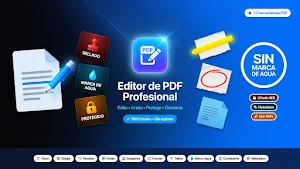
Looking for a complete, free PDF editor without watermarks? Professional PDF Editor is the most comprehensive all-in-one tool for editing, annotating, protecting, and managing your PDF documents directly from your Android phone. No payment, no registration, no limits.
✏️ ADD TEXT TO PDF
Write directly on any page of your PDF. Choose the text color from 6 options, adjust the font size, and select the page where you want to insert the text. Ideal for filling out forms, adding comments, annotations, or additional information to existing documents without needing a computer.
🖊️ FREEHAND DRAWING AND HIGHLIGHTER
Draw freely on your PDF documents using your finger as if it were a digital pen. Navigate between pages to annotate exactly where you need. Switch between drawing mode and highlighter mode to mark important text in yellow. Control the stroke thickness with 3 levels and choose from 6 colors. Includes undo and redo changes.
📝 STICKY NOTES
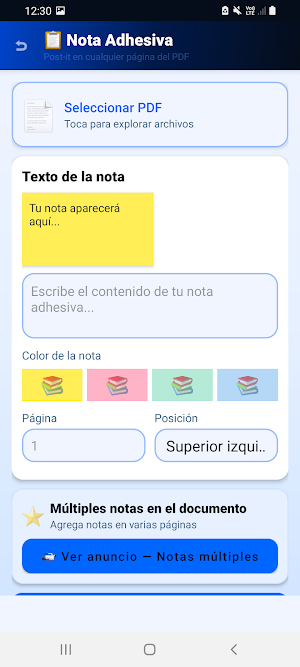
Add sticky notes to any page of your PDF. Write reminders, comments, or instructions. Choose from 4 note colors (yellow, pink, green, blue) and 5 page positions. Preview in real time before applying.
🖼️ INSERT IMAGES INTO PDF
Insert photos, logos, scanned signatures, or any image from your gallery directly into your PDF pages. Choose the exact position (top left, center, bottom right, etc.) and image size. Perfect for adding company stamps, corporate logos, or photos to reports and contracts.
⬜ GEOMETRIC SHAPES
Draw and add professional shapes to your PDF documents. Rectangles to frame important sections, circles to highlight areas, arrows to point to elements, dividing lines, and decorative stars. Customize the border color, enable semi-transparent fill, and adjust the stroke thickness.
🔖 PROFESSIONAL PDF STAMPS
Apply professional stamps to your PDF documents with a single tap. 8 stamp types are available: PAID, APPROVED, REJECTED, CONFIDENTIAL, DRAFT, URGENT, ORIGINAL, and COPY. Each stamp is displayed in large format with a double-bordered box and corresponding color. Apply it to a specific page or to all pages at once. Configurable position: bottom right, center, or top left.
💧 CUSTOM WATERMARK
Protect and personalize your documents by adding a text watermark to every page. Enter your desired text (CONFIDENTIAL, your name, your company), choose the color, size, and opacity. Activate diagonal mode for a more professional appearance or use grid mode to cover the entire page. Ideal for protecting documents before sharing them.
🔒 PDF PASSWORD AND ENCRYPTION
Protect your most confidential documents with a password. AES-128 encryption included. Real-time visual password strength indicator (very weak, weak, moderate, strong). Configure whether to allow printing or copying of text. Separate owner password option from user password. For maximum protection, unlock AES-256 encryption with a reward.
📋 EDIT PDF METADATA
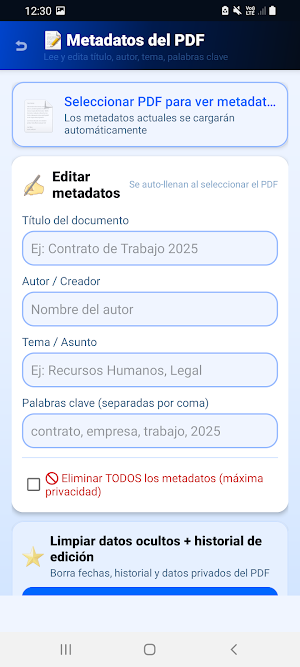
Read, view, and edit the hidden information in your PDF files. When you select a document, the app automatically loads the current metadata: title, author, subject, keywords, number of pages, file size, creator, publisher, and creation date. Edit the fields you need or delete all metadata at once for maximum privacy before sharing documents.
Contact: [email protected]
Editor de PDF Profesional details
Editor de PDF Profesional is a free Tools app for Android with 10+ installs on Google Play. It was released on May 21, 2026 and last updated on August 15, 2026. It requires Android 8.0 or later. The app contains ads.
- Category
- Tools
- Installs
- 10+
- Price
- Free
- In-app purchases
- No
- Ads
- Contains ads
- Current version
- 2.0.1
- Requires Android
- 8.0
- Content rating
- Everyone
- Released
- May 21, 2026
- Last updated
- August 15, 2026
What’s new in Editor de PDF Profesional
- Cumplimiento de política de permisos de fotos: la app ahora usa exclusivamente el selector del sistema - 6 herramientas nuevas: rotar, extraer, comprimir, PDF a imágenes, fotos a PDF y numerar páginas - Optimizado para Android 16
Version 2.0.1 · Updated August 15, 2026
Alternatives to Editor de PDF Profesional
Looking for apps like Editor de PDF Profesional? Here are 6 similar Android apps on Google Play. All of them are free to download.

Turbo MX: Carreras Infinitas
Accelerate without limits! Dodge traffic, overtake at breakneck speed, and break your record. 🏎️🔥

English Quest
Learn English while playing! Speak with your voice, listen, and defeat the dragon!

Golazo MX: Fútbol de Chapitas
Bottle cap football! Create your team, win the World Cup and shout GOAL!

SUPER FÚTBOL MX soccer fútbol
⚽ Penalties, free kicks, and fire goals. The best Mexican arcade soccer! 🔥

Billar MX el clásico Bola 8
Classic Billiards: 8 Ball, 9 Ball, tournaments, duels, fancy shots and rankings.

Bingo MX El Bingo más mexicano
Mexican Bingo! 🇲🇽 6 modes, up to 4 cards, unique patterns and ranking
| App | Rating | Price | Installs | Last updated |
|---|---|---|---|---|
| Editor de PDF Profesional | – | Free | 10+ | Aug 15, 2026 |
| Turbo MX: Carreras Infinitas | – | Free | 5+ | Jul 29, 2026 |
| English Quest | – | Free | 10+ | Jul 27, 2026 |
| Golazo MX: Fútbol de Chapitas | – | Free | 10+ | Jul 27, 2026 |
| SUPER FÚTBOL MX soccer fútbol | – | Free | 5+ | Jul 25, 2026 |
| Billar MX el clásico Bola 8 | – | Free | 10+ | Jul 22, 2026 |
| Bingo MX El Bingo más mexicano | – | Free | 10+ | Aug 15, 2026 |
