Scribe - Handwriting Launcher
Scribe is an very minimalist and unique launcher with Handwriting for philosophy
About Scribe - Handwriting Launcher
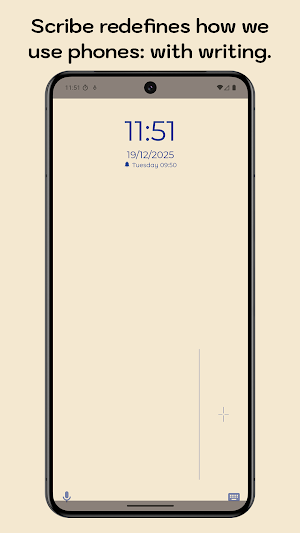
Scribe is very personal, relaxing, and extremely unique minimalist launcher: it puts Handwriting and Search as its core focus. Scribe is designed to enforce intentional phone usage through manual interaction.
It's one of a kind, bringing a home screen on which you need to draw characters to search for and open apps. Scribe aims to completely redefine how we use phones, for a much healthier and conscious alternative to the dominant app grid or list that comes with 100% of smartphones.
No Home Screen app grid. No widgets. No visual clutter competing for your attention. Just your wallpaper, and a conscious decision-making about what you want to do next.
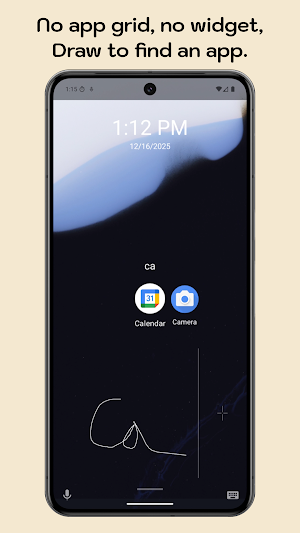
To open an app, you write its name with your finger.
Scribe replaces reflexive tapping with deliberate action. By requiring handwriting, it introduces productive friction that forces you to think, and choose what you actually want and need to open at a given time.
Write to access. Think to use.
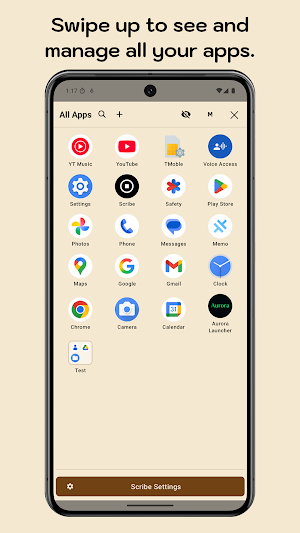
Instead of showing apps, Scribe hides them entirely (except a few optional shortcuts). You must know what you’re looking for before you can access it. This transforms your phone from a dopamine machine into a deliberate tool that’s there to serve your, not the other way around.
Languages supported: English, French, Brazilian Portuguese, Spanish, Italian, German, Polish, Russian.
---
Key Features
1. Handwriting-First App Access
- Draw app names with your finger to search.
- Real-time, offline handwriting recognition.
- Each launch requires conscious intent.
2. Zero-Icon Home Screen
- No visible apps by default.
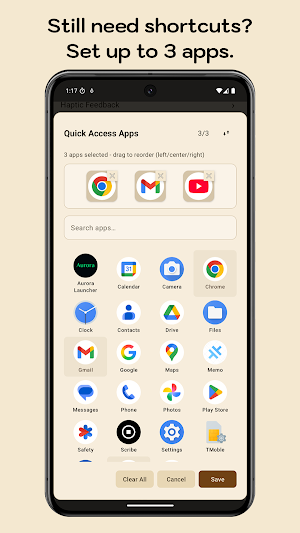
- Optional 1 to 3 essential quick-access apps (recommended: 0).
- Wallpaper-first, distraction-free design. Supports Live wallpapers. Also includes minimalist single color backgrounds.
3. Manual Search Philosophy
- No suggestions, no rankings, no predictions.
- Alphabetical, neutral results only.
- You decide, Scribe does not guess based on what it thinks deserves your attention and valuable time.
4. Keyboard as Optional Fallback
- Minimal keyboard toggle for accessibility or speed.
- Same search behavior, no shortcuts added.
5. Total Privacy
- No accounts.
- No analytics.
- No tracking.
- All data stays on your device, always.
---
Scribe’s Philosophy
- Intentional friction — Opening an app should be a decision, not a reflex.
- Nothing by default — Apps are accessed, not displayed.
- Manual over automatic — Writing forces awareness and true requirement.
- Privacy by design — No data leaves your phone.
Scribe Launcher is not designed to be faster. It's designed to change how you interact.
It is designed to help you control your phone and get what you need, exactly when you need it. Scribe makes you pause and focus on what matters: what’s outside of the screen.
Similar Apps

Wondr Note: Fun Notes & Tools
Notes, lists, planner & tools. Customize everything. Make productivity fun!

touchnotes
Notetaking·MindMap·FlashCard·Cloud
Squid: Take Notes, Markup PDFs
Take handwritten notes for class, work, or fun! Easily markup PDFs and share…
MyScript Notes: AI Note Taking
Smart note taking with PDF, handwriting to text & AI notes — perfect for study.
HiNotes by HiDock
HiNotes: The AI note-taking app built for your HiDock device.

SCRIBZEE®
Scan, organise, share and securely save your notes.


