Markleaf — Markdown Notes
Quiet Markdown notes for Android. No accounts, no ads, no internet permission.
About Markleaf — Markdown Notes
Markleaf is a quiet, local-first Markdown notes app for Android. Quick to open, calm to write in, and your text stays as plain Markdown — on your device, in your folder.
The point isn't a knowledge-management system. It's a notebook you actually open every day.
WHAT'S INSIDE
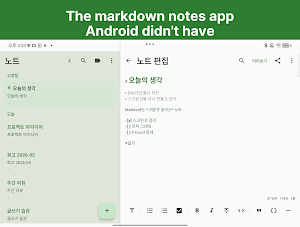
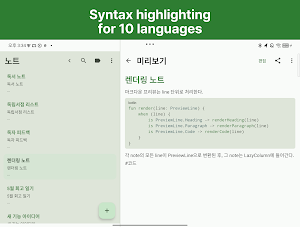
• Markdown-native editor with live syntax highlighting (10+ languages in fenced code blocks)
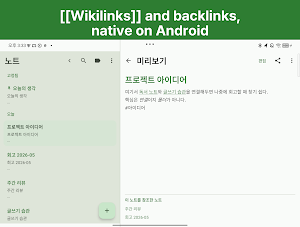
• [[Wikilinks]] and automatic backlinks between notes
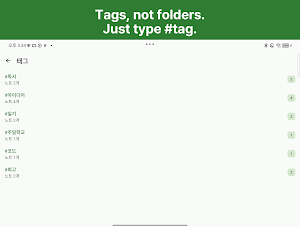
• #tags written inline in the body, organized in a single tags screen
• Quick Switcher — jump to any note by title (Ctrl+K with a keyboard)
• Find and replace inside a note
• Two-pane layout on tablets, single-pane on phones
• Home-screen widget, share-sheet integration, biometric lock, screenshot protection
PRIVACY BY ARCHITECTURE, NOT BY POLICY
• No INTERNET permission. The app cannot phone home — it has no permission to.
• No account, no analytics, no ads, no tracking
• No Markleaf servers; there are none to talk to
• Excluded from Android Auto Backup
• Open source under GNU GPLv3, also on F-Droid
YOUR DATA, YOUR FOLDER
Markleaf doesn't run its own sync. Instead, you pick a folder, and Markleaf mirrors your notes there as ordinary .md files. Any sync tool that watches that folder — Drive, Dropbox, Syncthing, OneDrive, a NAS app — keeps your notes in sync across devices. The mirror is one-way clean Markdown, so your notes round-trip with other Markdown editors, or just `cat note.md` in a terminal.
If Markleaf disappears tomorrow, your notes are still .md files in a folder you own.
DESIGNED FOR ANDROID TABLETS
• Two-pane note list + editor split
• Tablet typography and line widths tuned for reading distance
• Touch-first toolbar, no hidden gestures
YAML frontmatter, CommonMark / GFM preview, hierarchical tags, attachments, pinned notes — the small things you expect from a serious Markdown editor are in there. The big things you don't expect — accounts, telemetry, push notifications — are not.
If you've been waiting for an Android Markdown editor that respects your time and your data, Markleaf is for you.
Source code: __GITHUB_URL__
F-Droid: https://f-droid.org/packages/com.markleaf.notes
Similar Apps

Markleaf — Markdown Notes
Quiet Markdown notes for Android. No accounts, no ads, no internet permission.

Lumina Daily - 오늘의 명언
Start your day every morning with an AI-generated quote of the day.

BrioDo — Do it with brio.
Smart To-Do Management with AI — Get It Done Energetically.