About Tap to Learn
Read anything. Learn everything. One tap.
Most vocabulary apps make you stop reading to study. Tap to Learn is different — it turns your everyday reading into a learning engine. Tap any word on your screen, get instant definitions, then build it into long-term memory with built-in flashcards, quizzes, and streaks.
No copy-paste. No switching apps. Just tap.
───
🔍 Instant Word Lookup — On Any Screen Allowed
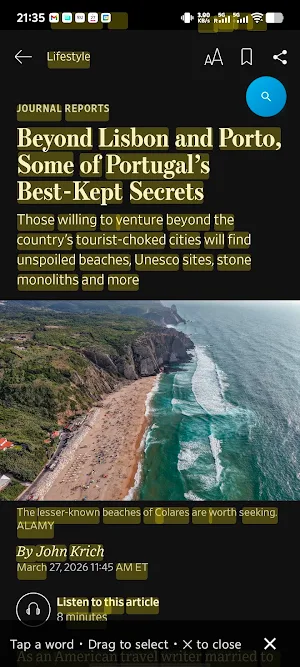
A floating button lives quietly on your screen while you browse. Tap it, tap any word — news, social media, e-books, PDFs, any app — and get instant:
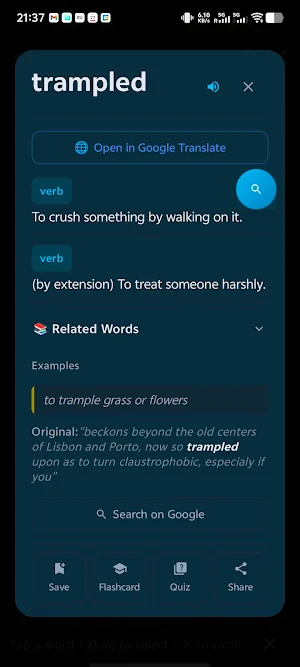
• Dictionary definitions
• Translation into your language (Chinese, Spanish, Korean, Japanese, Hindi, and more)
• Pronunciation & phonetics
• Example sentences with context
• The original sentence you tapped from (so you learn in context, not in isolation)
🎓 Built to Actually Make You Learn
Looking up a word is just the start. Tap to Learn turns every lookup into a learning opportunity:
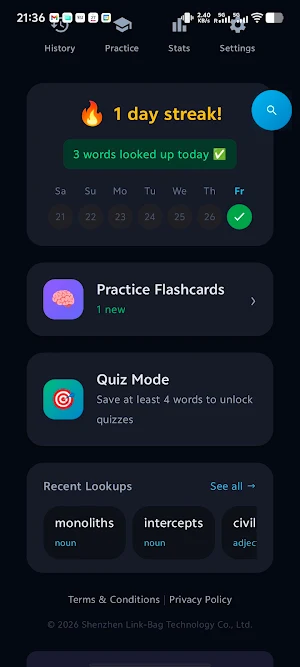
🃏 Flashcards — Review saved words with swipe-based flashcards. See the word, recall the meaning, flip to check. Spaced repetition built in.
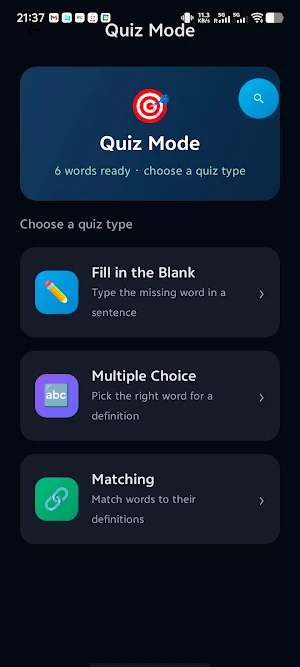
📝 Quizzes — Test yourself on your saved vocabulary. Multiple choice, fill-in-the-blank, and more — so words actually stick.
💾 Personal Word List — Every word you look up is saved automatically. Your vocabulary list grows with your reading.
👆 Tappable Example Sentences — Even inside the word card, tap any word in an example sentence to look it up instantly. Learn vocabulary networks, not isolated words.
───
🔥 Build a Daily Learning Habit
📅 Streak Calendar — See your learning streak grow day by day. Miss a day, lose your streak — the gentle pressure that actually works.
🏆 Milestones — Celebrate 7-day, 30-day, and 60-day streaks. Learning is a marathon, and every milestone counts.
🔔 Daily Reminders — Optional notifications to keep you on track. Set your preferred time.
───
🌍 Truly Global
• App UI in 6 languages: English, 中文, Español, हिन्दी
• Auto-detects source language of any word you tap
• Translation language syncs with your app language automatically
───
Perfect for:
• 📰 Professionals reading industry content in a second language
• 🎓 Students building academic vocabulary
• 📚 Language learners who want to learn from real content, not textbooks
• 🌏 Anyone living, working, or studying in a multilingual world
No ads. No subscription. No paywalls.
Just read, tap, and grow.
Accessibility Service Usage
Tap to Learn uses Android's AccessibilityService API solely to capture screenshots when you tap the floating button. This enables on-device OCR (text recognition) so you can tap any word on your screen to instantly look up its definition. Screenshots are processed entirely on your device using ML Kit OCR and are immediately discarded — no screen content is stored, transmitted, or shared with any server. The Accessibility Service is not used for any other purpose. You can revoke this permission at any time in your device's Accessibility Settings.
Similar Apps

German Citizenship in Bangla 2
German Citizenship (Einbürgerungstest) test practice quiz in Bangla part2

ガス溶接作業主任者免許試験 合格ドリル
Gas Welding Supervisor License Exam Preparation: Efficient Learning with Past and Predicted Questions

Vilex
Your all-in-one Vilex hub: training, product resources, sales tools, and more.
Oído Pro 2.0
Train your perfect pitch, sing in tune and master rhythm with real exercises.
Trualta: Caregiver Support
Training, connection, and support for caregivers—anytime, anywhere.

Noapara Ideal School
School app for students, teachers, and guests with secure access.
