InputForge: Gamepad Mapper
Play touch games via controller. Send keyboard mouse, map buttons, gyro, macros
About InputForge: Gamepad Mapper
InputForge lets you fully customize your gamepad on Android. Map buttons to screen taps, send keyboard keys, mouse clicks, remap every button, add gyro aiming, build macros, import Steam configs
Steam Controller (v1 & v2) mapping: acts as a real gamepad, sticks, trackpads, gyro, Bluetooth, puck, wired all supported, more to come.
Try all Pro features free for 7 days.
No ads, ever.
Always free:
Touch mappings, Button remapping, Macros, Action layers & sets, Radial & Hotbar menus, Trigger bindings, Analog stick tuning, Controller test mode, DualSense touchpad, Importing InputForge configs, 3 profiles
Pro Version ($3.99, one time):
Gyro aiming, Flick stick, Send keyboard & mouse inputs, Touch cursor, Cheat sheet overlay, Steam config imports, Unlimited profiles
Touch Mappings
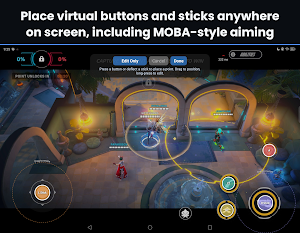
For games that only support touchscreen. Map any button to a screen tap or swipe. Touch Aim lets you hold a button to activate a skill, aim the direction with your stick, and release to fire, great for MOBA abilities
Gyro
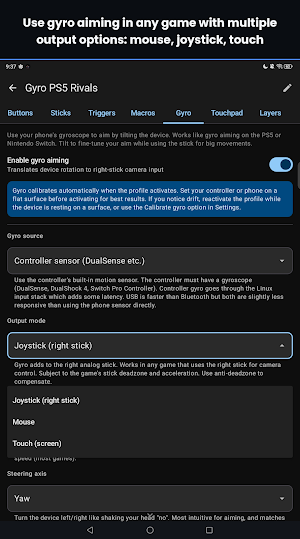
Works on games without native gyro support, including streamed games
Steam Config Import
Import layouts from Steam community profiles using the URL, ID, or exported file. Supports nearly all config options
Touch Cursor
An on-screen cursor controlled by your analog stick or DualSense touchpad. Press a button to tap where the cursor is pointing. Navigate menus, tap UI elements, and drag items in touch-only games
Button Remapping
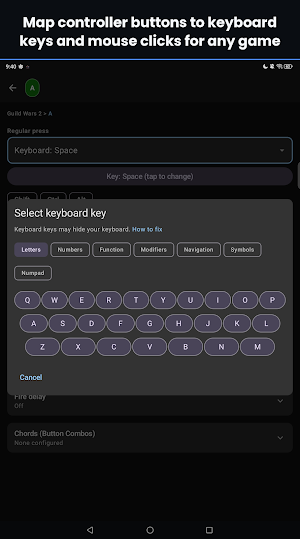
Remap any button with tap, hold, double press, start press, release press, chords, turbo, toggle, and cycle actions. Map to keyboard, mouse, or scroll inputs for games without controller support
Flick Stick
Flick the right stick to instantly snap your camera, then use gyro for fine aim. Eliminates slow stick turn speeds
Macros
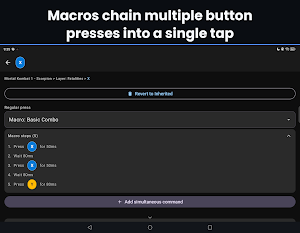
Create multi-step sequences of key presses, delays, and touch actions. Fire an entire combo from a single button
Action Layers & Sets
Layers temporarily override select buttons while the rest stay the same: hold, toggle, or apply permanently. Sets are complete independent layouts you can swap on the fly
Radial & Hotbar Menus
Radial menus with up to 20 slots. Use your analog stick to select, release to activate. Hotbar menus use the D-pad for quick sequential switching. Each slot supports any action: remaps, macros, hotkeys, and more
Analog Stick Tuning
Custom deadzone size and shape, response curves, anti-deadzone, vertical sensitivity scaling, and mode shifts triggered by a modifier button. Additional stick modes include mouse cursor, D-pad, and touch joystick
DualSense Touchpad
Use the PS5 controller's touchpad as a mouse, scroll wheel, directional pad, or button grid. Supports tap-to-click, two-finger gestures, and absolute screen region mapping
Trigger Bindings
Configurable soft and full press thresholds with hair trigger and hip-fire modes. Each stage supports tap, hold, double press, turbo, toggle. Route trigger analog output to any joystick axis for throttle and brake in racing games or flight sims
Community Sharing
Share profiles with a link
Cheat Sheet Overlay
Shows your bindings while you play
Accessibility Service Disclosure
InputForge uses the Android Accessibility API for the following purposes:
Intercepting gamepad button presses so they can be remapped, macros can fire, chords can be detected, and turbo can repeat inputs before they reach your game. This is the core functionality of the app.
Detecting which app is in the foreground so controller profiles can switch automatically when you open a different game.
Receiving controller gyroscope motion data for gyro aiming.
During the one-time wireless debugging setup, reading the 6-digit pairing code from the Android Settings screen so you don't have to type it manually.
InputForge does not read passwords, clipboard content, screen text, or any personal data. It does not modify system settings, prevent uninstallation of any app, or work around Android privacy controls.
Similar Apps
Castro Premium - system info
Learn the vast amount of system information about device and monitor it's state

WiFi Mouse Pro
PC remote: Pro wireless mouse, keyboard, scanner, AI tools & desktop.

UserLAnd - Linux on Android
Run Linux on Android. No root required.
HamStudy.org
The best way to study for your amateur radio license exam.

Sensi
Remote control your home comfort. Anytime, anywhere.

Aceable Drivers Ed & Test Prep
Driving School & DMV Permit Test