Free website generator for mobile apps; privacy policy, app-ads.txt support and more...
AppPage.net
About 5G Only Network Mode - 4G LTE
About 5G Only Network Mode
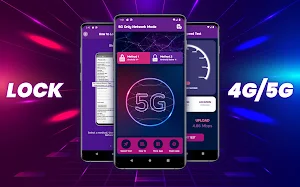
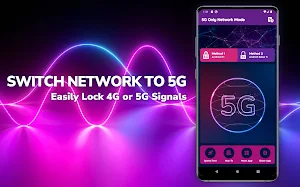
Forcibly lock 4G LTE or 5G network with 5G Only Network Mode app. This application allows smartphones to lock the internet network so they can only access the 5G network.
Not only the 5G signal, you can also use this application to lock the 4G LTE network easily and quickly. This application is 100% free and developed with a special code for easy use on all brands of smartphones.
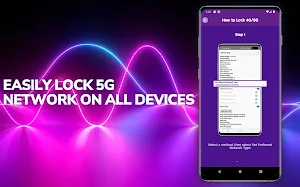
We present two methods of 5G Only. The first is for smartphones with the Android 11 operating system and above, such as Android 12, Android 13, Android 14, and later versions.
For those who use Android 10, there is a second method that you can use to lock the 4G LTE network so that it becomes 4G LTE Only. That means all smartphones can use this application.
Whatever smartphone you use, be it Samsung, Oppo, Vivo, Lenovo, Xiaomi, Realme, Infinix, Asus, OnePlus, and various other brands, you can immediately lock the 5G network to become 5G Only or 4G LTE Only.
Features 5G Only Network Mode
The 5G Only Network Mode application can not only be used to lock 5G signals or 4G LTE signals only. We also provide some interesting features that you can use for free. Are as follows:
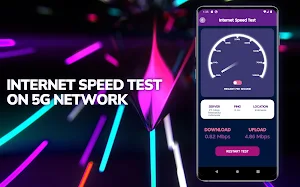
1. Internet Speed Test
After locking the 4G or 5G network, you can immediately check the internet speed through the Speed Test feature available in this application.
2. Lock 5G and LTE Only
Lock the internet network easily and quickly with one click.
3. 4G LTE Switcher
Change the internet network from 5G to 4G or vice versa to get faster and more stable internet access.
4. 5G Only Android 12 and Above
This application supports all versions of Android, starting from Android 9, Android 10, Android 11, Android 12, Android 13, and other recent versions.
5. Light and Easy to Use.
The 5G Network Mode application has an attractive user interface and is easy to use. This application is also lightweight so it can run smoothly on all smartphones
6. 5G Switcher
If the 5G signal is not strong enough, then you can change the 5G network to 4G through the menu provided.
7. Force 5G Only
In order to get a faster and more stable 5G signal, you can choose to change the network to 5G Only through the Force 5G Only feature.
How to use:
1. Download the 5G Only Network Mode application on the Play Store
2. Select an available method
3. Change the Set Preferred Network Type to NR Only (5G Only) or LTE Only
4. 4G/5G network successfully changed
Disclaimer:
1. The Force 5G Only feature is only available on smartphones that support the 5G network
2. The 5G Only Network Mode app only works in areas that support 4G/5G networks
3. The Force 4G Only feature only supports smartphones that have a 4G network
4. Some smartphone brands may limit the Force 4G/5G feature for some reason
Please try this application so you can lock the 5G or 4G LTE network. Don't forget to give a 5-star rating if this application is useful.
Similar Apps

Wednesday Addams Coloring Book
About Wednesday Addams Family Coloring BookWednesday Addams Family Coloring Book is an...

Wednesday Keyboard Theme
About Wednesday Addams Keyboard ThemeWednesday Addams Keyboard Theme is an android keyboard...

Wednesday Coloring Game
About Wednesday Coloring GameWednesday Coloring Game is an android app that will...

Jenna Ortega Fake Video Call
What is Jenna Ortega Fake Video Call Prank?Jenna Ortega Fake Video Call...

Jenna Ortega Wallpaper 4K HD
About Jenna Ortega Wallpapers AppJenna Marie Ortega is an American actress. She...

Enid Wednesday Wallpaper 4K HD
About Enid Sinclair Wallpapers AppGet thousands of high-quality Enid Sinclair wallpapers from...
