

About FairiesEye
See what just happened.
FairiesEye turns your phone or tablet camera into a live-and-replay tool. Watch the world right now, and at the same time see what was on screen 5, 10, or 30 seconds ago — or pause and scrub through every recorded moment. Instant replay in your pocket, with no record button to remember to press.
WHY IT'S USEFUL
• Practice a dance move, golf swing, ski trick, or magic flourish — instantly review your last take in slow motion without losing the next one.
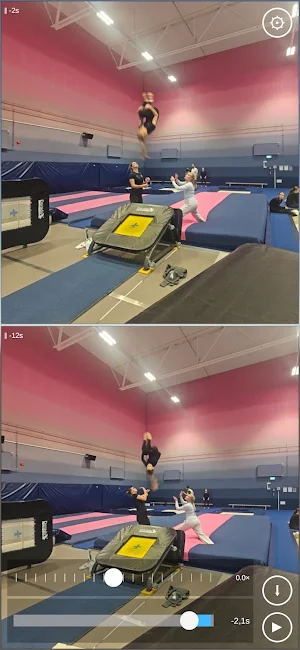
• Coach a sport in real time. Show your athlete the live action and a 5-second delayed view side by side; they can see and correct themselves while the action keeps going.
• Watch a science experiment, an animal, or a child unfold from multiple time offsets at once.
• Catch what you missed: pause on something interesting and step backward frame by frame.
• Studio rehearsal, juggling drills, dexterity training — review your last attempt while you set up the next.
FEATURES
• Live multi-pane view — 1, 2, or 4 simultaneous streams from the same camera, each with its own delay (LIVE, −5 s, −10 s, −15 s …).
• Pause and scrub through the rolling buffer, landing on real recorded frames.
• Forward and reverse slow-motion playback in pause mode.
• Save buffered moments straight to your gallery as a real MP4 with sound — pick how many seconds back you want to keep.
• Snapshot button for full-resolution stills, saved to your gallery. It captures the pane's moment, so a delayed pane gives you the delayed frame.
• Pinch to zoom on any pane; drag with one finger to pan when zoomed in.
• Front / back camera switch with a single tap.
• 180° rotation toggle for tripod-mounted or upside-down setups.
• Capture resolution: SD, HD, or Full HD.
• History length: 1, 2, or 5 minutes of rewindable footage.
PRIVACY
Everything happens on your device. There's no upload, no cloud, no account, no tracking. The rolling buffer lives in RAM only and disappears when the app exits — the only files ever written to disk are the clips and stills you explicitly choose to save. The Privacy Policy linked in Settings spells this out in full.
HISTORY AND QUALITY
The two settings trade against each other, because the rewindable buffer is held in memory. Full HD is the sharpest but the hungriest, so it suits the 1-minute window; drop to HD or SD when you want the full five minutes. A modern phone handles a minute of Full HD comfortably.
Changing camera, quality or history restarts the recording from empty — the app tells you before it does. Opening Settings and closing it again without changing anything costs you nothing.
A built-in Help dialog (the "?" inside Settings) explains every control inline if you forget what something does.
Whether you're learning a new skill, coaching a teammate, watching nature unfold, or just curious to rewind reality for a few seconds, FairiesEye gives you a window into what your camera saw a moment ago — without ever pressing record.
Similar Apps

Smart Launcher & AI Tools
Modern launcher with AI tools, notes, gallery, browser and useful utilities

RX Player — Video Player
Fast, private video player. Every format, resume anywhere, no account needed.

الشيخ صالح المغامسي
Parent Videos of Sheikh Saleh

Zentro: Video Player
Play any video format & HLS streams with gesture controls and subtitles

HD Video Player All Format
Fexo HD Video Player All Format: offline movie player and video editor App.

Vv Video Viewer
Vv is a highly efficient professional video security viewing application
