About Videoproc Editor
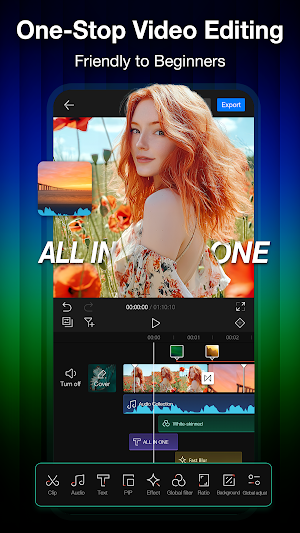
VideoProc Editor is a free and one-stop video editing tool perfect for personal vlog creation and beyond. With multi-track, PiP, and fully featured keyframes, it offers everything you need for polished and cinematic results.
Utilizing hardware acceleration, it delivers outstanding performance and effortless editing - even with 4K videos.
Highlight Features
「Video Editing」
Precision: Markers let you split and trim frame by frame.
Basic Tools: Cut, merge, copy, delete; zoom, rotate, crop, and more, just in one tap.
Creative Features: Reverse, freeze, PiP, mask, blend, and animations - all at your fingertips.
「Keyframe Animations」
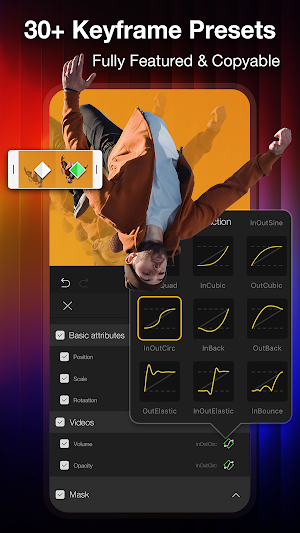
30+ keyframe curves for linear and smooth transitions.
Add keyframes to videos, photos, audio, text, masks, filters, colors, and more.
Adjust position, path, opacity, colors, zoom, and rotation; simulate object motion paths.
Copy keyframe attributes to different frames or clips to streamline your workflow.
「Speed Control」
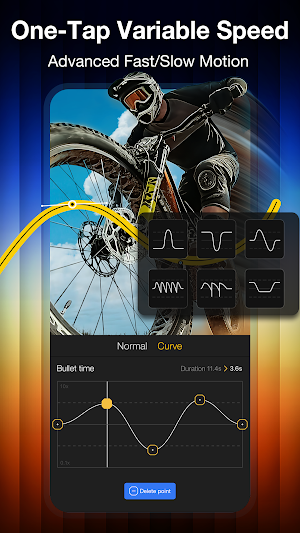
Constant Speed Change: Set speeds from 0.1x to 10x for fast and slow motion.
Speed Ramping: Variable speed presets for advanced speed effects.
Pitch: Choose to change or keep the original voice pitch.
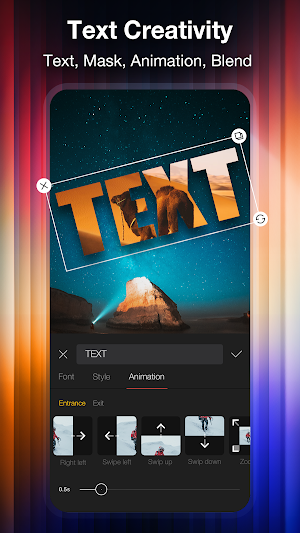
「Creative Text」
Text Editing: Add and customize text for different styles or effects.
Text Effects: Keyframes, masks, and picture-in-picture for standout text effects.
Multi-track support for layered subtitles and seamless integration with video elements.
「Mask」
Presets: Restructure scenes, creating selective overlays and smooth transitions.
Adjustable Parameters: Freely customize mask settings.
Multiple shapes, reverse masking, and dynamic masking and transitions with keyframes.
「Audio Editing」
Multi-Track Support: Overlay with background music and sound effects.
Keyframe Control: Precisely adjust timing, speed, and volume.
Beat syncing, BGM extraction, noise reduction, etc.
「Effects &Transitions」
95 effect presets; support unlimited effect tracks.
100+ transition animations for camera movement and dynamic transitions.
Customizable parameters and adjustable settings.
「LUTs]
180 pro LUTs for color grading, correction, or style transformation.
Apply filters to any media for smooth color adjustments and transitions.
Portrait LUTs: Calibrated skin tones for a natural look even with stylized LUTs.
Sky LUTs: Optimized for sky colors, with smooth edges.
「Color Editing]
Support HSL; adjust brightness, contrast, saturation, sharpness, shadows, hue, etc.
Add vignetting, grain, and other effects, create unique styles, and correct imperfections.
「Blending]
11 blend modes: Lighten, Darken, Overlay, Soft/Hard Light, Multiply, Linear Burn, etc.
Pro Tips: Combine with masks and other tools to create unique blending and overlay effects.
Similar Apps
Lift: Reels & Stories Maker
Lift is the ultimate tool for creating stunning and unique Stories. The...
Promeo - Story & Reels Maker
Create stunning designs with no effort. Easily customize ready-to-use templates with simple...

Magisto - Video Editor & Music
Get Magisto Video Editor - Music Slideshow, Collage & Movie Maker now...

LightCut -AI Auto Video Editor
LightCut is a free AI video editor with rich video templates and...
AI Video Maker - Renderforest
Create professional videos in minutes with Renderforest – the all-in-one video maker,...

invideo AI: Video Generator
invideo AI is the easiest app to create AI videos. This easy...