Enchant Companion
The companion that scans your wall and sets up your Enchant art projections.
About Enchant Companion
Enchant your art.
This is the companion app for Enchant — the system that turns the paintings and
posters on your wall into living, AI-animated projections. The animations play
on your Android TV projector; this phone app is how you set it all up.
You'll need the Enchant app installed on your Android TV projector, and the two
talk to each other to map your wall and pick what to animate.
WHAT THIS APP DOES
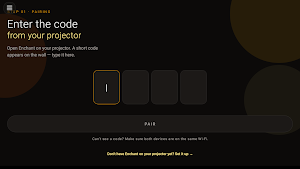
• Pairs with your projector using a short on-screen code.
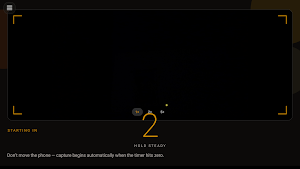
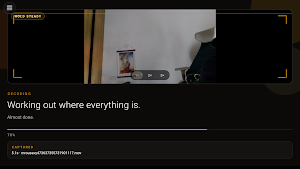
• Guides the wall scan: hold your phone steady while the projector throws a
sequence of light patterns, and the camera captures them so the system can
learn the exact shape and position of every artwork.
• Lets you review every detected piece and toggle which ones to animate —
paintings on by default, everything else opt-in.
• Capture an optional close-up of a piece for sharper, source-aware results.
• Set a style and options per object, and manage your wall on the go.
• Export the whole mapped wall as a video to share.
THE WALL SCAN
For the scan, prop your phone somewhere stable — on a surface, against a wall, or
in a small stand — pointing at the projection area, and leave it still for about
30 seconds while the patterns play. The app keeps the screen awake during the
scan so it doesn't drop the capture. You can take your phone away once the scan
is done.
PRIVACY, PLAINLY
The camera is used only to capture your wall during calibration and any close-ups
you choose to take. Those frames are sent securely to Enchant's cloud to compute
the geometry and detect your artwork. No ads, no selling your data. See our full
privacy policy at enchant.art/privacy.
GETTING STARTED
1. Install Enchant on your Android TV projector.
2. Open this companion app and tap Get Started.
3. Enter the pairing code shown on the projector.
4. Run the guided wall scan.
5. Choose what to animate and enjoy.
Subscriptions (more objects, more animations, extra styles) are managed at
enchant.art. A free tier lets you try it on one piece of art.
Questions or feedback: [email protected]
Learn more: https://enchant.art
Similar Apps

Cardly AI: Sports Card Scanner
Grade, Collect & Value Cards

Area 51 Fireworks
Area 51 Fireworks App: Check-in with the app, check rewards and more!

OSAIO
Emotion of love, Simple and focused, with more freedom

Discover Me - AI Art
Discover more fun with this AI photo editor.
Pose: AI Video Maker, AI Photo
AI Video Generator, viral ai fan videos of stadium cam & ai dance generator app!

Prisma Art Effect Photo Editor
Aesthetic Editor: cool editing photo to picture, make retouch & funny selfie
