RE:solid STL, STEP, CAD Viewer
STL, STEP, OBJ, 3MF: measure, section, weight, explode, converter, projects
About RE:solid STL, STEP, CAD Viewer
RE:solid 3D viewer opens engineering 3D models on Android. It reads mesh and CAD formats, computes geometry on device, and saves your work to a file. No cloud, no sign-up, no internet.
📁 FORMATS
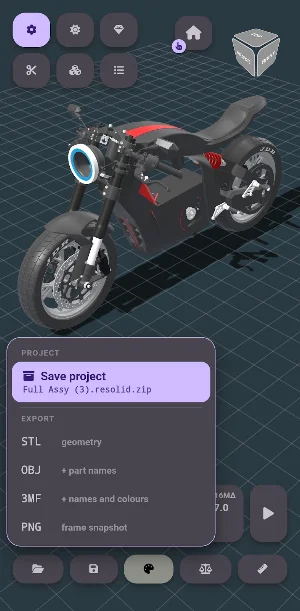
• STL — binary and ASCII, with automatic smoothing that keeps real edges sharp
• OBJ — with MTL, so with materials and colours
• 3MF — part names and colours, including per-face colours
• PLY — with vertex colours, the 3D scanner format
• STEP / STP, IGES / IGS, BREP — CAD solids [PRO]
• ZIP — models inside an archive are listed; open one, or all of them as a single assembly
• RE:solid project — the model together with the state of your work
🔄 CAD CONVERSION [PRO]
STEP, IGES and BREP are read by the built-in OpenCascade kernel. Tessellation runs locally: the file is never uploaded. An assembly arrives as a tree of named parts, not as one solid. Saving to STL, OBJ or 3MF turns the app into a STEP → STL converter on the phone.
📏 MEASUREMENTS [PRO]
• Distance between two points, with snapping to vertices
• Normal distance, angle between faces, per-axis difference (ΔX, ΔY, ΔZ)
• Radius, diameter and centre of a circle from three points
• Wall thickness with a single tap on the surface
• Session history of measurements, with copy to clipboard
• Units: millimetres or inches
✂️ SECTION [PRO]
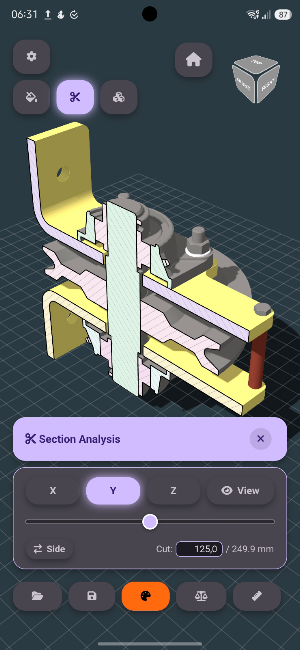
A cutting plane along X, Y, Z or the view direction. The cut is capped and the plane stays visible; for models that are not watertight the cap is not built, and the app says so.
⚖️ WEIGHT AND COST [PRO]
Volume, surface area and mass for 10 materials: PLA, PETG, ABS, PA12-CF, gold 14K and 18K, silver 925, steel, copper, aluminium. A price per gram is stored per material. Hidden parts are excluded, so you can weigh a single sub-assembly. For models that are not watertight the result is marked as approximate.
🔩 EXPLODE AND ANIMATION [PRO]
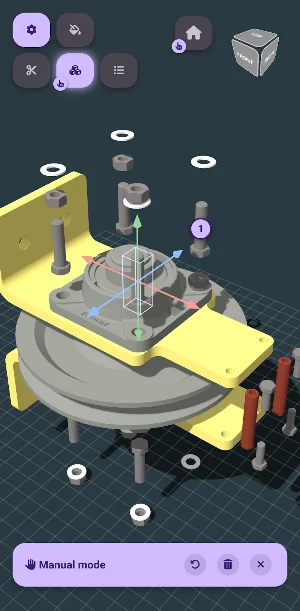
• Automatic explode in assembly order: whatever is covered comes off later
• Manual tuning: three axis arrows set a part's direction and travel, a group's number sets its place in the order; the same number means simultaneous movement
• The path repeats your hand: a polyline, not a straight line between endpoints
• Video recording (MP4 or WebM) with a set number of passes and turns; the clip loops seamlessly
• PNG frame capture — the model canvas is written, without the app interface
📦 PROJECT [PRO]
The model and the state of your work in one file: orientation, part colours, hidden parts, the section, the manual explode with its order, the camera. The original model is inside, so a project opens on another device without the source file. Prepared geometry is stored with it — a heavy STEP assembly opens from a project in a fraction of a second instead of tens of seconds of parsing. An open project is overwritten in one action.
🗂 FILES
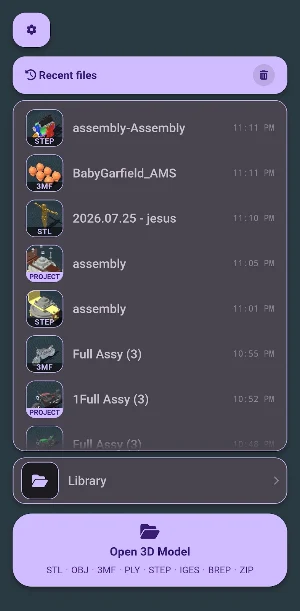
A folder of models inside the app: subfolders, model snapshots, search and a format filter; several folders supported. A list of recent files. Opens from a file manager, messenger, mail or cloud.
👁 VIEWING
Shaded and Rendered modes with materials (metal, gold, silver, chrome, copper, glass, diamond), technical modes — wireframe, X-ray, ghosted [PRO], colour for the whole model or a single part, the parts list, dimensions, hiding and isolating parts [PRO], splitting an STL into separate solids.
⭐ RE:SOLID PRO
Free: viewing STL, OBJ, 3MF, PLY, ZIP archives, the library, view modes, materials, colours, the parts list, dimensions, STL splitting.
A one-time purchase (no subscription) unlocks: STEP, IGES and BREP conversion; projects; explode with manual tuning; animation recording and frame capture; section; all measurements; weight, area and cost; technical modes; hiding and isolating parts; saving to STL, OBJ, 3MF.
Three trial sessions: each unlocks every Pro tool until you close the app; spent only on your command.
Everything is computed on the device; models are never uploaded. This is a viewer, not an editor: you cannot model in it.
Similar Apps

Digit 3D: CAD Viewer & Editor
Open STEP, IGES, STL, DXF. Model, dimension and export — offline, no account.

Mi Economía
The best tool to manage your expenses and income!
Heat Exchanger Design
Heat exchanger design & evaluation for shell-and-tube and double-pipe systems

Solar Units Forecast
Predict solar energy output, estimate savings, and plan your solar system.

Asurion Tech Care
One place for instant tech help and trusted expert support.

WLED Max: LED Light Control
Control WLED smart lights with RGB colors, 180+ effects, and device discovery.

