SHIRUSHI App
This app connects IoT products manufactured by Shirushi Co., Ltd. to Wi-Fi. It is possible to connect multiple IoT products to Wi-Fi at the same time, making it easy to build a data center.
About SHIRUSHI App
The "SHIRUSHI App" allows you to easily connect Shirushi IoT products, including "Web3 Maker," to Wi-Fi from your smartphone. Once you set up your Shirushi IoT products, they're hassle-free.
Enjoy a comfortable and exciting Web3 life!
◎ Recommended System
Android 15 or later
◎ IoT Product Wi-Fi Connection Procedure
1. Have the IoT product you want to connect to Wi-Fi ready.
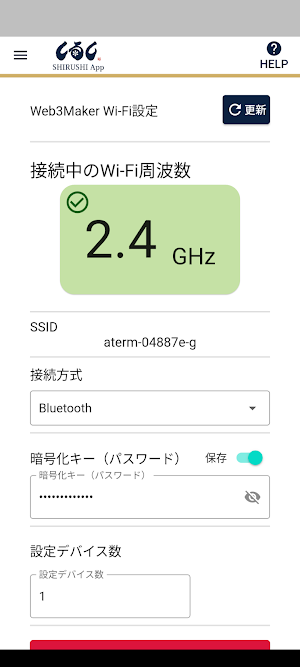
2. Make sure your smartphone is connected to 2.4GHz Wi-Fi.
3. Make sure your smartphone's Bluetooth setting is turned on.
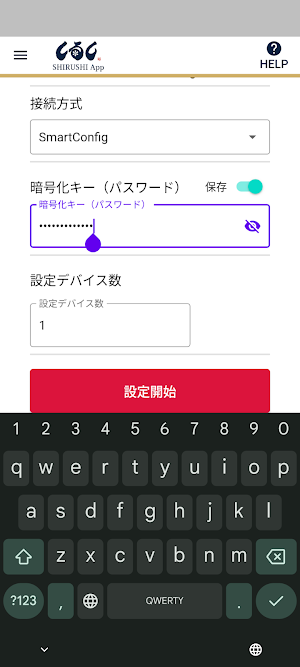
4. Make sure the app's "Connection Method" is set to "Bluetooth," and enter the Wi-Fi password your smartphone is connected to in the "Encryption Key (Password)" field on the settings screen.
5. When you connect a Shirushi IoT product to a USB cable and power it, power will be supplied and the red LED on the side of the device will light up. This indicates that the device is prompting you to enter Wi-Fi information.
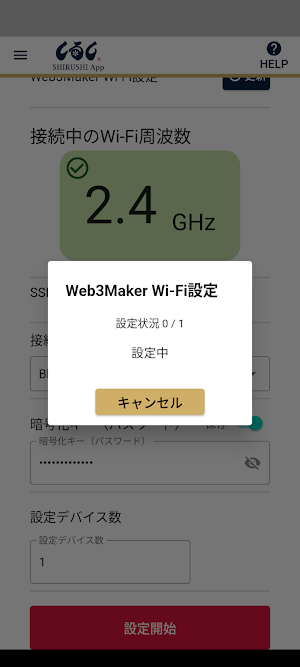
⑥ If you have multiple IoT devices, enter the number in the "Number of Devices to Configure" field and click the "Start Configuration" button to begin Wi-Fi configuration for your IoT devices.
⑦ Once Wi-Fi configuration begins, the configuration status will be displayed in real time. Once the IoT device configuration is complete, it will be reflected in the app, and you can check the number of devices configured.
⑧ Once the specified "Number of Devices to Configure" has been completed, the Wi-Fi connection is complete.
◎Notes
- Please turn on location information when using the app.
- There is a limit to the number of router sessions, so please check the number of router sessions you are using before using.
- The app cannot be used on the "5GHz" Wi-Fi frequency; please make sure it is set to "2.4GHz" before using.
- When connecting using "Smart Config," please change the connection method in the settings. If the device you are connecting to is "Smart Config" or "Bluetooth," please refer to the product manual for the device you are connecting to.
・If Wi-Fi configuration is not completed for the specified "Number of Configured Devices," or if a certain amount of time has passed, Wi-Fi configuration from the app will stop. Please refer to the manual for each IoT product to confirm that Wi-Fi configuration is complete for the IoT products you will actually connect to.
◎If you cannot connect
We apologize for the inconvenience, but please contact us through the Web3Maker service website.
https://web3maker.io/inquiry
Similar Apps

Instant GPS Coordinates
Instantly get your GPS coordinates and altitude in a simple, customisable format

CityGP: Biker Life
Turn your city into a racing circuit. Track times, compete, and top the rankings

ESD WiFi Box V2
Application for the product ESD WiFi Box V2.

Escribir Borrador
It allows you to write text, drafts or notes, it is a light and simple app.

Leopard Lync
Bicycle Lock,smart bike,iot,bike alarm.

Flash +
Flash + is much more secure.
