Piano Transcription
App recognizes the notes you play on real piano and highlights them in real-time
About Piano Transcription
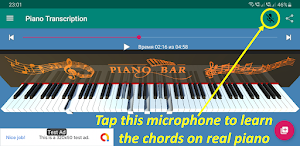
This app may help you to learn the MIDI chords on your real piano, there is the real-time transcription feature. The app will recognize the notes you play and highlight them. If you correctly play all the notes of the chord, it will proceed to the next MIDI chord, and so on.
Not only MIDI-files are supported, but also MP3, MP4, etc. If you do not have a MIDI, you can open any audio file (the app can also extract audio-stream of some video formats). Polyphonic piano transcription feature will generate MIDI from audio/video.
No instrument information is extracted, and all transcribed notes get combined into one part. The accuracy depends on the complexity of the song, and is obviously higher for solo piano pieces. Currently, accuracy for piano pieces is around 75%.
Want to transcribe some piano piece from YouTube? You can google for websites/apps that will download video from YouTube. You then can open downloaded file in my application.
About Midi/Karaoke Files
You can find plenty of them over the internet. Those *.mid or *.kar files usually consist of several tracks, including percussion. You probably would not want to play percussion-tracks on piano, because their "MIDI-notes" do not overload correctly on piano-notes. So, in the most cases, you may choose any kind of tracks, but percussions (like "Drums", "Rhythms", "Hit", "Blow", "Strike", "Clash", etc.) will be disabled.
How to Use
1. Open any MIDI- or Karaoke-file or any other audio/video-file (such as MP3, MP4, etc.) or record a piano piece with microphone.
2. The program will automatically transcribe audio and save as a MIDI-file.
3. If you opened an existing MIDI-file, select tracks. Percussion-tracks will be disabled.
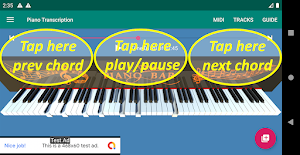
4. If you want just to play the song in real time, tap in the upper-middle area of the screen. Or if you want to go forward or backwards chord-by-chord, you can pause and tap in the upper-left or upper-right areas of the screen.
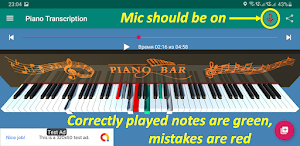
5. If you want to learn the MIDI chords on your real piano, you can use the real-time transcription feature. Correctly played notes will be highlighted with green color, mistakes - with red.
6. If somebody talks near your phone, or if you sit in a loud environment, it will incorrectly recognize too many notes which you actually do not play. Too many keys will be red in this case and it will be annoying.
So, if you want better recognition accuracy, ideally there should be no other sounds than your piano.
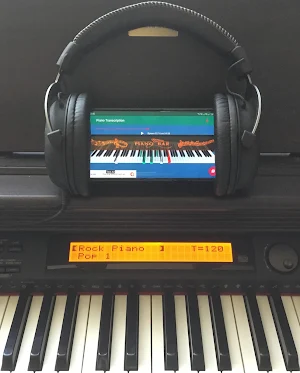
If you have convenient headphones which you can plug into your electric piano, there is a life-hack - you can “put on the headphones on your mobile device” and turn the volume louder.
7. Once you correctly play all the notes of the chord simultaneously (all the pressed keys are green), it will automatically proceed to the next MIDI chord, and so on.
8. Enjoy 😄
Similar Apps
Pianolytics - Learn Piano
Pianolytics is the ultimate educational game to learn the notes and chords...

Chord Analyser (Chord Finder)
Chord Analyzer is an interactive, reverse chord finder. If you don't know...

Pianote
Musicians start here.We’ll help you learn the piano anywhere, anytime -- with...

Piano2Notes - Notes from Piano
» Transcribe piano recordings to sheet music» View the transcribed music as...

La Touche Musicale-Learn piano
La Touche Musicale is one of the best piano learning apps. Connect...