TapSign ID: Sign PDFs
Sign PDFs with your Romanian electronic ID (CEI) over NFC, or with a USB token.
About TapSign ID: Sign PDFs
TapSign is developed by BILOUD SRL (Romania). It is not an official government app and does not represent the Romanian Ministry of Internal Affairs, the European Commission, or any other public authority.
Official sources for the government-related information in this listing and in the app:
EU Trusted List (eIDAS): https://eidas.ec.europa.eu/efda/tl-browser
Romanian electronic identity card: https://www.mai.gov.ro
eIDAS Regulation (EU) No 910/2014: https://eur-lex.europa.eu/legal-content/EN/TXT/?uri=CELEX:32014R0910
Sign PDFs directly on your Android phone or tablet using the certificate you already own.
Use your Romanian electronic identity card (CEI) over NFC, or connect your USB token through USB-C. Signing is free, no account is required, and your PDF stays on your device.
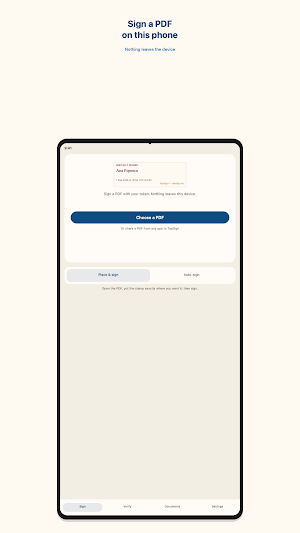
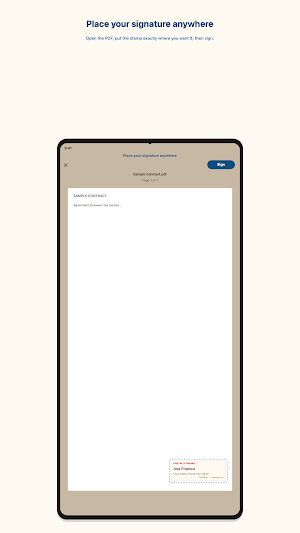
Open a PDF, place your signature, enter your PIN and sign.
USE WHAT YOU ALREADY HAVE
Sign with qualified USB tokens issued by Romanian providers such as certSIGN, DigiSign, Trans Sped and others.
Connect your USB token directly through USB-C or with a compatible adapter.
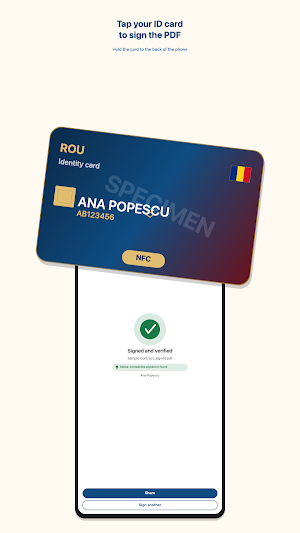
Have a Romanian electronic identity card (CEI)? Simply hold the card against the back of your NFC-enabled Android device when prompted and sign using the certificate stored on the card.
Sign contracts, declarations, forms, invoices and other PDF documents.
SIMPLE PDF SIGNING
• Open a PDF from your device, email, messaging apps or any other compatible app
• Place and resize the visible signature anywhere on the page
• Choose between a visible or invisible signature
• Enter your PIN
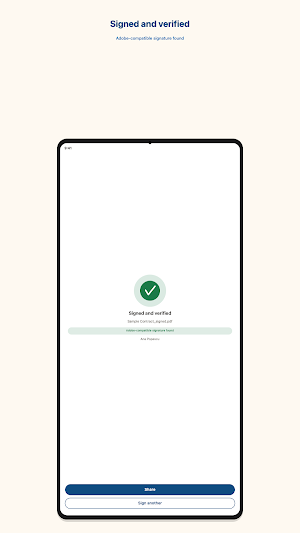
• Save or share the signed PDF
Existing signatures are preserved, so you can also add your signature to a document that has already been signed.
YOUR DOCUMENTS STAY PRIVATE
Signing happens entirely on your device. Your PDF is not uploaded to TapSign for signing.
Your private key never leaves the secure chip inside your USB token or electronic identity card. Your certificate PIN is sent directly to the secure device and is never stored by TapSign.
STANDARD, VERIFIABLE ELECTRONIC SIGNATURES
TapSign uses your own electronic certificate to sign the document. It does not issue certificates and does not create its own type of electronic signature.
TapSign creates standard PDF electronic signatures based on the PAdES format. Signed PDFs can be verified using Adobe Acrobat and other compatible software.
The type and legal effect of the signature depend on the certificate and device you use:
• Qualified electronic signature is the highest level of electronic signature defined by eIDAS. It is created using a qualified certificate together with an appropriate secure signature device, such as qualified USB tokens provided by certSIGN, DigiSign, Trans Sped and other authorized providers. In the European Union, a qualified electronic signature has the same legal effect as a handwritten signature.
• Advanced electronic signature provides a strong link between the signer and the signed document and can show whether the document was changed after signing. It does not automatically have the same legal status as a handwritten signature in every situation.
TapSign preserves the level provided by your certificate. If you use a qualified certificate together with the appropriate secure device, TapSign can create a qualified electronic signature.
The Romanian electronic identity card currently allows the creation of an advanced electronic signature.
FREE TO SIGN
TapSign is free to use with your own certificate.
Creating an account is optional. You can use one to sync your preferences between devices and, if you choose, store documents in TapSign's end-to-end encrypted vault.
Signing itself always works without an account and without uploading your document.
Your document. Your certificate. Your signature.
TapSign ID: Sign PDFs details
TapSign ID: Sign PDFs is a free Productivity app for Android with 0+ installs on Google Play. It was last updated on September 23, 2026. It's developed by BiLoud.
- Category
- Productivity
- Installs
- 0+
- Price
- Free
- In-app purchases
- No
- Ads
- No ads
- Requires Android
- Varies with device
- Content rating
- Everyone
- Last updated
- September 23, 2026
- Developer
- BiLoud
Alternatives to TapSign ID: Sign PDFs
Looking for apps like TapSign ID: Sign PDFs? Here are 6 similar Android apps on Google Play. All of them are free to download.

Gaveki — ADHD Focus App
Brain dump everything, choose today’s three, and focus on one next move.

Uryth
Track expiry dates for food, medicine, beauty & more. Never waste, never miss.

Eco-Prints: A4 Print & Collage
Easy Color Printouts for school projects. Create A4 photo collages & grids.

Dot
Minimalist habit tracker and daily routine planner to build lasting routines.

Eureka Ore Commessa
Time and hour detection of your construction sites

Consistency Tracker: Aurabit
Habit Tracker app to build self improvement & daily habits using Streak Tracker.
| App | Rating | Price | Installs | Last updated |
|---|---|---|---|---|
| TapSign ID: Sign PDFs | – | Free | 0+ | Sep 23, 2026 |
| Gaveki — ADHD Focus App | – | Free | 10+ | May 20, 2026 |
| Uryth | – | Free | 1+ | Sep 18, 2026 |
| Eco-Prints: A4 Print & Collage | – | Free | 1,000+ | Sep 6, 2026 |
| Dot | – | Free | 10+ | Jun 23, 2026 |
| Eureka Ore Commessa | – | Free | 50+ | Jun 24, 2025 |
| Consistency Tracker: Aurabit | – | Free | 100+ | Aug 14, 2026 |
