TV Remote For Roku&Smart TV
Easy Roku TV Remote – Auto Connect, Volume Control & Screen Casting.
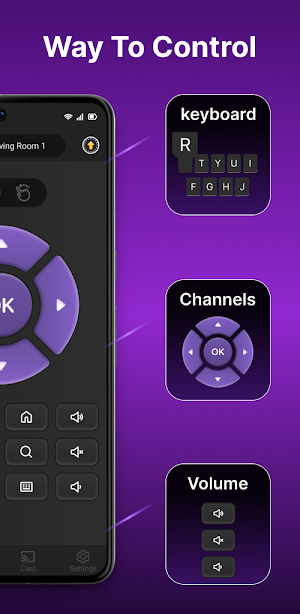
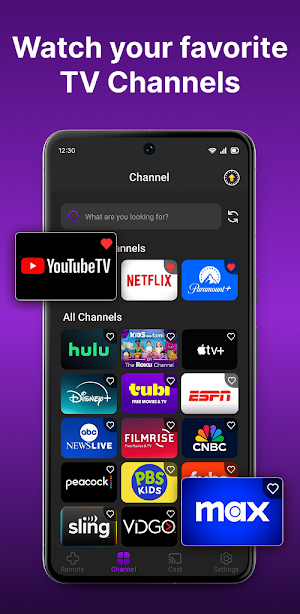
About TV Remote For Roku&Smart TV
Say Goodbye to Lost Remotes, Dead Batteries, and Complicated Controls!
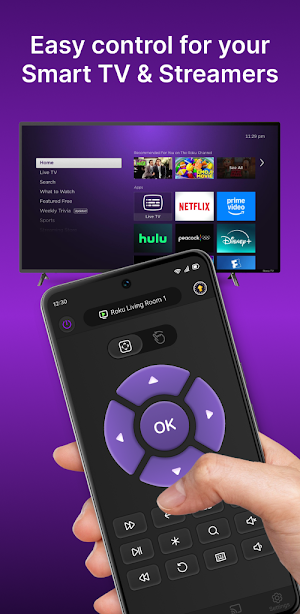
TV Remote For Roku & Smart TV instantly turns your Android phone into a Roku TV remote. Control your Roku TV and Roku streaming devices via Wi-Fi—no physical remote required.
Switch channels, adjust volume, cast photos or videos, and even mirror your phone screen to the big screen—all effortlessly.
Key Features
Automatic Device Scanning & Connection
Instantly scan your Wi-Fi network and automatically connect to available Roku TVs and Roku streaming devices—no pairing or complicated setup needed.
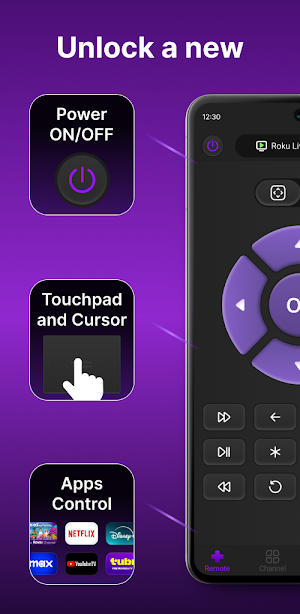
Volume & Power Control
Adjust volume or turn your Roku TV or Roku streaming device on/off directly from your phone.
Touch Navigation & Button Control
Use touch gestures or traditional button controls for a seamless experience just like the official Roku remote.
Quick Keyboard Input
Quickly type titles, movies, shows, or channels using the built-in keyboard.
Channel Switching
Switch effortlessly between TV channels and streaming apps with a single tap.
Photo & Video Casting
Cast photos and videos from your phone to your Roku TV for a bigger-screen viewing experience.
Screen Mirroring
Mirror your phone screen to Roku TV in real-time to instantly share content.
Quick Start Guide
Ensure your TV or device is connected to the same Wi-Fi network as your phone.
Open the app and select the device you want to connect. Once connected, you can start controlling your Roku device immediately.
Compatible Devices & Brands
This app supports all TVs running Roku OS, including but not limited to:
TCL, Sharp, Hisense, Philips, Sanyo, Element, JVC, RCA, Magnavox, Westinghouse, and more.
Supported Roku streaming devices include:
Roku Express, Roku Express+, Roku Streaming Stick 4K, Roku Streaming Stick 4K+, Roku Ultra
Troubleshooting
If the app does not work, enable mobile app control on your Roku TV or device:
Settings → System → Advanced System Settings → Control by Mobile Apps → Enable
If the TV cannot connect, reinstall the app and restart the TV—this usually resolves most issues.
The app only works when your phone and TV are on the same Wi-Fi network.
Disclaimer / Trademark Statement
Dynamic Remote is not affiliated with Roku, Inc. in any way and is not a subsidiary or related entity.
TV Remote For Roku & Smart TV is independently developed and has no affiliation, partnership, or official authorization from Roku, Inc. Likewise, this app is not affiliated with or authorized by any of the TV brands or devices listed above.
Contact Us
Support Email: [email protected]
Learn More: https://ldyt.online
Similar Apps
Verizon Home
Manage and Optimize Your Fios, 5G Home, or LTE Home Network with Ease

JayC
Save with JayC! Coupons, ads, rewards, find stores & shopping list in one app!
VIDAA Smart TV
A virtual remote for smart TV
1st Source Mobile Banking
New and improved 1st Source Bank Mobile App

InstaVision: Smart & Safe Home
Security App with HD Video, 2-way Audio, and event detection for Home monitoring

Credit One Bank Mobile
Manage your credit card account with the Credit One Bank mobile app.