Kouyou Nagare Japanese Face
Japanese maki-e watch face for Pixel Watch & Galaxy Watch - maple on a stream

About Kouyou Nagare Japanese Face
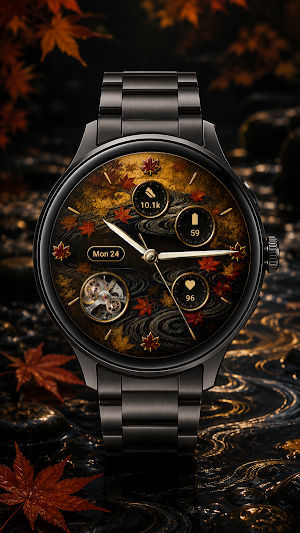
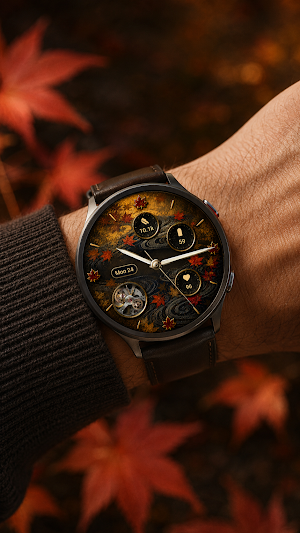
WabiFace Kouyou Nagare brings an autumn lacquer stream to your Wear OS smartwatch.
🍁 KOUYOU NAGARE — MAPLE ON THE FLOWING WATER A chased silver current runs across black urushi lacquer, and maple leaves ride it in gold maki-e. Maple carried on water is one of the oldest patterns in Japanese decorative art, and the dial keeps its logic: the stream sets the direction, and the leaves are scattered by it rather than arranged.
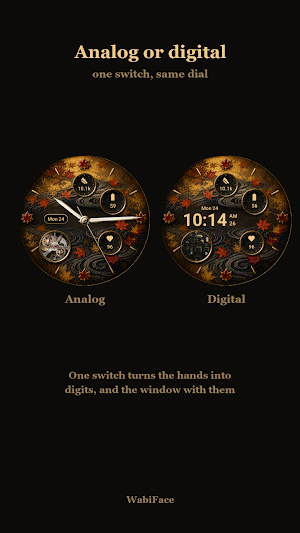
⚙️ A WINDOW AT HALF PAST SEVEN A round opening in the lower left is cut clean through the dial. Behind it a watch movement turns on jewelled bridges — two wheels, one geared to the other, running whenever the face is analog.
💻 AND A QUARTZ BOARD WHEN DIGITAL Switch to digital and the same opening shows a black-and-gold clock board instead, built around its 32.768 kHz crystal. The circuit breathes and two indicators blink. Mechanical time, then electronic time, in the same window.
⌚ ANALOG OR DIGITAL Analog gives pale silver hands, a sweeping second hand and a weekday-and-day window at nine. Digital gives a large time with AM/PM and running seconds beside it, and the date on a line above. The hour ring stays where it is in both, so the dial is always the same object.
🍁 FALLING LEAVES A maple leaf drifts down across the dial, turning as it falls, one at a time and without pause. It can be switched off.
🎨 FOUR DIAL METALS The maki-e can be set in gold, silver, copper or blue steel. Only the metal changes — the maple leaves stay red in every one, so it is the same dial in a different lacquer.
⌚ THREE DATA SLOTS, YOUR SIZE Three recessed wells show steps, battery and heart rate by default, and can be changed to other information you prefer. Choose Large, Medium or Small — or turn one off, and a red maple crest is set into the well instead of leaving it empty. Each well is finished like a chronograph register: a sixty-mark engraved track inside the bezel, over gold flake sunk in the lacquer.
🌙 AMBIENT MODE Optimised for always-on display. The lacquer, the window and the data step aside; the eight gold batons, the four applied maple leaves and dimmed hands remain, readable at a glance while the screen stays gentle on battery.
🎴 DETAILS - Eight applied gold batons, with a crimson maple leaf at each quarter - A second hand that sweeps rather than ticks - Two wheels turning behind the window, at different speeds - A gold-rimmed window at nine carrying the weekday and the day - A maple crest for a well you have switched off - Figures in the wells in gold, maple, pearl or steel
🎴 MORE FROM WABIFACE Kyoto, our free Japanese watch face: https://play.google.com/store/apps/details?id=jp.wabiface.kyoto
🌸 ABOUT WABIFACE WabiFace is a collection of watch faces celebrating Japanese aesthetics — wabi-sabi, mono no aware, and the dignified passage of time.
Artwork is AI-assisted illustration, curated and assembled by the developer.
Requires Wear OS 5 or later. Compatible with Pixel Watch, Galaxy Watch, and other Wear OS 5+ smartwatches.
Please check your watch OS version before purchasing.
For support: [email protected] Website: https://wabiface.jp
Kouyou Nagare Japanese Face details
Kouyou Nagare Japanese Face is a paid Personalization app for Android with 0+ installs on Google Play and a 5.0/5 average rating from 9 ratings. It was released on August 24, 2026 and last updated on August 24, 2026. It's developed by wabiface.
- Category
- Personalization
- Rating
- 5.0 / 5 (9 ratings)
- Installs
- 0+
- Price
- $1.99
- In-app purchases
- No
- Ads
- No ads
- Current version
- 1.0.0
- Requires Android
- Varies with device
- Content rating
- Everyone
- Released
- August 24, 2026
- Last updated
- August 24, 2026
- Developer
- wabiface
What’s new in Kouyou Nagare Japanese Face
The phone companion for WabiFace Kouyou Nagare. This app does not show the time on its own. The watch face itself is delivered to your watch. - Buy the watch face and redeem promo codes from your phone - Step-by-step guide for setting the face up on your watch Requires a Wear OS 5 or later smartwatch.
Version 1.0.0 · Updated August 24, 2026