JogRecorderV2 ジョギング・ランニング記録アプリ
It is a recording application "JogRecorder V2" for jogging, running and walking. It is a successor application to the previous work Jog Recorder.
About JogRecorderV2 ジョギング・ランニング記録アプリ
◆Introduction
On June 27, 2012, I released the previous version of JogRecorder. The development tools that were mainstream at the time (Eclipse & Android SDK) are no longer supported, and I've been updating it through trial and error. However, no matter how hard I tried, the previous version could no longer display maps on Android 10.
Therefore, I rebuilt it using Android Studio to enable map display on Android 10. I also added features to enhance the enjoyment of jogging and walking, such as sharing the record screen and photos, and a function to purchase jogging gear. Please feel free to use it.
◆Background Execution
JogRecorderV2, in order to maintain jogging recording functionality, will continue to collect location information via GPS in the background, even if the app is closed or the screen is turned off, but only when measurement is in progress.
◆Main Features
JogRecorder V2 mainly has the following features:
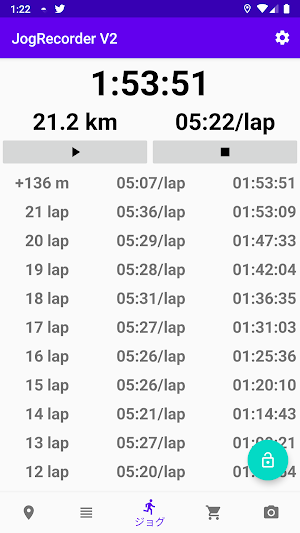
• Saves GPS location information every second
• Displays lap times every 1km (lap distance can be changed)
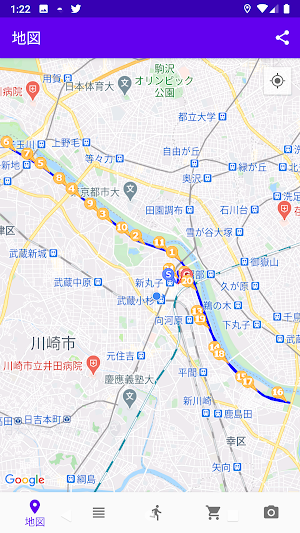
• Displays the measured route on a map
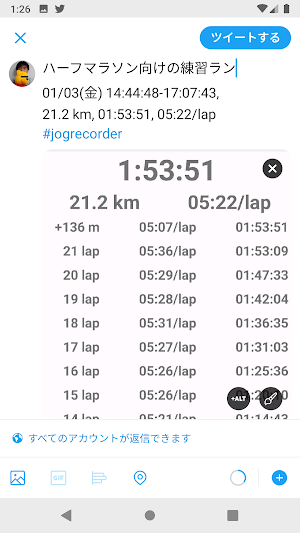
• Shares the record screen (can be shared on X (formerly Twitter), etc.)
• Shares photos (can be shared on X (formerly Twitter), etc.)
• Shopping function for jogging goods, etc.
(Includes introductions to jogging goods on Rakuten Market, and product search functions for Rakuten Market, Amazon, and Yahoo! Shopping)
◆ Record Data Migration (V1→V2)
This is the procedure for migrating record data from the previous version of JogRecorder.
(1) From the top right menu of the previous JogRecorder, tap [All Records].
(2) From the top right menu of the All Records screen, tap [CSV Output].
(3) Confirm that the file name is the date of the last record, and tap [OK].
(4) Wait a while for the process to finish.
(5) After the process is finished, launch JogRecorder V2.
(6) From the bottom menu, tap the Records tab.
(7) From the top right menu, tap [Import].
(8) Select the file you just output and tap [OK].
(9) Wait a while for the process to finish.
That's all.
◆Record Data Migration (V2→V2)
This is the procedure for migrating record data from JogRecorder V2 to V2 when changing devices, etc.
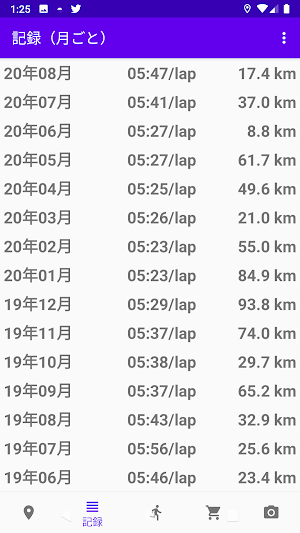
(1) On your old JogRecorderV2, tap the second icon from the left at the bottom [≡] (Record).
(2) On the Record (Monthly) screen, tap [Export (All)] in the upper right menu.
(3) Confirm that the file name matches the date of the last record, and tap [OK].
*If you save to Google Drive, you can skip steps (5) and (6).
(4) Wait a while for the process to finish.
(5) After the process is complete, use a file manager or similar app to copy the CSV file (all records up to yy-mm-dd.csv) from the [JogRecoder] folder in the main storage of your smartphone to your new smartphone via SD card or network.
(6) Launch JogRecorderV2 on your new smartphone.
(7) From the bottom menu, tap the Record tab.
(8) From the upper right menu, tap [Import].
(9) Select the file you just exported and tap [OK].
(10) Wait a while for the process to finish.
That's all.
◆Permissions Used
【Current Location】
Detailed Location Information
-Used to obtain current location information.
【Storage】
Modify/Delete SD Card Content
-Used for importing and exporting measured data.
【Network Communication】
Full Internet Access
-Used for displaying maps and accessing the Runner's Shop's internet.
【Vibration Control】
-Used for starting, pausing, and ending measurements using buttons.
【Photo and Video Recording】
-Used for camera functions.
◆Update History
2026/08/13
・API Level 36 Support
2025/11/24
・Dark Mode Support
2025/07/06
・API Level 35 Support
2024/08/08
・Fixed an issue where the GPS service would stop in sleep mode after API Level 34 support
2024/07/29
・API Level 34 Support
2023/08/24
・Fixed an issue where the app would not launch on Android 10 after API Level 33 support.
2023/08/22
・API Level 33 Support
2022/07/18
・Changed the lock button so that it does not react to light touches
・SDK Version 32 Support (Responding to changes in storage access specifications)
*The locations accessible during record export/import have changed.
2021/06/19
- Changed the setting to allow vibration for automatic stop/resume.
2020/12/23
- Changed the setting to allow ogg files in addition to mp3 for notification sounds per lap.
2023/08/19
- Added support for API level 33.
2020/12/20
- Fixed a bug where the setting for vibration notifications per lap was not reflected.
2020/12/06
- Added setting for displaying the navigation bar.
2020/11/22
- Restored the calorie mode that was in V1.
2020/11/21
- Added an explanation about background location information collection when granting location information permission.
2020/10/31
- Improved the record notation (reduced the number of characters).
2020/10/18
- Fixed a bug where distance was sometimes calculated incorrectly. Further revisions
2020/10/16
- Fixed a bug where distance was sometimes calculated incorrectly.
2020/10/04
- Added sound support for each lap (any mp3 can be specified).
- Added a map menu to the recording details.
2020/09/13
- Fixed an issue where GPS recording stopped when the screen was off on Android 10.
2020/08/31
- Fixed an issue where files could not be imported on Android 10.
- Improved file selection for import/export.
2020/08/30
- App released.
Similar Apps
BTC電卓
"BTC Calculator" is a calculator that calculates the amount of Bitcoin and Japanese Yen (JPY) in both directions. It is useful when converting to yen on a BTC-denominated exchange and grasping it!

簡単検索くん(軽い・シンプルな検索アプリ)
Easy Search is a search app that allows you to perform various searches quickly and easily. It is a search tool that allows you to search from major search sites, major shopping sites, and auction sites.

期間限定ポイント自動チェック for 楽天市場
This app, check the limited time points Rakuten Ichiba automatically, is an application to be displayed on the home screen.
商品検索ツール for ネットショップ
This app makes it easy to search for products from online shops. It also has a widget function that periodically searches for products matching specified keywords and displays them on your home screen.
