ユピスマ1(ユピ坊アプリ)
"Yupisuma 1" is a dedicated app for the watching robot Yupibo YR-03. You can check the video taken by Yupibo with the "Yupisuma 1" app.
About ユピスマ1(ユピ坊アプリ)
"Yupisuma 1" is a dedicated app for the watching robot Yupibo YR-03.
You can check the video taken by the camera of "Watching Robot Yupibo YR-03" with the "Yupisuma 1" app.
By switching between "watching mode" and "security mode"
"Watch over children and pets who are away" or "Confirm the safety of elderly families living away"
It is possible to use it according to the scene.
In addition, it is equipped with an incoming call from the "watching robot Yupibo YR-03" and a outgoing function from the "Yupisuma 1" app.
We realize video calls through the camera.
You can connect to Yupibo's camera from the app, operate it, and make various settings.
Also, when Yupibo detects an abnormality, the app will be notified of the detected content.
Detected abnormalities can also be confirmed within the app.
While connected, you can control the camera direction and change the detection intensity of Yupibo.
----------------------------------------
▼ Notes
----------------------------------------
* To use, you need the main body of Yupibo and a smartphone compatible with this application.
* Even if the app can be installed normally, it may not be available depending on the device status and communication status you are using.
* The total number of notifications is up to 20. If the number exceeds 20, the oldest notification will be deleted. (Notification history does not disappear.)
* You can only receive calls from one of the multiple registered Yupibos.
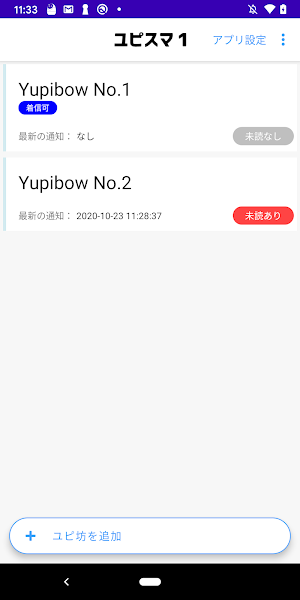
→ For Yupibo who can receive calls, "Incoming call accepted" is displayed on the Yupibo selection screen.
→ To switch to Yupibo, which can receive incoming calls, use one of the following methods.
・ Open the monitoring screen of Yupibo on the Yupibo selection screen.
・ On the Yupibo selection screen, press and hold any item → touch "Switch (make incoming calls possible)"
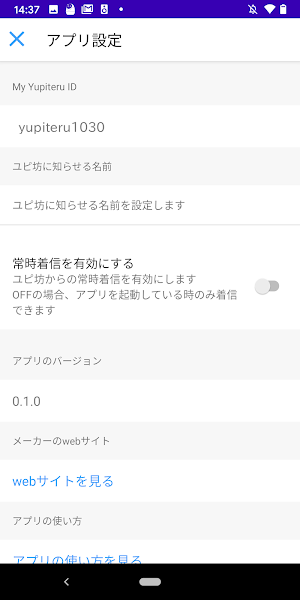
* If you turn off "Enable constant incoming calls" in the app settings, you will not be able to receive incoming calls when the app is not running.
If you want to receive constant calls, it is recommended to turn on "Enable constant incoming calls".
* If the "detection time" of the "watch sensor" is short (generally less than 4 hours, but it depends on the operating status of other apps), the notification may be delayed.
We recommend unlocking your smartphone screen several times a day.
* Notification history can be stored within 2 weeks or 100 notifications.
* If you are using a magnetic smartphone case, you may not be able to receive incoming calls depending on the model.
Similar Apps

Metanet Explorer
Metanet is a mobile browser built for the next generation of the web!

Avvocati Lamezia Terme
Official app of the Lamezia Terme Bar Association.

Groupe JVCE
Follow the latest news and communicate easily.

Messages - AI Chat & SMS
AI chat assistant, smart reply, 1-tap copy OTP, dual SIM, popup & dark mode

We Invest Boulogne Billancourt
Stay up-to-date with the latest news and exchange information easily.

Supercars Teams App
Official communication app
