e-BRIDGE Print & Capture Entry
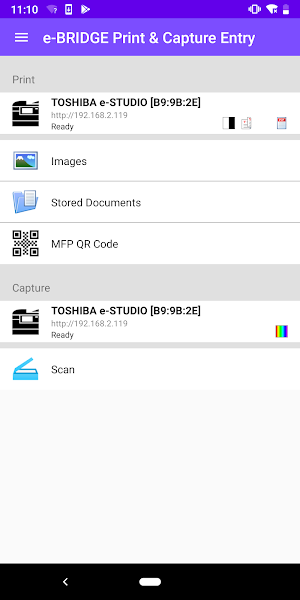
This application will allow you to utilize TOSHIBA MFPs to print and scan.
About e-BRIDGE Print & Capture Entry
e-BRIDGE Print & Capture Entry is an application that allows you to print and scan from TOSHIBA e-STUDIO2829A Series, e-STUDIO2822A Series and e-STUDIO2823AM Series MFPs utilizing your Android device.
Key Features:
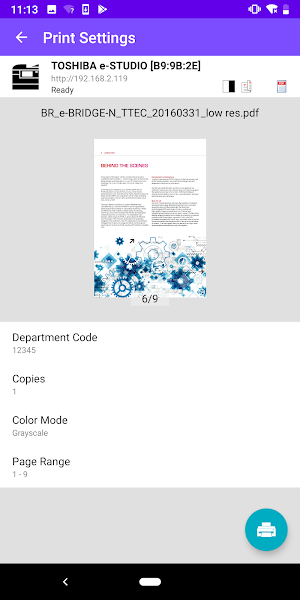
- Print images and documents stored in Android or captured by the device's Camera
- Utilize advanced MFP print settings such as number of copies and page range
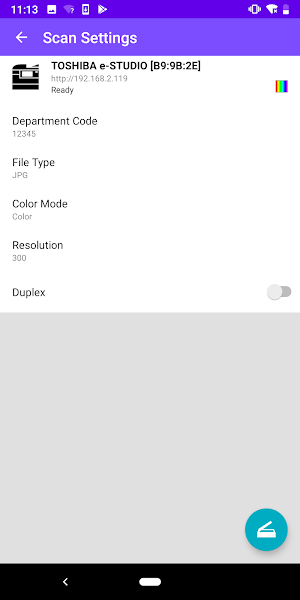
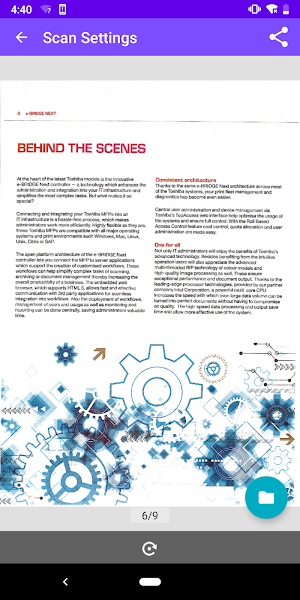
- Scan documents from an e-STUDIO MFP and save them onto your Android device
- e-STUDIO MFPs can be discovered on your network by scanning the QR code printed from e-BRIDGE Print & Capture Entry with the e-BRIDGE Print & Capture Entry QR code scan function or by searching through your history of the most recently used MFPs
- Department codes are recommended to maintain office security
-------------------------
System Requirements
- Supported TOSHIBA e-STUDIO models should be used
- SNMP and Web Service settings on the MFP must be enabled
- Please contact your dealer or sales representative about configuring this application when using with department codes
-------------------------
Supported Languages
Czech, Chinese (Simplified), Chinese (Traditional), Danish, Dutch, English (US), English (UK), Finnish, French, German, Hungarian, Italian, Japanese, Norwegian, Polish, Russian, Spanish, Swedish, Turkish
-------------------------
Supported Models
e-STUDIO2822AM
e-STUDIO2822AF
e-STUDIO2323AM
e-STUDIO2823AM
e-STUDIO2329A
e-STUDIO2829A
-------------------------
Supported OS
Android 7.x, 8.x, 9.x
-------------------------
Website for e-BRIDGE Print & Capture Entry
Please refer to the following page for Website.
http://www.toshibatec.com/products_overseas/MFP/e_bridge/
-------------------------
Note
- MFPs may not be discovered under the following conditions. If not discovered, you may manually enter the hostname or use the QR Code
*IPv6 is used
*Other unknown reasons
The company names and product names are trademarks of their respective companies.
e-BRIDGE Print & Capture Entry details
e-BRIDGE Print & Capture Entry is a free Business app for Android with 10,000+ installs on Google Play and a 3.6/5 average rating from 19 ratings. It was released on July 30, 2019 and last updated on July 31, 2019. It's developed by TOSHIBA TEC CORPORATION. It requires Android 5.1 or later.
- Category
- Business
- Rating
- 3.6 / 5 (19 ratings)
- Installs
- 10,000+
- Price
- Free
- In-app purchases
- No
- Ads
- No ads
- Current version
- 1.0.34
- Size
- 21M
- Requires Android
- 5.1 and up
- Content rating
- Rated for 3+
- Released
- July 30, 2019
- Last updated
- July 31, 2019
- Developer
- TOSHIBA TEC CORPORATION
Alternatives to e-BRIDGE Print & Capture Entry
Looking for apps like e-BRIDGE Print & Capture Entry? Here are 6 similar Android apps on Google Play. All of them are free to download.

Signage Studio Player
Go from a TV to a Digital Signage in 5 minutes.

3D Entrance – Augmented Realit
See and experience dormakaba physical access systems in 3D just where you are.

Skidaddle
The event and networking app for Skidaddle 2024.

Valyutalar kursi
So'mga nisbatan valyutalar narxini kuzatish

Care Crew
The temporary worker interface that is making work easier and fulfilling.

Society Mitra
Society Mitra is the most comprehensive society management solution, BYE Law
| App | Rating | Price | Installs | Last updated |
|---|---|---|---|---|
| e-BRIDGE Print & Capture Entry | 3.6 / 5 | Free | 10,000+ | Jul 31, 2019 |
| Signage Studio Player | – | Free | 5+ | – |
| 3D Entrance – Augmented Realit | – | Free | 500+ | Sep 25, 2024 |
| Skidaddle | – | Free | 1+ | – |
| Valyutalar kursi | – | Free | 5+ | – |
| Care Crew | – | Free | 1,000+ | Nov 3, 2025 |
| Society Mitra | – | Free | 100+ | – |
