Icon 3x3 - Shortcut Icon Widget
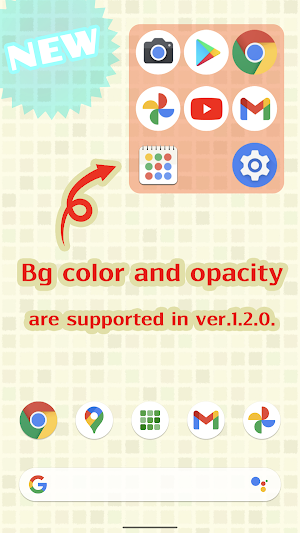
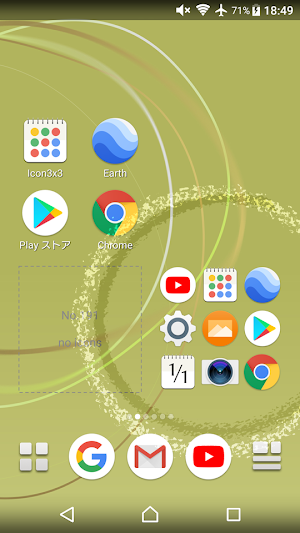
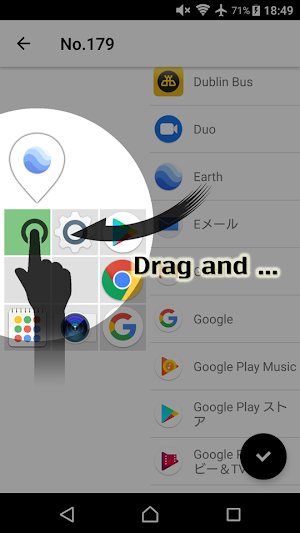
This widget displays 3x3=9 app icons in 2x2 space on your home screen.
About Icon 3x3 - Shortcut Icon Widget
URL shortcut icon can be placed, too.
Widget menu
- Icon 3x3 in space 2x2
- Icon 2x2 in space 1x1
- Icon 3x1 in space 2x1
- Icon 1x3 in space 1x2 (added in v1.0.10)
- Icon 2x1 in space 1x1 (added in v1.0.11)
- Icon 2x3 in space 1x1 (added in v1.2.4)
- Icon 3x4 in space 2x2 (added in v1.2.4)
Supported
- widget resize
- background color and opacity (added in v1.2.0)
Recommended for you like this
- I want to place many app icons on my home screen!
- I want to place smaller app icons on my home screen!
- I want to place app icons in the lower left or right corner of my home screen where my thumb reaches!
Basic operations in the icon editing screen
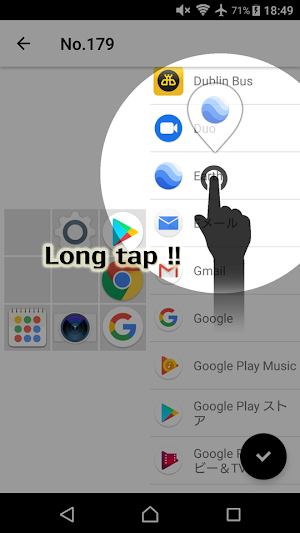
1. Choose an app from the app list on the right pane and hold it down.
2. Drag and drop it into any app field on the left pane.
3. Tap the save button on the bottom right lastly.
Supported in the icon editing screen
- Replacing icons
How do you edit icons of the widget that have already been placed?
1. Launch Icon 3x3 app and you will see "WIDGET".
2. Tap the item you want to edit.
How do you change background color and opacity of the widget?
1. Firstly, place the widget on your home screen.
2. Launch Icon 3x3 app and tap "SETTING".
Icon 3x3 - Shortcut Icon Widget details
Icon 3x3 - Shortcut Icon Widget is a free Personalization app for Android with 10,000+ installs on Google Play and a 4.4/5 average rating from 147 ratings. It was released on December 29, 2018 and last updated on September 22, 2021. It's developed by chlorocube. It requires Android 4.2 or later. The app contains ads.
- Category
- Personalization
- Rating
- 4.4 / 5 (147 ratings)
- Installs
- 10,000+
- Price
- Free
- In-app purchases
- No
- Ads
- Contains ads
- Current version
- 1.2.4
- Size
- 3.9M
- Requires Android
- 4.2 and up
- Content rating
- Everyone
- Released
- December 29, 2018
- Last updated
- September 22, 2021
- Developer
- chlorocube
What’s new in Icon 3x3 - Shortcut Icon Widget
v1.2.4 - added 2x3 & 3x4 widget - added function to replace icons - changed function to return an icon already set to blank v1.2.3 - fixed a bug in version 1.2.0-1.2.2 that prevented new creation on some devices. v1.2.1 - added function to return an icon already set to blank by holding it down - added icon size adjustment when the error due to exceeding the allowable memory size of the widget occurs - fixed minor bugs v1.2.0 - added background color and opacity setting
Version 1.2.4 · Updated September 22, 2021
Similar Apps
Cute Note Widget
This is a note widget that can be placed on your home...
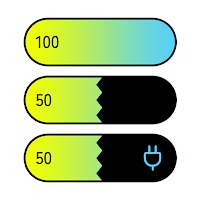
Battery Widget
\ NEW /3-color gradation supported since version 1.0.5 !!(*) To use 3-color...
Photo Widget for Twitter
- Initial settingsFirst, enter your Twitter Username (string after @) on the...
A words bird - Cute comms app
* Family communication apps* Easy voice input and output* Cute little birdThis...
GitHub Widget
GitHub contributions graph widget similar to GitHub official iOS widget.* Change contributions...

Color Picker Demo
It's a color-picker demo application.PlanetColorPicker is a simple, cool and cute design.You...