고졸 검정고시 모의고사 - 검정고시 독학 문제은행
This is a learning app for preparing for the high school equivalency exam through weakness analysis and smart review.
About 고졸 검정고시 모의고사 - 검정고시 독학 문제은행
For the High School Equivalency Exam, the outcome is determined not by how many questions you answer, but by how long you retain the answers.
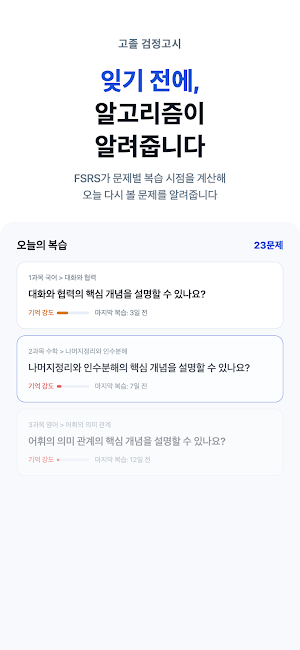
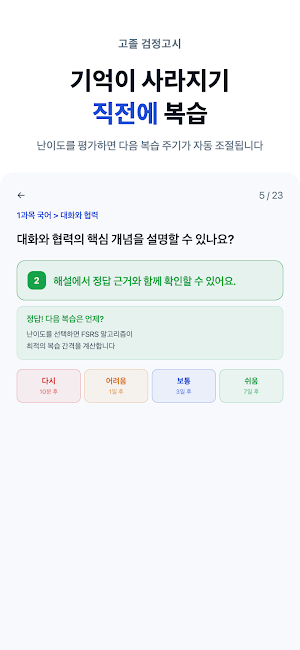
It is designed to help you identify your current weaknesses and revisit questions just before you forget them. The cognitive science-based FSRS algorithm automatically determines the optimal review time for each question.
[Key Features]
**Full-range Question Bank for 6 Essential Subjects**
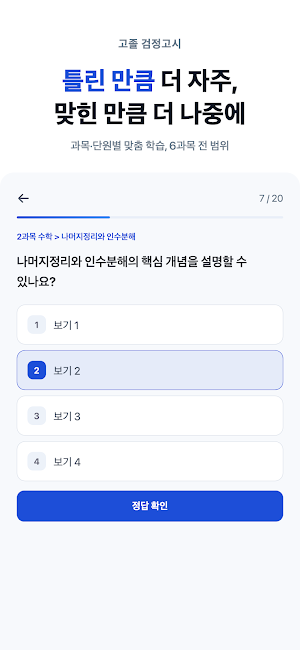
Learn six subjects—Korean, Mathematics, English, Social Studies, Science, and Korean History—divided by unit. You can master key concepts and question types evenly through self-produced questions that reflect the curriculum and the scope of the GED exam.
**Practical Mock Tests by Session**
The GED exam is divided into sessions for each subject, with each session lasting 40 minutes. Practice session by session with the same number of questions and time limit as the actual exam, and check your results based on an average score of 60 points across all subjects to pass. As your exam history accumulates, you can view changes over time by session.
**Detailed Explanations**
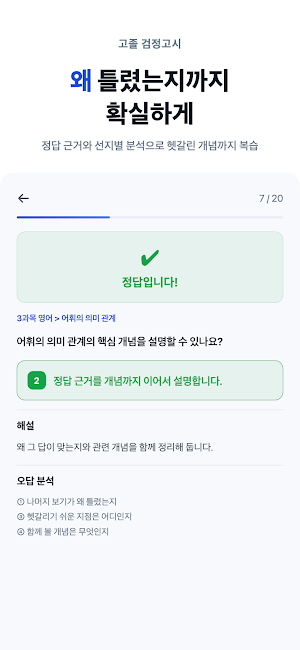
Explanations are provided for every question. You can learn not just by checking the correct answer and moving on, but by understanding the related concepts to determine why that answer is correct and why the other options are incorrect.
**Various Solution Modes**
You can select and solve problems by subject or unit, and your progress and proficiency levels are displayed for each unit. You can start with unsolved problems or select weak units for intensive study.
**Narrowing Down Answers by Eliminating Errors**
You can narrow down the answer by eliminating confusing options from the screen. You can reduce errors by practicing the elimination method used in actual exams.
**Learning Tool Drawer**
You can instantly access the tools you need while solving problems. You can take notes or check information without leaving the screen, ensuring your problem-solving flow remains uninterrupted.
**Continue Solving**
It remembers your progress even if you stop solving problems. When you return, you can resume your study immediately from where you left off.
**FSRS Smart Review**
It extends the review interval for questions you answer correctly and quickly revisits questions you frequently get wrong. It analyzes the forgetting curve for each question to automatically schedule the questions for today's review. Review Notifications
We provide daily study reminders and send notifications at review times calculated by FSRS. This allows you to maintain a consistent study flow and review cycle.
Weakness Analysis Heatmap
Check answer rates by subject and unit at a glance. Visually identify your weak areas and jump directly to the solutions for those units.
Review Box
Gather incorrect answers and questions to review in one place. Find the questions you need using sorting and filtering, and leave personal notes for each question to review the reasons for confusion and the concepts you have organized.
Incorrect Answer Notes
Incorrect answers are automatically collected. If you solve and answer correctly, the question is removed from the list; if you get it wrong again, it remains, ensuring you only keep questions that have not yet been organized.
Solve Count Display
Displays how many times each question has been solved. You can manage your review cycles by distinguishing between questions you have reviewed repeatedly and those you are not yet familiar with.
Study Reports and Growth Records
Check your study records on a calendar and review your day's learning through weakness diagnoses and today's growth reports. You can track your study flow and growth process by viewing your accumulating records.
Learning Statistics and Continuous Study
Check your daily problem-solving count, accuracy trends, and consecutive study days. You can manage consistent study habits by recording your daily study volume and performance changes.
Exam Schedule D-Day
Check the upcoming High School Equivalency Exam schedule directly on the home screen. You can review your study plans and progress based on the remaining days.
Pre-Exam Checklist
A checklist appears on the home screen when the exam is within 7 days. You can calmly prepare for the day of the exam by checking your supplies and mindset one by one.
1-on-1 Inquiries and FAQ
Check frequently asked questions within the app and ask questions immediately. You can attach photos to your inquiries, and receive notifications when answers are registered.
Font Size Adjustment
You can adjust the font size to make questions and explanations easier to read. You can select a size that fits your screen and study environment.
Light and Dark Themes
You can follow system settings or choose your preferred theme. You can study comfortably in bright or dark environments. Tablet Support
You can study not only on mobile phones but also on tablets with a layout optimized for large screens. You can comfortably view questions and explanations on the wide screen.
Offline Learning
You can solve problems even without an internet connection. You can continue your studies uninterrupted, even on the subway or while on the go.
Device Synchronization
Your study records and review schedules are saved once you log in. You can seamlessly continue solving problems on your tablet that you started on your mobile phone, and you can retrieve your existing records even if you switch devices.
[Suitable for These People]
Those who have dropped out of school or are not attending and wish to obtain a high school diploma
Those preparing for six subjects alone who feel overwhelmed and unsure where to start
Office workers and students who need to study in short bursts frequently
Those who gave up because managing incorrect answers was cumbersome
[Content Guide]
All questions and explanations in this app are self-produced study materials based on the high school curriculum and the scope of the GED exam; they do not restore or duplicate actual past GED exam questions.
This app is an independent private learning tool designed to assist with studying for the High School Equivalency Examination. We are not affiliated with or represent any government or public institution, such as the Ministry of Education or Provincial/City Offices of Education, and do not guarantee passing.
The GED is administered by Provincial/City Offices of Education and is held twice a year. Eligibility requirements and exempted subjects vary depending on individual circumstances, so please be sure to check the original announcement. For exam schedules and detailed criteria, please check the latest announcement from the Office of Education in the region where you intend to take the exam.
Privacy Policy: https://dayprep.co/geomjeong-go/privacy
Terms of Use: https://dayprep.co/geomjeong-go/terms
Inquiries: [email protected]
© 2026 DAYLAB
