e-BRIDGE Print & Capture
This application will allow you to utilize TOSHIBA MFPs to print and scan.
About e-BRIDGE Print & Capture
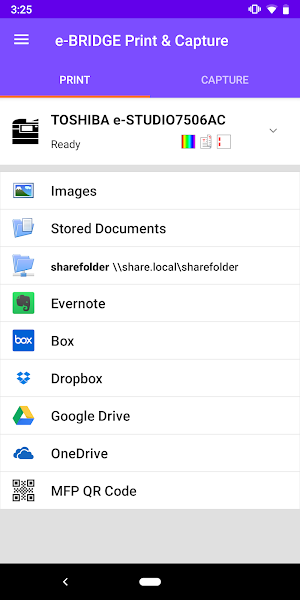
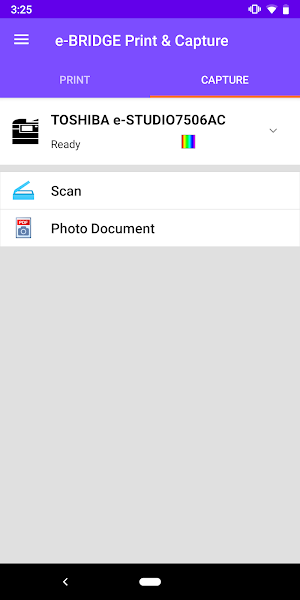
e-BRIDGE Print & Capture is an application that allows you to print and scan from TOSHIBA e-STUDIO MFPs utilizing your Android device.
Integrated with TOSHIBA e-BRIDGE Re-Rite OCR software, e-BRIDGE Print & Capture allows you to convert scanned images or photo documents into one of 22 editable file formats including Microsoft Word, Excel, and PowerPoint files.
Key Features:
- Print documents (JPEG/PDF) from cloud storage services (Box, Dropbox, Google Drive, OneDrive, Evernote) or a network folder through e-STUDIO MFPs or shared printers
- Print images stored in Android or captured by the device's Camera
- Print web pages and emails with Android print services
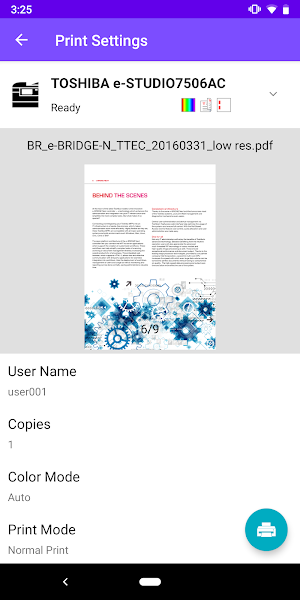
- Utilize advanced MFP print settings such as number of copies, duplex, color mode (BW/Color/Twin Color), Print Mode (Normal/Private/Hold/Multi Station*), Paper Type, Paper Size, Staple, Omit Blank Pages and Toner Save
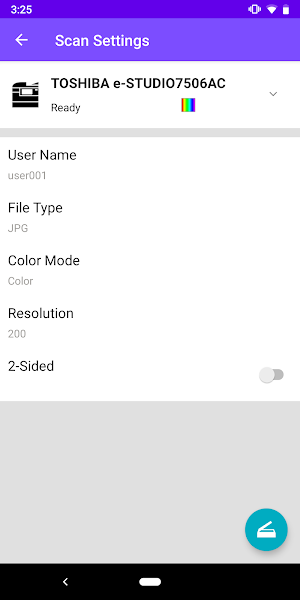
- Scan documents from an e-STUDIO MFP and save them onto your Android device, a network folder, upload it to a cloud storage service, or send it by Email
- Convert scanned images or photo documents to an editable format such as searchable PDF, Microsoft Word, Excel or PowerPoint by using TOSHIBA e-BRIDGE Re-Rite OCR software or the OCR* function within the MFP
- e-STUDIO MFPs can be discovered on your network via scanning the QR code printed from e-BRIDGE Print & Capture with the scanner on e-BRIDGE Print & Capture or by searching through your history of the most recently used MFPs
- Secure access for print and scan using your NFC enabled mobile device. (optional card reader required, available only on supported MFPs, not supported on Android 10.x)
- Authentication and department codes are recommended to maintain office security
* Optional Enabler required
-------------------------
System Requirements
- Supported TOSHIBA e-STUDIO models should be used
- SNMP and Web Service settings on the MFP must be enabled
- Please contact your dealer or sales representative about configuring this application when using with user authentication or department codes
-------------------------
Supported Languages
Czech, Chinese (Simplified), Chinese (Traditional), Danish, Dutch, English (US), English (UK), Finnish, French, German, Hungarian, Italian, Norwegian, Polish, Russian, Spanish, Swedish, Turkish
-------------------------
Supported Models
Please refer to the following page for supported models.
https://www.toshibatec.com/supported_models/
-------------------------
Supported OS
Android 5.x, 6.x, 7.x, 8.x, 9.x
-------------------------
Website for e-BRIDGE Print & Capture
Please refer to the following page for Website.
https://www.toshibatec.com/cnt/products_overseas/mobile_solutions/e_bridge/
-------------------------
Note
- Before using this App with a cloud storage service, install the cloud storage app on your device
- MFPs may not be discovered under the following conditions. If not discovered, you may manually enter hostname or use the QR Code
*IPv6 is used
*SSL is used in the Web Service Setting
*Other unknown reasons
- It is recommended to print the QR Code in Black and White for best scanning results
- Hold/Private prints are available with the e-STUDIO2550C series when an optional hard disk is installed
- When using Android printing services, the contents displayed on the preview screen may differ from the printed result
- User name cannot contain "@" mark
- Part of the feature may not function properly with your device depending on the support level of the service
The company names and product names are trademarks of their respective companies.
e-BRIDGE Print & Capture details
e-BRIDGE Print & Capture is a free Business app for Android with 100,000+ installs on Google Play and a 3.7/5 average rating from 465 ratings. It was released on November 1, 2013 and last updated on August 6, 2019. It's developed by TOSHIBA TEC CORPORATION. It requires Android 5.0 or later.
- Category
- Business
- Rating
- 3.7 / 5 (465 ratings)
- Installs
- 100,000+
- Price
- Free
- In-app purchases
- No
- Ads
- No ads
- Current version
- 4.2.26.1
- Size
- 24M
- Requires Android
- 5.0 and up
- Content rating
- Everyone
- Released
- November 1, 2013
- Last updated
- August 6, 2019
- Developer
- TOSHIBA TEC CORPORATION
What’s new in e-BRIDGE Print & Capture
- Support printing documents from a shared network folder and scanning to a shared folder - Support printing to a shared printer such as PaperCut™ print queue (by integration with e-BRIDGE File Handler) - Support the embedded OCR languages selection when scanning - Support Chrome OS - Support new models (some models require the “e-BRIDGE Print & Capture Entry” installation)
Version 4.2.26.1 · Updated August 6, 2019
Alternatives to e-BRIDGE Print & Capture
Looking for apps like e-BRIDGE Print & Capture? Here are 6 similar Android apps on Google Play. The highest rated is Print adjuster (4.7/5), and all 6 are free to download.

Print adjuster
The purpose of this app is to fit pictures for printing. By...

HP JetAdvantage Secure Print
HP JetAdvantage Secure Print is a cloud-based solution that increases security and...

Konica Minolta Mobile Print
Konica Minolta Mobile Print is an application that allows you to easily...

iPrint
Provide rich and colorful printing materials and printing templates to meet all...

HP Sprocket
Print your favorite memories on 2x3”, 2.3x3.4”, 3.5x4.25”, or 4x6” photo paper...

ESCPOS Bluetooth Print Service
ESC POS Bluetooth Print ServiceThe app allows you to try printing for...
| App | Rating | Price | Installs | Last updated |
|---|---|---|---|---|
| e-BRIDGE Print & Capture | 3.7 / 5 | Free | 100,000+ | Aug 6, 2019 |
| Print adjuster | 4.7 / 5 | Free | 100,000+ | – |
| HP JetAdvantage Secure Print | 3.6 / 5 | Free | 10,000+ | – |
| Konica Minolta Mobile Print | 3.0 / 5 | Free | 100,000+ | – |
| iPrint | 3.4 / 5 | Free | 1,000,000+ | Sep 20, 2026 |
| HP Sprocket | 4.4 / 5 | Free | 1,000,000+ | – |
| ESCPOS Bluetooth Print Service | 4.4 / 5 | Free | 100,000+ | – |