IWO Ultra 3 Max Watch App
Connect compatible IWO Ultra 3 Max smartwatches with easy setup and reconnection
About IWO Ultra 3 Max Watch App
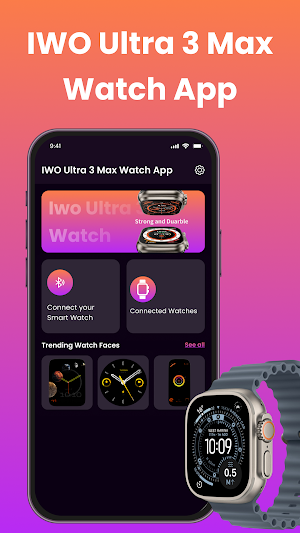
IWO Ultra 3 Max Watch App is a simple connectivity utility designed to help Android users connect supported IWO Ultra 3 Max smartwatches. The app provides an easy way to discover compatible wearable devices, start Bluetooth pairing, and reconnect a watch when necessary.
With a clean interface and straightforward navigation, the app keeps the smartwatch connection process easy to follow for both new and existing users.
Connect Your IWO Ultra 3 Max
Pair a compatible IWO Ultra 3 Max smartwatch with your Android smartphone through Bluetooth. The connection process is designed to make device discovery and initial pairing simple.
Find Compatible Devices
Use the device discovery process to look for supported smartwatches nearby. Once your wearable is recognized, you can proceed with the available connection steps.
Simple Watch Setup
Setting up a smartwatch does not need to be complicated. The app provides a streamlined experience for connecting supported wearable devices and getting started with basic connectivity.
Reconnect With Ease
If a previously connected smartwatch becomes disconnected, the app can help you return to the connection process. Keep your watch nearby and use the available pairing options when needed.
Key Features
IWO Ultra 3 Max smartwatch connection
Bluetooth smart watch pairing
Quick compatible device discovery
Easy wearable device setup
Smartwatch device recognition
Convenient reconnection support
Simple and intuitive interface
Lightweight app experience
Android smartwatch connectivity
Easy connection management
Designed for Everyday Use
IWO Ultra 3 Max Watch App concentrates on essential smartwatch connectivity features. Its lightweight interface is designed to provide smooth navigation while helping users complete common pairing and reconnection tasks.
The app can be useful for people looking for an IWO Ultra 3 Max Watch App, IWO Smart Watch App, Bluetooth smartwatch pairing utility, wearable device connection app, smartwatch setup tool, or Android smartwatch connectivity solution.
How to Pair Your Smartwatch
Install IWO Ultra 3 Max Watch App on your Android smartphone.
Turn on your compatible IWO Ultra 3 Max smartwatch.
Enable Bluetooth on your phone.
Open the app and provide any requested permissions.
Search for nearby supported wearable devices.
Choose your smartwatch from the discovered devices.
Follow the displayed pairing instructions.
Keep the smartwatch close to your Android device during connection.
Simple Connection Experience
The app is designed to make the connection process clear from beginning to end. Whether you are pairing a new watch or reconnecting an existing device, the straightforward layout helps you access the main smartwatch connection functions quickly.
Connection quality may depend on Bluetooth range, phone settings, smartwatch status, Android version, and the capabilities of the connected hardware.
Compatibility
Compatibility and available functions can vary depending on the IWO Ultra 3 Max model, Android device, operating system version, Bluetooth support, permissions, and hardware capabilities. Some features may not work with every device combination.
For a smoother setup, make sure your smartwatch is powered on, Bluetooth is enabled, and both devices remain within an appropriate connection range.
Important Information
This app is intended as an independent utility for connecting compatible wearable devices. It does not replace any official application, firmware, or service that may be required for particular smartwatch functions.
Disclaimer
IWO Ultra 3 Max Watch App is an independent third-party utility and is not affiliated with, associated with, authorized by, sponsored by, or endorsed by any smartwatch manufacturer or trademark owner. The name IWO Ultra 3 Max and related product names are used solely for compatibility and identification purposes. All trademarks and product names belong to their respective owners.
