

Minesweeper Classic: Retro
Puzzle In-app purchases Contains ads
Go back in time with Minesweeper, the classic we all love to play
- Rating
- 4.7
- 27.4K ratings
- Downloads
- 1.7M+
- on Google Play
- Price
- Free
- In-app purchases
- Updated
- Apr 7
- 2026 · v1.5.0
Screenshots
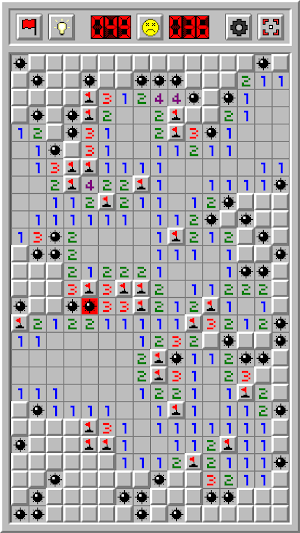

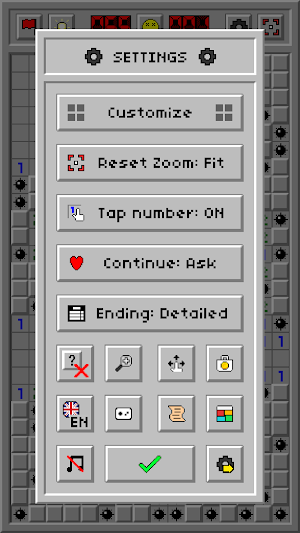
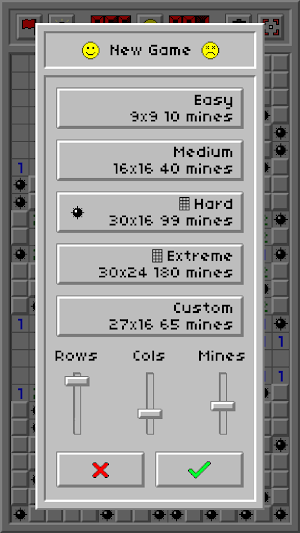


About Minesweeper Classic: Retro
*NOW WITH MORE THAN 40+ THEMES* :) Your free theme is waiting!
Play Minesweeper with its all retro classic graphics! Customize your game with tons of settings and make the game your own. Earn coins and unlock gorgeous themes. Get lost in the world of classic Minesweeper!
Key Features:
• Starting point: You will always encounter an open area with your first tap
• 5 game modes to choose from: Easy, Medium, Hard, Extreme and Custom
• 40+ gorgeous retro themes: Unlock these themes by earning coins. Earn coins for flagging mines and winning rounds
• Quick Flag: Turn this mode on to tap and quickly flag cells
• Zoom & Pan: Pinch to zoom and drag to pan around. Use the Overview button to reset your zoom
• Tons of Settings: Customize your game with tons of settings. Change your zoom sensitivity, set the functionality of the New Game button, customize the top bar to quickly access your favorite buttons, turn off the 'hold to flag' option or set your desired Minesweeper theme along with many other settings
• Stats: Keep track of your high scores, win percentage and total play time
• Hints: Are you stuck? Press the hint button to highlight the area you should focus on. The hint button only shows you areas where you are certain to progress. It won't show areas where the outcome is unknown
• Save/Load: The game will automatically continue where you left off from upon being launched
• Continue: If you hit a mine you can continue from where you left off for 50 coins or by watching a video ad
• Leaderboards: Keep track of worldwide player scores
Functions:
• Flags: Press and hold on a cell to deploy a flag. Press and hold again to remove the flag. A cell will never open if you click on a flag
• Question marks: (Disabled by default) Press on a flag to turn it into a question mark. Press on it again to turn it back into a flag
• Hints: The hint button will highlight the surrounding of a cell which is already opened, and from which it is guaranteed to make progress
• Tap number: Press on an open cell to reveal the cells surrounding it. This will only work if the amount of flags placed around the open cell is equal to the number on that cell
Coins:
• Earn 1 coin for 1 correct mine flag
• Earn bonus coins for completing a game
Save & Restore your themes with Google Play Services:
• Save your themes by logging into Google Play Services so you can restore them if you happen to switch to a different device
• Make sure your themes are saved by checking your achievements. If an achievement is unlocked for a particular theme then that theme is saved
Make sure you are logged into Google Play Services (if you are not automatically logged in):
• Click on the leaderboards button located in the Statistics window
• If the game doesn't log you in or prompt a login window after a few seconds close the app
• Go to your device's settings and login to Google Play Services from there
• Open Minesweeper Classic: Retro and click on the leaderboards button again and it should log you in
Enjoy!
Play Minesweeper with its all retro classic graphics! Customize your game with tons of settings and make the game your own. Earn coins and unlock gorgeous themes. Get lost in the world of classic Minesweeper!
Key Features:
• Starting point: You will always encounter an open area with your first tap
• 5 game modes to choose from: Easy, Medium, Hard, Extreme and Custom
• 40+ gorgeous retro themes: Unlock these themes by earning coins. Earn coins for flagging mines and winning rounds
• Quick Flag: Turn this mode on to tap and quickly flag cells
• Zoom & Pan: Pinch to zoom and drag to pan around. Use the Overview button to reset your zoom
• Tons of Settings: Customize your game with tons of settings. Change your zoom sensitivity, set the functionality of the New Game button, customize the top bar to quickly access your favorite buttons, turn off the 'hold to flag' option or set your desired Minesweeper theme along with many other settings
• Stats: Keep track of your high scores, win percentage and total play time
• Hints: Are you stuck? Press the hint button to highlight the area you should focus on. The hint button only shows you areas where you are certain to progress. It won't show areas where the outcome is unknown
• Save/Load: The game will automatically continue where you left off from upon being launched
• Continue: If you hit a mine you can continue from where you left off for 50 coins or by watching a video ad
• Leaderboards: Keep track of worldwide player scores
Functions:
• Flags: Press and hold on a cell to deploy a flag. Press and hold again to remove the flag. A cell will never open if you click on a flag
• Question marks: (Disabled by default) Press on a flag to turn it into a question mark. Press on it again to turn it back into a flag
• Hints: The hint button will highlight the surrounding of a cell which is already opened, and from which it is guaranteed to make progress
• Tap number: Press on an open cell to reveal the cells surrounding it. This will only work if the amount of flags placed around the open cell is equal to the number on that cell
Coins:
• Earn 1 coin for 1 correct mine flag
• Earn bonus coins for completing a game
Save & Restore your themes with Google Play Services:
• Save your themes by logging into Google Play Services so you can restore them if you happen to switch to a different device
• Make sure your themes are saved by checking your achievements. If an achievement is unlocked for a particular theme then that theme is saved
Make sure you are logged into Google Play Services (if you are not automatically logged in):
• Click on the leaderboards button located in the Statistics window
• If the game doesn't log you in or prompt a login window after a few seconds close the app
• Go to your device's settings and login to Google Play Services from there
• Open Minesweeper Classic: Retro and click on the leaderboards button again and it should log you in
Enjoy!
What’s new
Version 1.5.0 · Updated April 7, 2026
Thanks for playing and sweeping those mines! • In this update we added 15 FRESH NEW THEMES! Enjoy :)
Play today's Queens puzzle
One queen in every row, column and color. A free daily puzzle from Fiplay, same board for everyone. It plays right here, no download.
User reviews

Passing time without thinking about problems and covid19

There are lost of minesweeper apps but this one is the best. Best graphics and gameplay and you can customize the screen and mines with the coins you earn.

Awsome

Loving it

Uses just enough brain power to make it fun and easy going

The best I've used! Love the retro style with different themes and lots of customizations. Very beautiful app.
Alternatives to Minesweeper Classic: Retro
Looking for apps like Minesweeper Classic: Retro? Here are 6 similar Android apps on Google Play. The highest rated is Infinitode 2 - Tower Defense (4.7/5), and 5 of the 6 are free to download.
-
Solitaire: Treasure of Time 4.5
-
Infinitode 2 - Tower Defense 4.7
-
Threes! 4.6
-
Chess - Clash of Kings 4.5
-
99 Bricks Wizard Academy 4.3
-
Sudoku - Classic Sudoku Puzzle 4.6
| App | Rating | Price | Installs | Last updated | Compare |
|---|---|---|---|---|---|
| Minesweeper Classic: Retro | 4.7 / 5 | Free | 1,000,000+ | Apr 7, 2026 | |
| Solitaire: Treasure of Time | 4.5 / 5 | Free | 1,000,000+ | Aug 19, 2026 | Compare |
| Infinitode 2 - Tower Defense | 4.7 / 5 | Free | 1,000,000+ | Nov 11, 2025 | Compare |
| Threes! | 4.6 / 5 | 0.99 USD | 100,000+ | Oct 27, 2025 | Compare |
| Chess - Clash of Kings | 4.5 / 5 | Free | 10,000,000+ | – | Compare |
| 99 Bricks Wizard Academy | 4.3 / 5 | Free | 1,000,000+ | Nov 18, 2016 | Compare |
| Sudoku - Classic Sudoku Puzzle | 4.6 / 5 | Free | 100,000,000+ | Oct 29, 2026 | Compare |
Similar apps on Google Play
- Solitaire: Treasure of Time
- Infinitode 2 - Tower Defense
- Threes!
- Chess - Clash of Kings
- 99 Bricks Wizard Academy
- Sudoku - Classic Sudoku Puzzle
- Backgammon Pro
- Tetris®
- 1010! Block Puzzle Game
- Mahjong 3
- Chess - Play and Learn
- Mahjong Club - Solitaire Game
- Mahjong Village
- 4=10
- Killer Sudoku - Sudoku Puzzles
- Chess Universe : Online Chess
- ChessCraft
- Solitaire - Classic Card Games
- Gomoku
- Sudoku: Crossword Puzzle Games
- factory balls
- Solitaire - Classic Card Games
- Slidey®: Block Puzzle
- Microsoft Sudoku
- ZHED - Puzzle Game
- Four Letters
- 0h n0
- Blackjack Championship
- Radiant Defense
- Sagrada
- Wood Block Puzzle - Brain Game
- Charterstone: Digital Edition
- Online GO
- Solitaire, Klondike Card Games
- Bricks vs Balls Breaker
- Ticket to Ride
- World of Goo
- Mahjong Epic
- Solitaire Fairytale