About Clock (Offline)
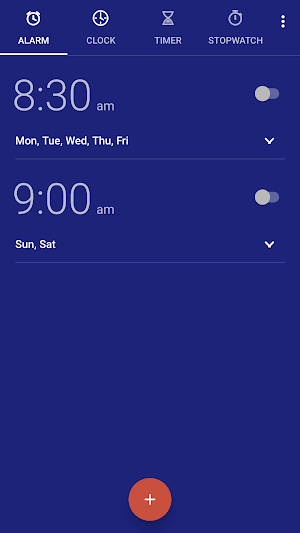
Clock provides alarms, a world clock, timers, and a stopwatch. All data is held in the application's private storage on the device. The application requires no account, no sign-in, and no internet permission.
Alarm management
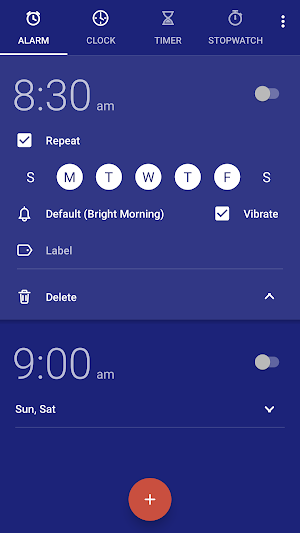
• Repeat days, a label, and an individual sound and vibration setting for each alarm
• Alarm groups, for organizing a large alarm list without affecting when any alarm rings
• A snooze policy configured per alarm: snooze interval, maximum number of snoozes, or snoozing disabled
• The option to skip a single upcoming occurrence of a repeating alarm, leaving the schedule intact
• Gradual volume increase, and a configurable choice of stopping an alarm by button or by swipe
Alarm notification
A notification is issued about 25 minutes before an alarm is due. Dismissing that notification removes it from the notification shade and has no effect on the alarm, which rings as scheduled. Skipping an alarm requires the dedicated action within the notification and cannot occur inadvertently.
Timers and stopwatch
• Multiple concurrent timers, each with an individual label
• Saved presets for frequently used durations
• A one-minute extension applied to a running or expired timer from its notification
• A stopwatch with lap recording and an action to share the recorded times
World clock
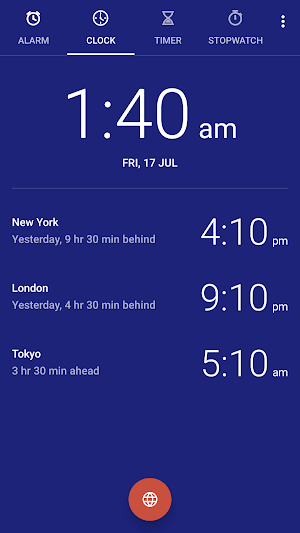
• Cities selected from a built-in list and displayed against a world map
• An automatic home clock, shown when the device is in a different time zone
Platform integration
Material colors follow the system light and dark theme, and the system color scheme where the platform provides one. Alarms are registered before the device is first unlocked following a restart, and are restored if the application is force-stopped. Analog and digital home screen widgets are included.
Permissions and their purpose
• Alarms and reminders: rings an alarm at the exact minute for which it was set
• Notifications: displays the advance alarm notification, the ringing alarm, and running timers
• Full-screen notification: presents the alarm screen over the lock screen
• Run at startup: restores scheduled alarms and timers after the device restarts
• Wake lock: keeps the processor active for the interval an alarm requires to begin playback
• Vibration: vibrates for an alarm or timer where the user has enabled vibration
• Foreground service: allows a ringing alarm or expired timer to run to completion
• Modify audio settings: requests audio focus so that an alarm is audible over other playback
The application does not request internet, network state, location, contacts, calendar, camera, microphone, or any storage or media permission. Privacy policy: Clock privacy policy.
Open source
Clock is released under the Apache License 2.0. Source code on GitLab
