スムースエピアプリ
This is a skincare support app exclusively for Panasonic Beauty's Smooth Epi. It supports effective skincare with "schedule management" and "skincare progress check."
About スムースエピアプリ
By connecting to the device via Bluetooth, you can check your usage status, making treatment and recording easier and more efficient. (*1)
(*1: ES-WG0B exclusive feature)
Worried about remembering to use the device regularly?
Unsure if you're using it correctly?
Want to check the effectiveness of your beard treatment? (*2)
(*2: ES-WG0B/ES-WG0A only)
■Compatible Models
Not compatible with tablet devices (operation not guaranteed).
Recommended for Beard Scan are models released after 2023 with a main camera resolution of 40 megapixels or more.
*Due to differences in camera performance between smartphones, the Beard Scan feature is currently in beta mode prior to official release.
■Main Features
◆Scheduling Function
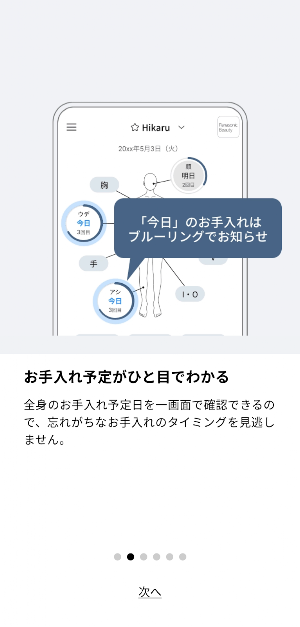
Check your full-body treatment schedule on one screen, so you'll never miss a treatment. So, make sure you don't miss a treatment, and the more you use it, the less noticeable unwanted hair will become.
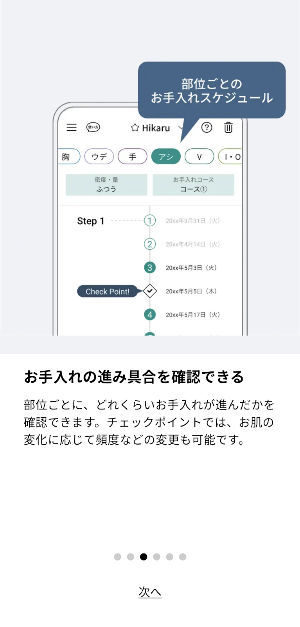
1. Manage your treatment schedule by area
Check your treatment schedule for each area. Even if your treatment frequency varies by area, you can easily manage each treatment's progress.
② Receive push notifications for scheduled treatments
Set a treatment schedule and receive push notifications on your scheduled treatment dates. This allows you to schedule your treatments at the optimal time.
③ Check your progress
As you continue your treatments, check the progress by completing checklists based on the number of treatments. You can also adjust the frequency as your skin changes.
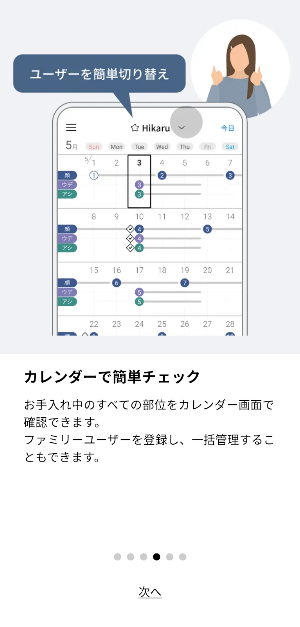
④ Easily manage your family's schedules (up to 3 people)
Manage all registered family members' treatment schedules in one place. The family calendar clearly displays everyone's scheduled treatment dates on one screen. This helps prevent children without smartphones from forgetting to treat.
◆ Usage support
① Before you start, review the steps and key points for each area.
Easily understand the steps and key points for each area. Start using the app without any hesitation.
② Proper treatment with personalized support
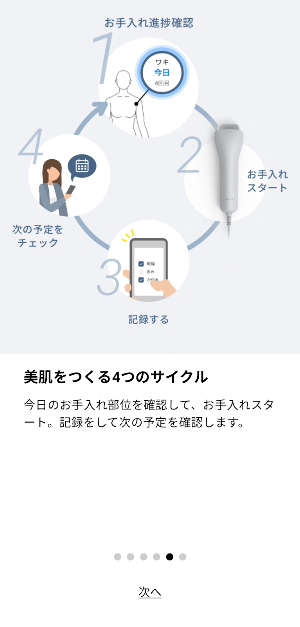
Select the area you want to treat and start the treatment. The timer will measure the treatment time. It will notify you of the estimated time, allowing you to apply the treatment at the appropriate time.
③ Finish and record
After your treatment, record your skin condition and check your next scheduled treatment. Keeping track of your beard grooming routine is easy and effortless, simply check boxes.
◆ Beard Scan (※2) with image analysis of beard hair
This feature is designed for users who groom their beards.
By taking a photo approximately once every four weeks, it visualizes your beard condition and supports your grooming routine.
By taking a photo with the Beard Scan, you can compare the number and thickness of hairs from previous and current images. Seeing the results will motivate you to keep grooming.
(※2: ES-WG0B/ES-WG0A only)
◆ Bluetooth communication function (※1)
Connecting to the device allows you to track your usage, making grooming and recording even easier and more efficient.
① Easy grooming record: Simply select the area you want to groom.
Check the attachments, power level/mode, number of treatments, and treatment time in the app.
② User support
The skin tone check function allows you to easily check whether your skin tone is suitable for grooming.
In addition, if you experience difficulty applying the product properly during use, the app will provide guidance on how to apply the product.
③ Irradiation Count Function
Connect via Bluetooth to display the total number of irradiations. Even when used by multiple people, you can rest assured knowing the total number of irradiations.
(※1: ES-WG0B only)
■Applicable Appliances
- Panasonic Hikari Este Smooth Epi
ES-WG0B, ES-WP9B, ES-WH7C, ES-WG0A, ES-WP9A, ES-WH7A
※Some functions are also available for users with other model numbers.
■How to Use
- The following equipment and preparation are required to use this app:
- Applicable appliances (Panasonic Hikari Este)
- Internet connection (internet line, broadband contract)
- This app is free to use.
- Downloading the app incurs additional data charges.
- Depending on your smartphone settings and network environment, the screen may not display correctly or some functions may not be available.
For more information on appliance and app settings, please see:
https://panasonic.jp/body/products/smoothepi-app.html
スムースエピアプリ details
スムースエピアプリ is a free Beauty app for Android with 100+ installs on Google Play and a 5.0/5 average rating from 1 rating. It was released on February 5, 2026 and last updated on February 6, 2026. It's developed by Panasonic Corporation. It requires Android 11 or later.
- Category
- Beauty
- Rating
- 5.0 / 5 (1 rating)
- Installs
- 100+
- Price
- Free
- In-app purchases
- No
- Ads
- No ads
- Current version
- 1.0.0
- Requires Android
- 11
- Content rating
- Rated for 3+
- Released
- February 5, 2026
- Last updated
- February 6, 2026
- Developer
- Panasonic Corporation
What’s new in スムースエピアプリ
・スムースエピアプリをAndroidに対応しました。
Version 1.0.0 · Updated February 6, 2026
Similar Apps

Technics Audio Connect
This app makes it even easier to connect and configure your headphone.

Panasonic LUMIX Lab
This app makes shooting and sharing more fun by connecting LUMIX cameras

Panasonic LUMIX Flow
Smoothly streamline your video production workflow!

HomeHawk
Free, easy-to-use app Monitor your home and family at home, work or on the go

Panasonic Audio Connect
This app makes it even easier to connect and configure your Headphones.

Panasonic MAX Juke
App will take you to the next level of party with compatible mini system.
