Upcoming Alarm: Next Alarm
See your next alarm on your home screen. A tiny widget, always up to date.
About Upcoming Alarm: Next Alarm
Never wonder "what time is my alarm again?"
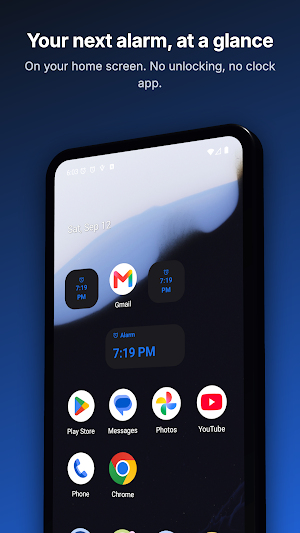
Upcoming Alarm puts your next scheduled alarm right on your home screen. One glance, no unlocking, no opening the clock app.
WHAT IT DOES
• Shows the time and day of your next alarm, read straight from your phone's alarm clock
• Works with the alarms you already have — nothing to set up twice
• Updates itself when you add, change, or delete an alarm
• Tap the widget to jump straight to your alarms
TWO WIDGET SIZES
• 1×1 — a compact tile that fits anywhere
• 2×1 — larger, and shows the day when the alarm isn't today
IN THE APP
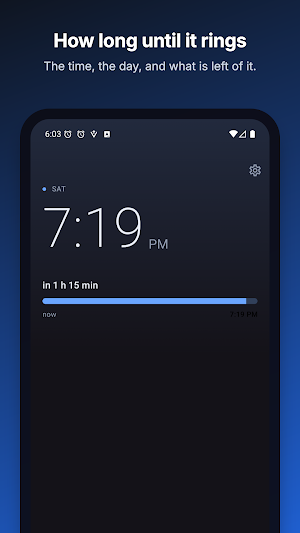
• Your next alarm fills the screen, with how long is left and a bar that fills as it nears
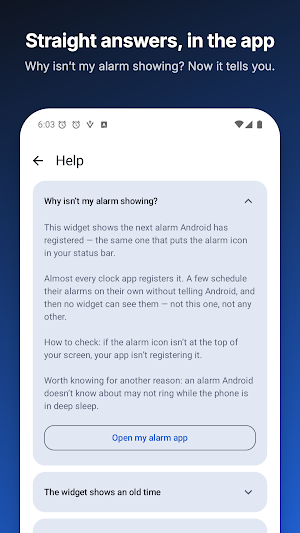
• A Help screen with straight answers: why an alarm may not show, why the widget can lag
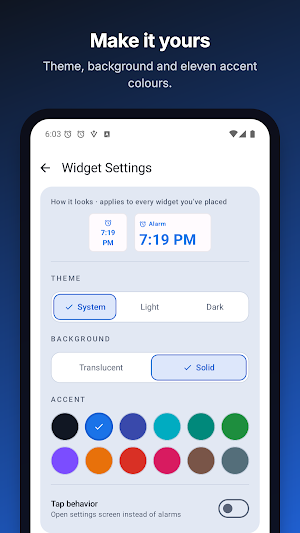
• See the widget before you place it, in your colors and at its real size
MADE TO STAY OUT OF THE WAY
• Light, dark, or follow the system theme
• Translucent or solid background — whichever reads better on your wallpaper
• 11 accent colors for the widget text and icon
• No ads. No subscriptions. No account.
• Reads only your device's next alarm — nothing else
GOOD TO KNOW
• Reads the next alarm your phone has registered — the same one your lock screen shows
• Works with the Clock app that came with your phone, and with most alarm apps
• A few alarm apps don't register their alarms with Android, so no widget can see them
Add it in seconds: long press your home screen, tap Widgets, and pick Upcoming Alarm.
Upcoming Alarm: Next Alarm details
Upcoming Alarm: Next Alarm is a free Tools app for Android with 100+ installs on Google Play. It was released on February 20, 2026 and last updated on September 17, 2026. It's developed by NowJordanHappy. It requires Android 12 or later.
- Category
- Tools
- Installs
- 100+
- Price
- Free
- In-app purchases
- No
- Ads
- No ads
- Current version
- 1.5.1
- Requires Android
- 12
- Content rating
- Everyone
- Released
- February 20, 2026
- Last updated
- September 17, 2026
- Developer
- NowJordanHappy
What’s new in Upcoming Alarm: Next Alarm
• Beta: see how long until your alarm, right on both widgets, in the 12 hours before it. Turn it on from the new card on Home or in Widget Settings → Show time left, as “3 h 46 min” or “3:46:12”. • Help: a new answer for when the time left is missing or looks off, and “Write to us” to reach us from the app. • Widget labels follow a language change right away, and the in-app previews no longer cut off text with a large font size.
Version 1.5.1 · Updated September 17, 2026
